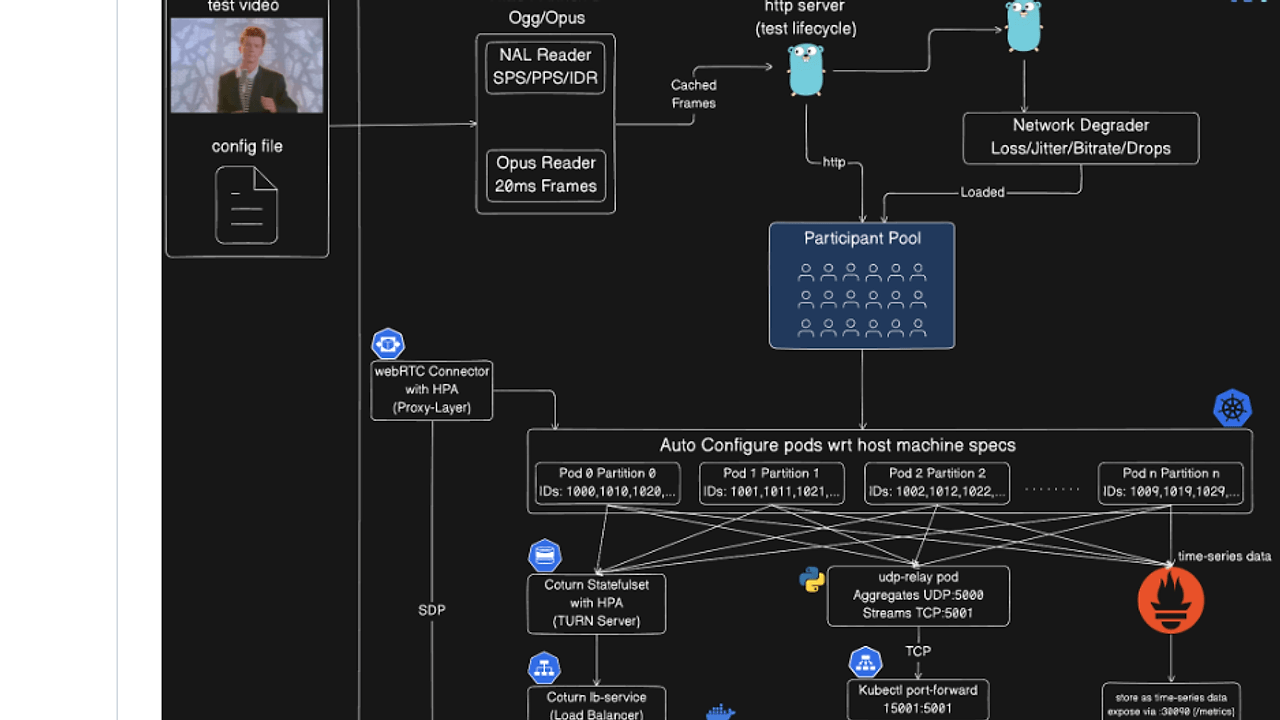
AV Chaos Monkey: What It Kills / Replaces
AV Chaos Monkey is a compelling alternative to conventional load testing tools like Locust or JMeter, specifically tailored for video conferencing systems. By simulating high-stress scenarios, it replaces the need for multiple resource-heavy test instances.
Under the Hood: Architecture
The architecture hinges on a media processing pipeline using FFmpeg and efficient network management protocols. The control plane exposes an HTTP Server that manages the entire test lifecycle via a REST API. The chaos is introduced remarkably through a Spike Scheduler, seamlessly altering network conditions including packet loss, jitter, and bitrate reductions.
The Good & The Bad
Pros:
- Handles up to 1500 WebRTC participants, simulating real-world loads.
- Reduces CPU usage by ~90% through zero-copy streaming across participants.
- Auto-detects partitioning in Kubernetes, optimizing resource allocation dynamically.
Cons:
- Complexity in setup, especially for non-Kubernetes environments.
- Limited documentation can make initial user experience challenging for those unfamiliar with chaos engineering.
Quickstart
Get started with a simple command to run the chaos test:
# Start AV Chaos Monkey with the default configuration
docker-compose up