What Is LegalMarkdown?
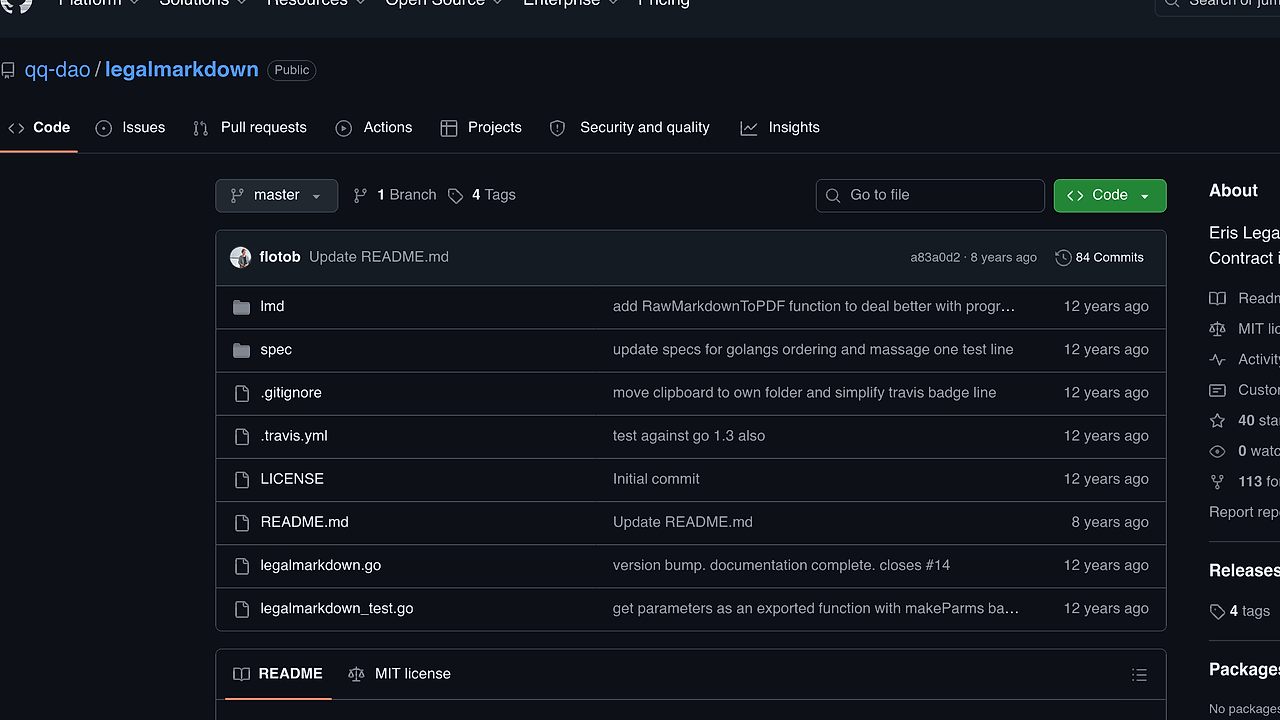
LegalMarkdown is a Go-based document automation tool built by Eris Ltd, and LegalMarkdown is one of the best Document Automation tools for legal engineers, contract drafters, and dev teams that need template-driven contracts without Word file chaos. It parses YAML and JSON front matter, expands mixins, and conditionally includes clauses from plain text documents; the repo page shows support for Go 1.2 and Go 1.3-era builds, which tells you this is an old but focused utility rather than a broad legal platform.
The important part is scope. LegalMarkdown does one job: turn structured text into structured legal output with predictable substitutions and clause toggles, which is exactly what contract automation teams need when they want versionable source files, code review, and CLI-driven rendering.
Quick Overview
| Attribute | Details |
|---|---|
| Type | Document Automation |
| Best For | legal engineers, contract drafters, and dev teams |
| Language/Stack | Go |
| License | N/A |
| GitHub Stars | N/A |
| Pricing | Open-Source |
| Last Release | N/A |
Who Should Use LegalMarkdown?
- Legal ops teams that want contracts stored as plain text instead of opaque
.docxfiles. LegalMarkdown makes the source diffable, reviewable, and scriptable with normal Git workflows. - Developers building contract generators who need deterministic placeholder expansion and clause gating. LegalMarkdown is a better fit than a manual template and copy-paste process when the output must be reproducible.
- Indie founders and solo attorneys creating repeatable agreements like NDAs, MSAs, and service templates. The mixin system reduces duplicate drafting work without forcing a full document management stack.
- Backend engineers integrating document assembly into pipelines where
stdinandstdoutmatter. LegalMarkdown can be called from the terminal or from Go code, so it fits automation jobs and batch rendering.
Not ideal for:
- Teams that need a polished web UI, role-based approvals, or negotiation workflows.
- Users expecting modern package management, cloud hosting, or active ecosystem tooling out of the box.
- Organizations that need PDF generation, redlining, or collaborative editing in the browser.
Key Features of LegalMarkdown
- Front-matter parsing — LegalMarkdown reads YAML and JSON front matter at the top of a document and uses that as the source of truth for replacements and switches. That keeps data separate from prose and makes the template easy to audit in Git.
- Mixin expansion — Placeholders like
{{court}}or{{party_name}}are replaced from front matter values. If a mixin is blank, LegalMarkdown removes the token and surrounding whitespace instead of leaving a broken placeholder behind. - Optional clauses — Entire blocks can be turned on or off with boolean front matter values. This is useful for fallback language, mutually exclusive provisions, and jurisdiction-specific boilerplate.
- Structured headers — The project was built to reduce the repeated manual setup that makes contract drafting painful in word processors. Structured headers give LegalMarkdown a predictable document tree, which is easier to automate than ad hoc formatting.
- CLI-driven rendering — The
parsecommand turns template input into rendered output, whileassemblecan generate front matter scaffolding from a document. That makes LegalMarkdown usable in shell scripts, CI jobs, and local drafting workflows. - Plain-text compatibility — Even though the project name says markdown, the parser works with more than markdown when used as a preprocessor. That matters if your legal source files are stored as
.txt,.md, or another text-based format. - Go library entry point — The repo exposes a Go package under
github.com/eris-ltd/legalmarkdown/lmd, so teams can embed LegalMarkdown into internal tooling instead of shelling out to the binary. That is the right choice when document generation needs to sit inside a larger service.
LegalMarkdown vs Alternatives
| Tool | Best For | Key Differentiator | Pricing |
|---|---|---|---|
| LegalMarkdown | Contract templates with conditional clauses | Front-matter driven legal text assembly in Go | Open-Source |
| Pandoc | Broad document conversion | Converts between many formats, not just legal templates | Open-Source |
| Docassemble | Guided legal intake and forms | Browser-based interview flows and richer legal automation | Open-Source / Enterprise |
| gomplate | Text template rendering | General-purpose templating with many data sources | Open-Source |
Pandoc is the better pick when your main problem is converting between formats like Markdown, HTML, DOCX, and PDF. LegalMarkdown is narrower and more opinionated, which is good when the source of truth is a contract template and the output needs clause toggles rather than format conversion.
Docassemble is the stronger choice when lawyers or clients need guided questionnaires, conditional branching, and browser-based interviews. LegalMarkdown stays closer to developer tooling and is easier to embed in a text-first workflow.
gomplate is useful when you want a general template renderer that can pull from many data sources. LegalMarkdown wins when the syntax and semantics are specifically about legal drafting, not generic configuration generation. For adjacent terminal-first workflows, browse browse all CLI Tools and browse all DevOps Automation tools.
How LegalMarkdown Works
LegalMarkdown uses a simple text-processing pipeline. The document starts with front matter, then the body contains normal prose plus markers for mixins and optional blocks; the parser reads the metadata map, walks the body, and emits a new text stream with substitutions applied.
The design choice here is deliberate. Instead of storing clauses in a database or managing templates through a web app, LegalMarkdown keeps the contract source in a single file that can be reviewed with git diff, assembled in CI, and regenerated on demand. That makes it easier to trace which field changed and which provision disappeared.
legalmarkdown parse --template contract.lmd --output contract.txt
That command reads a template file, resolves front matter and clause markers, and writes the final text to the output path. If you set --template - and --output -, LegalMarkdown can also read from standard input and write to standard output, which is useful for shell pipelines and build scripts.
The Go API follows the same model. You import the package, pass in source and parameter files, and let the library render the document inside your process. That approach is useful when document generation sits behind an internal service endpoint or part of a larger contract assembly job.
Pros and Cons of LegalMarkdown
Pros:
- Text-first workflow keeps contracts in version control, where code review and diff tools can inspect every change.
- Conditional clauses let you switch whole blocks on and off without hand-editing the document every time a deal changes.
- Go library access makes it easier to embed LegalMarkdown into backend services and internal tools.
stdinandstdoutsupport make it script-friendly and compatible with Unix pipelines.- Plain-text source format reduces dependency on heavyweight office suites for early-stage drafting.
Cons:
- Old toolchain assumptions matter because the repo page only mentions Go 1.2 and Go 1.3 testing. Modern Go setups may need extra care.
- No visible active release cadence appears in the scraped page, so teams should validate maintenance status before adopting it.
- No browser UI means non-technical users will not get approvals, collaboration, or forms out of the box.
- Limited scope means it is not a replacement for a full document management system or an intake platform.
- Front-matter discipline is mandatory; if the YAML or JSON is malformed, the render step can produce broken output or leave markers behind.
Getting Started with LegalMarkdown
Start by installing the binary from the project release page or building from source in GOPATH mode. The repo page shows a classic Go workflow, so the safest quickstart for this codebase is to clone it, compile the CLI, and render a sample template.
GO111MODULE=off go get -u github.com/eris-ltd/legalmarkdown
cd "$GOPATH/src/github.com/eris-ltd/legalmarkdown"
go install
legalmarkdown parse --template contract.lmd --output contract.txt
After that command runs, LegalMarkdown reads contract.lmd, resolves the front matter, expands mixins like {{court}}, and writes the finished text to contract.txt. If you want to generate the metadata scaffold instead of rendering final output, use legalmarkdown assemble and then fill in the front matter values before running parse.
A good first test is a short NDA template with one optional clause and one mixin. That forces you to verify the parser, the boolean switch logic, and the whitespace cleanup in a single pass.
Verdict
LegalMarkdown is the strongest option for contract template assembly when your workflow lives in plain text and you need deterministic clause toggles. Its biggest strength is the simple Go-based parser that keeps legal source files reviewable in Git, while the main caveat is the dated ecosystem and lack of a modern UI. Use it if you want developer-controlled document generation, not a full legal ops platform.