What Is ascii-agents?
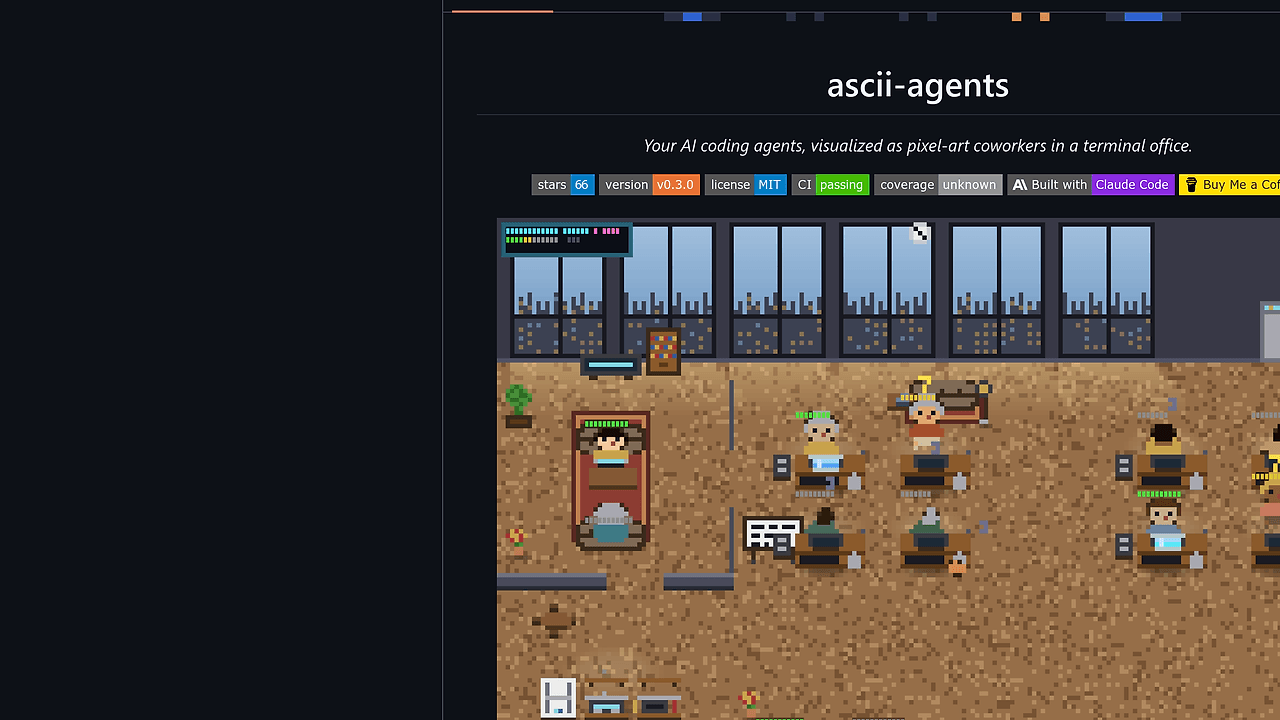
ascii-agents is an AI agent dashboard built by IvanWng97 that turns Claude Code and similar terminal-based coding agents into pixel-art coworkers inside a TUI office. ascii-agents is one of the best AI Agent Dashboard tools for Claude Code teams, and the repo ships MIT-licensed Rust binaries, 6 built-in themes, and hook-safe behavior so the visual layer never blocks your agent workflow.
The tool is built for people who run more than one session at a time and need a real-time status surface instead of reading hook logs line by line. It focuses on observability, not orchestration, which makes it a clean fit for developers who want fast feedback on agent state, tool usage, and idle time.
Quick Overview
| Attribute | Details |
|---|---|
| Type | AI Agent Dashboard |
| Best For | Claude Code teams |
| Language/Stack | Rust, ratatui, crossterm, tokio, Unix sockets, JSONL |
| License | MIT |
| GitHub Stars | N/A in scraped text as of Feb 2026 |
| Pricing | Open-Source |
| Last Release | N/A — version badge present, exact release string not exposed in scraped text |
Who Should Use ascii-agents?
- Claude Code power users running several sessions at once who want a visual map of what each agent is doing without tailing multiple terminals.
- Indie hackers shipping from the terminal who need a low-friction way to see whether an agent is typing, thinking, waiting, or asleep.
- Platform and infra teams experimenting with multi-agent workflows who need lightweight observability but do not want to stand up a full web dashboard.
- Demo-driven builders who want a more readable and memorable way to present agent activity to teammates or clients.
Not ideal for:
- Teams that want agent orchestration, task routing, or policy enforcement instead of visualization.
- Users who only run a single short-lived agent and do not care about session-level state.
- Workflows that require a web UI, remote collaboration layer, or historical analytics store.
Key Features of ascii-agents
- Multi-agent office layout — each Claude Code session gets a desk, and overflow agents automatically spill onto new floors. This makes concurrent activity readable at a glance instead of collapsing into a single noisy terminal stream.
- Animated state transitions — characters walk, type, think, wait, and sleep, with A* pathfinding for movement. The animation layer is not decorative fluff; it reflects live session state in a way that is faster to parse than raw logs.
- Per-tool monitor glow — different tools light up with distinct colors, such as Edit in blue, Bash in orange, and Read in cyan. That gives you an immediate sense of which tool calls dominate a session.
- Deterministic agent identity — shirt, hair, and skin palettes derive from the session hash, so each agent stays visually stable across refreshes. The repo also includes 16 curated outfits, which helps you distinguish agents without manual labels.
- Weather and ambient effects — rain, storm, snow, fog, overcast, windy, and sunset cycles add stateful visual variance every 10 minutes. The effect is cosmetic, but it also acts as a subtle heartbeat that tells you the TUI is alive.
- Tooltip-backed telemetry — hover an agent to inspect session duration, tool call count, and active-time percentage. Hover furniture for labels too, which keeps the office readable when many objects crowd the screen.
- Hook-safe integration — the shim always exits 0, so a broken visualizer cannot block Claude Code. That is the most important production safety property in the project because it keeps the terminal agent path resilient.
- Custom sprite packs —
ascii-agents init-pack,ascii-agents validate-pack, and--pack-dirlet you swap in your own pixel-art office staff. Thesprites/robot/example shows the expected palette and animation structure.
ascii-agents vs Alternatives
| Tool | Best For | Key Differentiator | Pricing |
|---|---|---|---|
| ascii-agents | Watching live terminal agents | Pixel-art office UI with hook-safe agent visualization | Open-Source |
| OpenSwarm | Coordinating multi-agent workflows | Orchestration-first design rather than visual monitoring | Open-Source |
| Claude Code Canvas | Claude-centric interactive workflows | More interaction surface, less of a pure observability dashboard | Open-Source |
| OpenTrace | Tracing execution paths | Trace capture and inspection instead of animated terminal presence | Open-Source |
Pick OpenSwarm when your real problem is routing work across agents, not watching them sit at desks. Pick Claude Code Canvas when you want a more interactive Claude workflow and care less about the office metaphor.
Pick OpenTrace when you need execution traces, spans, or post-hoc debugging rather than a live terminal scene. ascii-agents is the better fit when the fastest way to understand the system is to see each agent’s live state in the same terminal where the work is happening.
How ascii-agents Works
ascii-agents uses a hook shim to capture agent events from Claude Code and other supported CLIs, then forwards those events over a Unix socket to a Rust runtime. The page’s architecture shows ascii-agents-hook sending JSON into /tmp/ascii-agents.sock, where HookSocketListener and JsonlWatcher feed a shared mpsc channel before the reducer converts events into SceneState.
That design keeps the ingestion path decoupled from rendering. The headless ascii-agents-core crate owns the source trait, reducer, layout, pose, and sprite logic, while the TUI binary uses ratatui, crossterm, and tokio to paint the scene at roughly 30 fps.
brew install IvanWng97/ascii-agents/ascii-agents
ascii-agents install-hooks
ascii-agents
The first command installs the binary, the second wires the hook into your shell or agent workflow, and the third opens the office view. Start a Claude Code session in another terminal, and you should see a character walk in from the elevator almost immediately.
The project is intentionally modular because the supported tools use different event formats. Claude Code and Antigravity CLI emit JSONL-style events, while planned integrations like Cursor CLI expect NDJSON streams, so the Source trait acts as the abstraction layer that normalizes those inputs before rendering.
Pros and Cons of ascii-agents
Pros:
- Hook-safe by design — the shim exits 0, which means the visualizer does not become a single point of failure for Claude Code.
- Clear concurrency visualization — multi-floor layout makes it easy to separate 2 agents from 12 agents without scrolling through logs.
- Low operational overhead — no web server, database, or background sync layer is required to get useful runtime visibility.
- Strong terminal ergonomics — keyboard shortcuts like
q,p,t,↑↓,jk, andPgUp/PgDnmake it practical for daily use. - Extensible sprite system — custom packs and validation commands make the UI hackable instead of fixed.
- Rust-native architecture — the split between
ascii-agents-coreand the TUI binary keeps the engine testable and the UI replaceable.
Cons:
- Terminal-only experience — if your team wants a browser dashboard, ascii-agents is the wrong shape.
- Observability, not orchestration — it shows agent state but does not schedule tasks, manage queues, or enforce policies.
- Best support is narrow today — Claude Code and Antigravity CLI are supported, while other CLIs are still planned.
- Visual density can distract — the office metaphor is useful, but some engineers will prefer plain text over animation.
- No historical analytics layer — the page documents live telemetry, not long-term storage, trend reporting, or team metrics.
Getting Started with ascii-agents
The fastest path is the Homebrew install, then the hook install, then a normal launch. If you prefer Cargo or source builds, the repo also documents cargo install ascii-agents and cargo build --release from a cloned checkout.
brew install IvanWng97/ascii-agents/ascii-agents
ascii-agents install-hooks
ascii-agents
After the first run, ascii-agents reads configuration from ~/.config/ascii-agents/config.toml and respects $XDG_CONFIG_HOME. You can set theme = "cyberpunk", cap desks with max-desks = 8, or point pack-dir at a custom sprite pack, then override any of it at runtime with flags such as ascii-agents run --theme dracula.
If you want to build your own character set, run ascii-agents init-pack ./my-pack, edit the .sprite files, and validate them before launching with ascii-agents run --pack-dir ./my-pack. That workflow is useful when you want the dashboard to match your team’s internal theme or product branding without changing the rendering engine.
Verdict
ascii-agents is the strongest option for watching multiple Claude Code sessions when you want visual state instead of raw logs. Its biggest win is hook-safe live observability with a lightweight Rust TUI, and its main caveat is that it is not an orchestration layer. If your team lives in the terminal, it is worth adopting.