What Is comview?
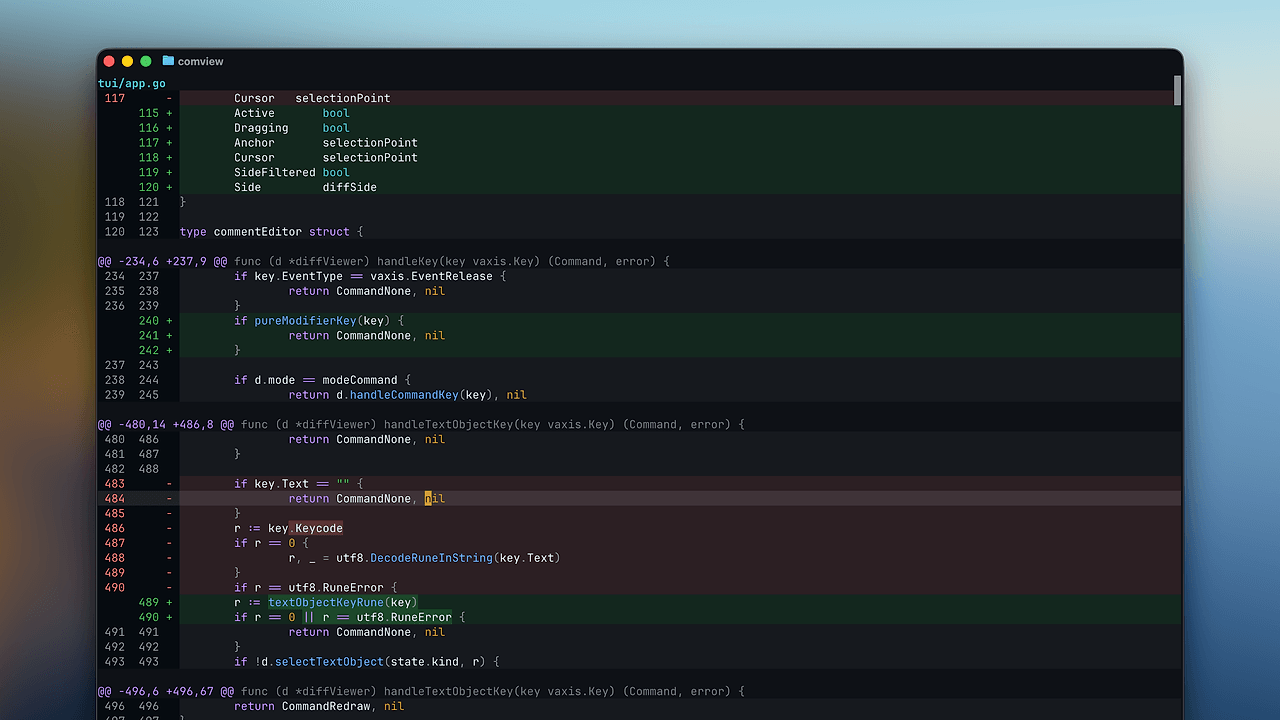
comview is a terminal diff viewer built by rockorager. comview is one of the best Terminal Diff Viewers tools for developers who review Git changes in the terminal; it reads unified diff from stdin, renders it in the shell, and ships with 20+ key bindings for navigation, search, notes, and editing. It is designed for people who want a pager-level workflow for git diff, git show, and gh pr diff without opening a browser.
Quick Overview
| Attribute | Details |
|---|---|
| Type | Terminal Diff Viewers |
| Best For | developers who review Git changes in the terminal |
| Language/Stack | Unix pipes, Git pager integration, terminal TUI, local JSON storage |
| License | N/A |
| GitHub Stars | N/A as of Feb 2026 |
| Pricing | Open-Source |
| Last Release | N/A |
Who Should Use comview?
- Solo maintainers who inspect patches all day and want a terminal review surface that keeps notes attached to the repository checkout.
- CLI-heavy engineers who already live in
git diff,git show,gh pr diff, and shell pipes and do not want to bounce into a browser for every change. - Vim and modal-editing users who expect
j/k,gg,G, text objects, and copy-paste flows to behave like muscle memory. - Code reviewers on small teams who need fast iteration on local changes and do not want a heavyweight review platform just to read a patch.
Not ideal for:
- Teams that need centralized review threads, approvals, or audit trails in a shared SaaS.
- Refactors that need AST-aware or syntax-tree diffing instead of line-based unified diffs.
- Developers who prefer mouse-driven browsers and do not want any terminal interaction.
Key Features of comview
- Unified diff rendering from stdin — comview consumes standard patch text, so anything that emits unified diff can feed it. That includes
git diff,git show, andgh pr diff, which makes it a clean terminal pager instead of a separate review system. - Git pager integration — the repo shows
git config --global pager.diff comviewandgit config --global pager.show comview, which turns comview into the default surface for Git diff output. That is the fastest path if you want every patch to open in the same TUI. - Watch mode for changing diffs —
comview watchreruns the underlying diff command and refreshes the display whenever the output changes. That is useful when you are iterating on a fix and want the review surface to stay live without rerunning the whole workflow manually. - Local comment persistence — comments are saved to
.comview/comments.json, so annotations stay inside the working tree instead of a remote database. That is a good fit for temporary review notes, pair sessions, and offline work. - Modal, Vim-like navigation — the built-in key map includes
j/k, arrows,gg,G,Ctrl-d,Ctrl-u,]c,[c,]n,[n,/,n, andN. That means you can jump between changes, notes, and search results without reaching for the mouse. - Side-by-side and theme toggles —
sswitches view mode andtchanges theme, so comview can adapt to dense patches or wide monitors. For reviewers who split time between a laptop and a docked terminal, those toggles matter more than splashy UI effects. - Editor handoff and text-object selection —
oopens the cursor location in your editor, while visual selection, copy, and text objects make the TUI feel closer to a real editor than a passive pager. That is a practical detail when you want to jump from review to edit in one keypress.
comview vs Alternatives
| Tool | Best For | Key Differentiator | Pricing |
|---|---|---|---|
| comview | Terminal-native diff review with notes | Comment storage, watch mode, and Vim-style interaction inside a small TUI | Open-Source |
| delta | Pretty paged Git diffs | Polished syntax highlighting and pager output | Open-Source |
| difftastic | Structural source diffs | AST-aware comparison for code refactors | Open-Source |
| git diff | Raw patch generation | Built into Git, zero extra install | Free |
Pick comview when you want to read, annotate, and revisit diffs without leaving the terminal. Pick delta if you mainly want prettier output and do not care about comments or live refresh.
Pick difftastic when line-based patches are not enough and you need structural awareness for a refactor-heavy codebase. Pick git diff when you only need the raw patch stream and another pager or editor will handle formatting.
For adjacent repository navigation, pair comview with Ghist when you need to move from diff review to commit browsing. If you want more terminal-first utilities around the same workflow, browse all CLI Tools.
How comview Works
comview is built around a simple Unix pipeline: Git produces a unified diff, comview reads that text from stdin, and the terminal UI renders files, hunks, notes, and search state in one place. The data model is intentionally small, centered on patch text and local cursor state instead of a server-side review database.
That design keeps comview predictable. Any command that prints a standard diff can flow into it, which is why git diff | comview and gh pr diff 123 | comview work the same way from the user's perspective. The trade-off is equally direct: comview is only as smart as the diff stream it receives, so it does not try to infer semantic edits beyond the unified patch format.
git diff | comview
comview watch --staged
comview watch -- git show HEAD
The first command sends the current patch to comview for interactive review. The second keeps the staged diff live, and the third tells comview to rerun another diff-producing command whenever the output changes.
Pros and Cons of comview
Pros:
- Fast terminal workflow — comview avoids browser latency and keeps review inside the shell, which is ideal for iterative local development.
- Good keyboard coverage — the shipped key map covers movement, search, notes, editor handoff, and selection, so the tool is usable without a mouse.
- Live diff refresh —
watchmode reduces the friction of re-checking a patch after each edit or rebase. - Local-only notes —
.comview/comments.jsonkeeps annotations near the code, which is useful for ephemeral review sessions. - Pager-friendly setup — the Git pager configuration makes adoption cheap because it slots into existing
git diffandgit showhabits.
Cons:
- Unified-diff only — comview does not replace AST-aware tools like difftastic when syntax structure matters.
- Terminal-only UX — people who prefer browser-based review UIs will not get much value from the TUI.
- Local comment storage —
.comview/comments.jsonis convenient, but it is not a shared review backend or team annotation system. - Repository-centric workflow — if you need PR metadata, approvals, or cross-repo review threads, you will still need a code host.
Getting Started with comview
git clone https://github.com/rockorager/comview.git
cd comview
mise run install
git config --global pager.diff comview
git config --global pager.show comview
git diff
After installation, Git can route diff output directly into comview through the pager settings. If you want a local install instead of a global one, the repo also documents PREFIX=$HOME/.local mise run install, which keeps the binary in your home directory and avoids system-wide changes.
Once you launch the first diff, expect a keyboard-first review loop: move through hunks, search for text, open the current file position in your editor, and save notes when you need to annotate a change. If you work from feature branches or review your own patches repeatedly, comview watch is the next command to learn.
Verdict
comview is the strongest option for terminal-first Git diff review when you want comments and keyboard navigation without a browser. Its biggest strength is the tight Unix-pipe workflow, and its main caveat is the lack of semantic diffing. If your team lives in the shell, comview is worth adopting.