What Is Glass?
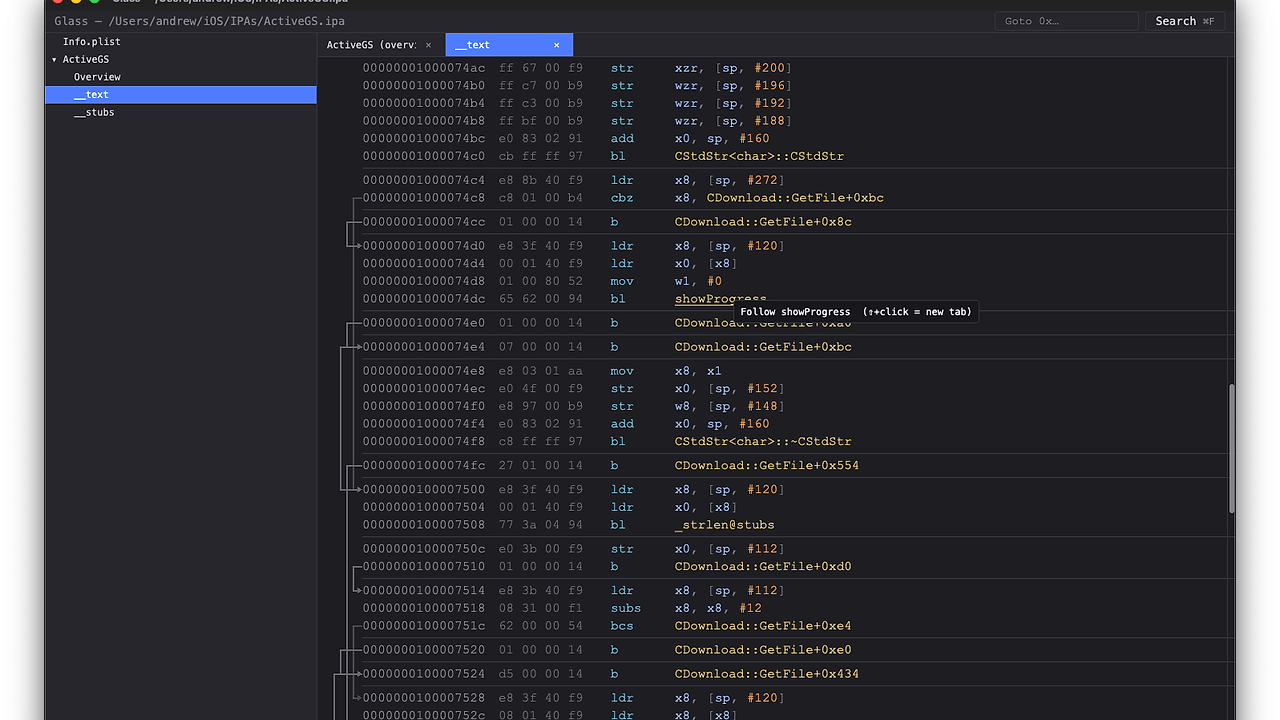
Glass is a fast, native, mobile-app first interactive disassembler built by azw413 for Android and iOS reverse engineers who want a local workflow instead of a heavyweight commercial stack. Glass is one of the best Mobile Reverse Engineering Tools for mobile app reversers, and the project claims 1–2 second analysis for most larger binaries plus a 120fps GPU-rendered UI. It focuses on APK, DEX, smali, AArch64 native libraries, and iOS Mach-O work in one Rust-native surface.
Glass is built around smali for Android bytecode, armv8-encode for AArch64 instruction handling, gpui for the interface, and redb for content-addressed persistence. The result is a disassembler that is not trying to be a generic IDE; it is built for people who need to move from symbols to xrefs to annotations without waiting on slow refresh cycles.
Quick Overview
| Attribute | Details |
|---|---|
| Type | Mobile Reverse Engineering Tools |
| Best For | Android and iOS reverse engineers, malware analysts, and app security teams |
| Language/Stack | Rust, smali, AArch64, gpui, redb, rquickjs |
| License | GPL-3.0-only |
| GitHub Stars | N/A as of N/A |
| Pricing | Open-Source |
| Last Release | N/A |
Who Should Use Glass?
Glass is the right fit when you need fast static analysis on mobile binaries and do not want to pay for an old-school proprietary license. It is especially useful when your workflow jumps between DEX, native code, string search, control flow graphs, and scriptable automation.
- Android reverse engineers working with APKs, DEX, and smali who need instant navigation across methods, fields, and call graphs.
- iOS and AArch64 analysts inspecting Mach-O or native
.socode who want linked disassembly, xrefs, and instruction-level search. - Malware researchers who need to annotate suspicious blocks, color findings, and keep a persistent project state across sessions.
- Automation-heavy teams that want the same analysis exposed through a terminal, JSON output, and an MCP server.
Not ideal for:
- Teams that need a mature commercial decompiler ecosystem with years of third-party plugins and vendor support.
- Analysts who rely on broad multi-architecture decompilation today, since Glass is still centered on mobile-app reversing and AArch64/DEX workflows.
- Users who need a turnkey, packaged binary with no setup, because this project is still an open-source repo and may require a build-from-source path.
Key Features of Glass
-
GPU-accelerated 120fps rendering — Glass uses gpui to keep the interface responsive when scrolling disassembly, graphs, and search results. That matters when you are jumping through large functions or dense DEX graphs and do not want UI hitching to hide the next clue.
-
Fast initial analysis — the project claims 1–2 seconds for most larger binaries, which is materially different from minute-scale waits in older desktop disassemblers. For triage work, that means you can open a sample, inspect the layout, and start searching before context has evaporated.
-
Linked and annotated disassembly — every listing can show control-flow lines, inline literals, colored operands, and clickable references to other functions. That reduces the mental overhead of cross-referencing
strings, xrefs, and symbol tables across separate panes. -
Control flow graphs with direct navigation — Glass renders per-function CFGs with basic blocks and clickable edges. For reversing obfuscated control logic, this is the fastest way to move from a static listing into branch structure and back again.
-
Full project search across DEX, code, and data — the search engine covers native symbols, DEX classes/methods/fields, and string literals in code and data sections. The background indexing model keeps the UI usable while the index builds, which is important on large APKs and mixed native bundles.
-
Binary and instruction pattern search — Glass supports byte masks, gaps, and assembly-pattern search through the same pipeline, with AArch64 instruction assembly handled by armv8-encode. That makes it practical to hunt for compiler idioms like
adrp+add, return stubs, or embedded magic values without writing custom scripts first. -
Persistent annotations and in-place edits — you can color lines, add comments, edit instructions or data in place, and rebuild for export. The redb-backed project model keeps this state durable, which is useful when a sample needs multiple passes over several days.
Glass vs Alternatives
| Tool | Best For | Key Differentiator | Pricing |
|---|---|---|---|
| Glass | Mobile reverse engineering, DEX + AArch64 inspection | Rust-native, GPU UI, CLI JSON, MCP automation | Open-Source |
| IDA Pro | Professional reverse engineering across many architectures | Mature plugin ecosystem and long history in the industry | Paid |
| Ghidra | Teams needing a free, broad static analysis suite | Strong decompiler workflow and wide architecture coverage | Free |
| Binary Ninja | Analysts who want a polished commercial RE environment | Fast UI and strong scripting for mixed workflows | Paid |
Pick IDA Pro when you need the deepest legacy plugin ecosystem or existing team muscle memory. It still wins on maturity, but Glass targets a faster mobile-first loop and does not ask you to buy a license to inspect your own binaries.
Pick Ghidra when you want a no-cost decompiler-centric platform with a larger architecture matrix. Glass is narrower by design, but it is better aligned with APK, DEX, AArch64, and annotation-heavy mobile workflows.
Pick Binary Ninja when commercial polish and scripting depth matter more than open-source transparency. Glass is the better choice if you want local JSON automation, an MCP surface, and a workflow centered on mobile app reversing rather than general-purpose binary analysis.
If your workflow includes runtime evidence, pair Glass with OpenTrace so you can correlate static xrefs with dynamic traces. If you already route tool calls through Claude Desktop or another MCP host, Claude Context Mode is a sensible adjacent workflow layer for agent-assisted reversing.
How Glass Works
Glass is built as a single local analysis engine with three surfaces: the GUI, the CLI, and the MCP server. The important design choice is that each action produces structured output, so a human at the keyboard and an automation client see the same underlying result rather than two separate code paths.
The data model is centered on binary artifacts, indexed symbols, disassembly listings, control-flow relationships, and durable annotations stored through redb. For mobile reversing, that means APK/DEX content and native code can be searched and revisited without rebuilding state from scratch every time you reopen a project.
The scriptability layer is what makes Glass stand out beyond a normal desktop disassembler. The repo exposes the same verbs through the command line and an MCP stdio server, and planned rquickjs plugin support suggests the project is aiming for embedded scripting rather than a bolted-on macro system.
# inspect a bundle and search for an Android lifecycle method
glass search ./app.apk onCreate

# inspect native callers of a symbol in a shared object
glass callers ./libfoo.so --artifact libfoo.so --symbol "glass::main"

# run as an MCP server for Claude Desktop, Cursor, or Zed
glass mcp
The first command builds a searchable project view and returns matching symbols or methods. The second command shows how Glass can bridge directly into native code navigation, while the third turns the same verbs into an MCP tool list for host applications.
Pros and Cons of Glass
Pros:
- Mobile-first scope maps directly to APK, DEX, smali, AArch64, and Mach-O work instead of generic binary analysis.
- Very fast UI response thanks to GPU-accelerated rendering and a workflow designed around immediate interaction.
- Unified CLI and GUI model means you can prototype manually and then automate the same operations with JSON output.
- Strong search primitives cover symbols, strings, byte masks, and assembly patterns without jumping between separate tools.
- Durable annotations make long-running investigations easier because comments and colors survive across sessions.
- MCP integration is useful for host-driven workflows in Claude Desktop, Cursor, Zed, and custom clients.
Cons:
- Narrower scope than IDA Pro or Ghidra if you need broad architecture coverage and years of community extensions.
- GPL-3.0-only licensing may be a blocker for some proprietary or embedded commercial redistribution scenarios.
- Plugin support is still planned, so the extensibility story is not as mature as the established commercial tools.
- Build-and-run friction is possible because the current repo is source-first, not a polished commercial installer.
- Mobile-focused design can be a limitation if your day job is non-mobile firmware, desktop malware, or exotic architectures.
Getting Started with Glass
The fastest way to try Glass is to clone the repository, build the Rust binary, and run a search or skill command against a sample APK or .so. That mirrors the project’s source-first workflow and gives you both the CLI and MCP entry points immediately.
git clone https://github.com/azw413/Glass.git
cd Glass
cargo build --release
./target/release/glass skills
./target/release/glass search ./app.apk onCreate
After the build completes, glass skills prints the machine-readable catalog of verbs, and glass search gives you an initial project index for a bundle. For deeper use, pass --text when you want human-readable output, or omit it when you want JSON for jq, CI jobs, or another automation client.
Verdict
Glass is the strongest option for mobile APK/DEX and AArch64 reversing when you want a fast local workflow and can accept an emerging GPL-licensed project. Its main advantage is the combination of speed, search, and machine-readable automation, while the caveat is that its ecosystem is still smaller than IDA Pro or Ghidra. If your work is mobile-heavy and you value CLI/MCP integration, Glass is worth adopting now.