What Is HentaiHunter?
HentaiHunter is a Python CLI downloader built by sinkaroid for bulk-saving doujinshi, manga, and manhwa from supported gallery sites and generic pages. HentaiHunter is one of the best CLI Downloaders tools for power users and manga archivists, with Python 3.9+ support, Apache 2.0 licensing, and a workflow that handles metadata, page ordering, and parallel image downloads across 5+ site profiles plus a generic mode.
Quick Overview
| Attribute | Details |
|---|---|
| Type | CLI Downloaders |
| Best For | Power users, manga archivists, and Python developers |
| Language/Stack | Python 3.9+, DOM parsing, ThreadPoolExecutor, site-specific scrapers |
| License | Apache 2.0 |
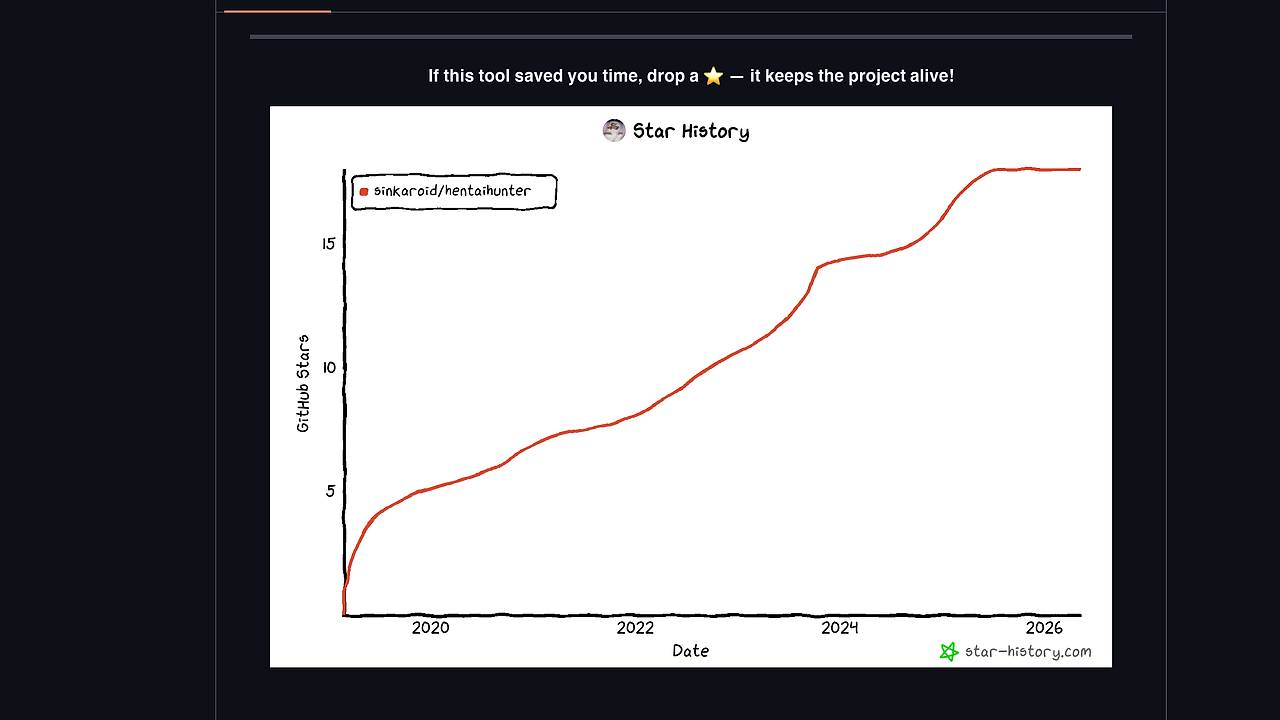
| GitHub Stars | N/A as of Feb 2026 |
| Pricing | Open-Source |
| Last Release | v2.0 — date not shown on page |
Who Should Use HentaiHunter?
- Terminal-first users who want a single command to pull a complete gallery without opening a browser or installing a desktop app.
- Archivists and collectors who care about numbered filenames, deterministic folder layout, and keeping pages in reading order.
- Python developers who want a small, hackable codebase with a base scraper abstraction and a clear place to add new site handlers.
- Power users on Windows, Linux, or macOS who prefer
python hentaihunter.py URLover a GUI downloader with hidden state.
Not ideal for:
- Casual users who want a point-and-click library manager with thumbnails, history, and cloud sync.
- Teams that need enterprise controls like central policy enforcement, audit logs, or SSO.
- Sites with aggressive bot protection where a headless browser, rotating proxies, or manual session handling may be required.
Key Features of HentaiHunter
- Site detection and routing — HentaiHunter maps a URL to a scraper implementation, so the same command can target nhentai, hentaifox, hitomi.la, or the generic image collector. That keeps the interface simple while the scraper layer handles site-specific HTML shapes.
- Parallel image downloads — The downloader uses
ThreadPoolExecutorwith configurable threads, which is the right fit for I/O-bound page fetches. The default is 4 threads, and the README shows higher values such as-t 8and-t 16for faster mirrors that do not rate-limit aggressively. - Metadata extraction — HentaiHunter fetches gallery title, tags, and page count before it starts downloading. That gives you predictable output folders and enough context to verify you grabbed the right release before burning bandwidth on all pages.
- Generic DOM scraping mode — The generic path scans page HTML and grabs image tags when a site is not explicitly supported. That is the main reason HentaiHunter still works on niche manga sites that do not need a dedicated extractor.
- Numbered archive output — Files are stored as
0001.jpg,0002.jpg, and so on inside a gallery-named subfolder. This makes the result friendly to comic readers, filesystem sorting, and later post-processing scripts. - Cross-platform CLI workflow — The README documents usage on Windows and states that
python hentaihunter.pyworks anywhere Python runs. That matters for users who want the same script on a workstation, a VPS, or a WSL environment. - Contributor-friendly scraper model — The repo shows a
BaseScraperpattern and a registry that maps domains to scraper classes. That architecture keeps new site support isolated and reduces the risk of breaking the core downloader when one source changes its markup.
HentaiHunter vs Alternatives
| Tool | Best For | Key Differentiator | Pricing |
|---|---|---|---|
| HentaiHunter | Fast terminal-based doujinshi and manga bulk downloads | Simple CLI, site detection, and a generic HTML image scraper | Open-Source |
| gallery-dl | Broad gallery downloading across many media sites | Much wider source coverage and mature extractor ecosystem | Open-Source |
| Hitomi-Downloader | Users who want a GUI with queue management | Desktop interface and less terminal work | Open-Source |
| JDownloader 2 | General-purpose large file and host downloads | Heavy-duty link handling and account-driven downloads | Freemium |
Pick browse all CLI Tools if you want more terminal-native utilities with low ceremony. For broader automation workflows around fetch, parse, and sync tasks, check browse all DevOps Automation tools.
Choose gallery-dl when you need the broader ecosystem and do not mind a larger extractor surface area. It is the safer pick if your download list spans many unrelated content platforms and you want a battle-tested project with long history.
Choose Hitomi-Downloader when the GUI matters more than scriptability. It is a better fit for people who batch content interactively and want to inspect queues, retries, and progress visually.
Choose JDownloader 2 when the job is less about manga-specific scraping and more about general download management. It is useful for link-heavy workflows, but it is heavier than HentaiHunter and less focused on clean chapter-by-chapter archives.
How HentaiHunter Works
HentaiHunter uses a small pipeline: resolve the URL, identify the source, fetch metadata, collect image URLs, and download everything in parallel. The design favors straightforward parsing over browser automation, which keeps startup time low and avoids the overhead of a full rendering engine for pages that already expose image sources in HTML.
The core abstraction is a scraper registry backed by site-specific classes and a generic fallback. That means the code path for supported sources can read structured metadata while the fallback still works on a wide range of simple gallery pages that expose <img> tags directly in the DOM.
python hentaihunter.py https://nhentai.net/g/177013/ -o ./downloads -t 8
That command starts a gallery fetch, saves into ./downloads, and runs eight download threads for the image payloads. Expect a metadata pass first, then a progress display while files are written in order, and finally a numbered folder that is ready for a comic reader or archiving script.
The architecture is intentionally small. There is a main entry point, a requirements file, and a Windows installer path for users who want shortcuts, but the real value is the clear separation between site parsing and file transfer. If you want to extend HentaiHunter for a new domain, the repo shows a BaseScraper pattern where the extractor owns page parsing and the shared base class handles download mechanics.
Pros and Cons of HentaiHunter
Pros:
- Very low ceremony — one URL and a few flags are enough to start a download run.
- Parallel I/O — multi-threaded fetching improves throughput on hosts that allow concurrent requests.
- Readable output structure — ordered filenames and gallery folders make later review and batch processing easy.
- Generic fallback — the DOM-based image collector gives HentaiHunter reach beyond the explicitly supported sites.
- Hackable codebase — the scraper registry and base-class design make new site support easy to reason about.
- Cross-platform Python runtime — the same script works across operating systems where Python 3.9+ is installed.
Cons:
- Limited to scraping-friendly pages — sites that hide media behind heavy JavaScript or anti-bot flows may fail.
- No GUI or library manager — users who want a visual queue, bookmarks, or a media database need another tool.
- Authentication is manual — login-required sources may need cookie or header tweaks rather than a built-in account manager.
- Source coverage is narrower than large extractors — if you need dozens of unrelated sites, gallery-dl is broader.
- Thread tuning is on you — pushing too many threads can trigger throttling on weaker hosts.
Getting Started with HentaiHunter
Install HentaiHunter by cloning the repo, creating a virtual environment, and installing the Python dependencies. Then run the CLI against a gallery URL and choose an output folder plus a thread count that matches the host's tolerance.
git clone https://github.com/sinkaroid/Hentaihunter.git
cd Hentaihunter
python3 -m venv .venv
source .venv/bin/activate
pip install -r requirements.txt
python hentaihunter.py https://nhentai.net/g/177013/ -o ./downloads -t 4
After the first run, HentaiHunter should create a gallery folder under ./downloads and populate it with numbered images. If a site needs authentication or custom headers, you will usually edit the session headers in the script before running a protected source, which keeps the workflow simple but puts the responsibility on the user.
Verdict
HentaiHunter is the strongest option for fast, terminal-based doujinshi downloading when you want predictable folder output and a lightweight Python workflow. Its biggest strength is the combination of site detection and generic DOM scraping, while the main caveat is weaker handling for hostile or JavaScript-heavy hosts. Use it if you want a lean CLI first and can tolerate manual tweaks when a site breaks.