What Is omikuji?
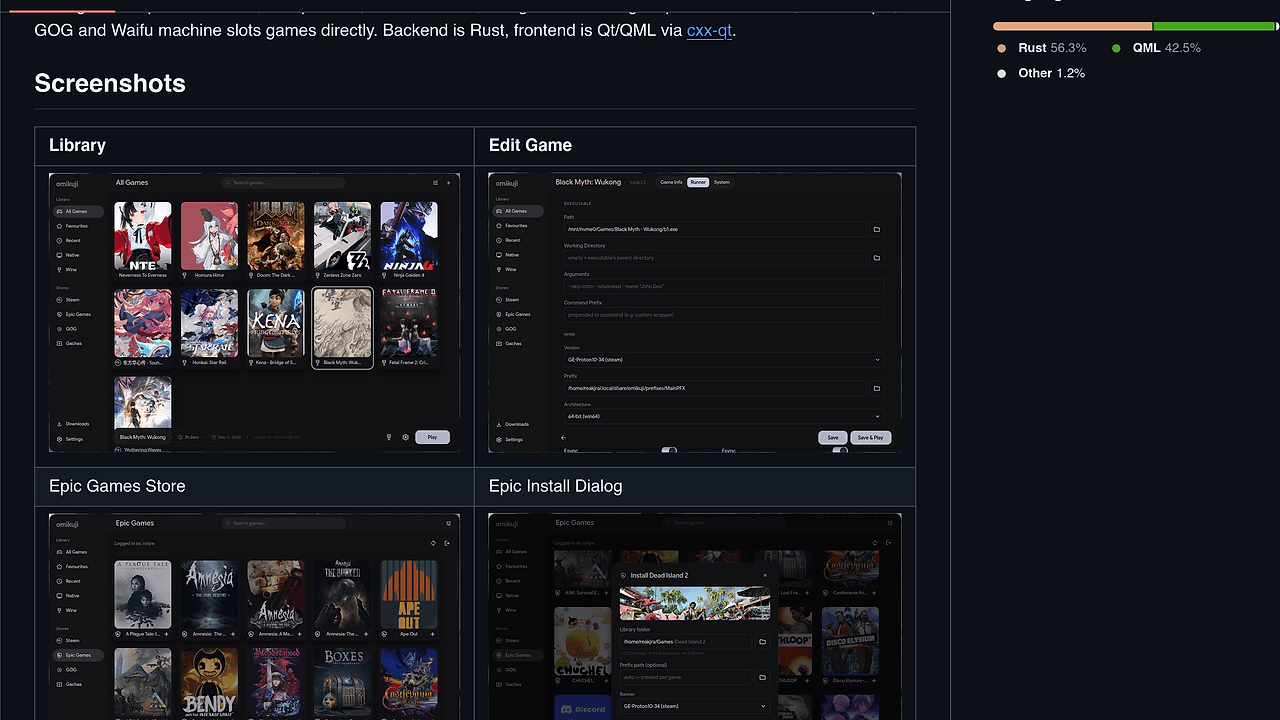
omikuji is a Qt/QML-based Linux game launcher built by reakjra to replace 3 separate launchers with one Rust-backed app for Wine and Proton games. omikuji is one of the best Linux Game Launchers tools for Linux gamers who need Steam, Epic, GOG, and gacha installs in one place, plus a headless omikuji run <slug_or_id> path for .desktop shortcuts. The repo describes it as usable, daily-driven, and still rough around the edges as of Feb 2026.
Quick Overview
| Attribute | Details |
|---|---|
| Type | Linux Game Launchers |
| Best For | Linux gamers, power users, and indie hackers who manage Windows games on Linux with Wine/Proton |
| Language/Stack | Rust backend, Qt 6/QML frontend, cxx-qt bridge |
| License | GPL-3.0-or-later |
| GitHub Stars | N/A as of Feb 2026 |
| Pricing | Open-Source |
| Last Release | N/A — no tagged release listed on the page |
Who Should Use omikuji?
- Linux gamers with mixed libraries who want Steam, Epic, GOG, and gacha titles in one launcher instead of switching between multiple frontends.
- Power users running Wine/Proton stacks who care about prefix control, DXVK/VKD3D selection, and wrapper ordering like
gamescope,mangohud, andgamemode. - Indie hackers and desktop tinkerers who prefer one TOML per game because it is easy to diff, sync, and store in git.
- People who need headless launch paths for
.desktopshortcuts, scripts, or launcher automation on a Linux desktop.
Not ideal for:
- Users who only play native Linux games and do not need Wine, Proton, or Windows compatibility layers.
- Teams that expect polished localization and enterprise release discipline, because the project explicitly calls out incomplete i18n and rough UI areas.
- People who want a fully hands-off app with no first-run runtime downloads, because omikuji fetches several tools on demand.
Key Features of omikuji
- Git-friendly game records — omikuji stores each game in one TOML file, which makes configs easy to review in diffs, sync across machines, and roll back when a prefix breaks.
- Wine and Proton management — it auto-detects Steam-installed Proton and can also fetch its own runner from settings, so the launcher is not locked to one runtime source.
- Translation layer handling — DXVK, VKD3D, and DXVK-NVAPI are auto-fetched from upstream releases, which reduces the manual work of keeping compatibility layers current.
- Store imports and installers — omikuji can import Steam libraries locally and install Epic, GOG, and gacha titles through
legendary,gogdl, and direct CDN or delta patch handlers. - Wrapper chain control — it supports
gamescope,mangohud,gamemode,taskset, and custom prefixes, so launch-time environment changes are explicit rather than buried in per-game hacks. - Built-in Wine tools — commands like
winecfg,winetricks,regedit,cmd,winefile,run-exe, andkill-wineserverare available from the same launcher context. - Artwork and playtime tracking — omikuji pulls art from SteamGridDB and persists per-game playtime on exit, with Steam playtime support if you provide your own Web API key.
omikuji vs Alternatives
| Tool | Best For | Key Differentiator | Pricing |
|---|---|---|---|
| omikuji | Linux gamers who want a Rust/QML launcher with per-game TOML config and CLI launch | Headless omikuji run, wrapper-chain control, and multi-store support in one app | Open-Source |
| Lutris | Broad Linux game library management | Larger ecosystem and long-running community patterns for runner management | Open-Source |
| Heroic Games Launcher | Epic and GOG users who want a cleaner GUI | More opinionated store-first UX with less emphasis on custom wrapper plumbing | Open-Source |
| Steam | Mainstream PC gamers on Linux | Native storefront, social layer, and Proton integration without third-party setup | Free |
Pick Lutris if you want the most established Linux compatibility-layer workflow and do not mind a broader, more cluttered surface area. Pick Heroic Games Launcher if your entire library lives in Epic and GOG and you care more about storefront convenience than low-level prefix control.
Pick Steam if you want the least amount of ceremony and your games already work well with Proton. If you want other terminal-first or automation-oriented utilities, browse all CLI Tools.
If you are comparing source-available desktop apps with similar open workflows, browse all Open-Source tools.
How omikuji Works
omikuji uses a Rust backend for launcher state, store integration, runner selection, and game execution, then exposes that logic to a Qt 6/QML frontend through cxx-qt. The design is intentionally split: Rust handles the data and execution model, while QML handles the visible launcher UI and settings screens. That division matters because game launchers spend most of their complexity in prefix orchestration, not in painting widgets.
The core abstraction is a per-game record plus a shared settings file. Games live under ~/.local/share/omikuji/, and the repo documents settings.toml plus custom runner and DLL-pack configuration in the docs. That layout makes it easy to inspect what a launcher will do before it starts a Windows game, which is useful when debugging Proton regressions, bad prefixes, or broken wrapper ordering.
At runtime, omikuji resolves the game entry, picks the configured or auto-detected runner, fetches missing helper binaries if needed, then constructs the launch chain. That chain can include environment setup, wrappers, translation layers, and a final executable or store-provided launcher. A typical first-run and launch flow looks like this:
git clone https://github.com/reakjra/omikuji.git
cd omikuji
cargo build --release
./target/release/omikuji
omikuji run baldur-gate-3
The build step compiles the Rust backend and the QML application, which is why the project warns that cargo build --release can take a long time on a cold cache. The run command is the practical automation entry point because it lets you launch a specific game from scripts, desktop files, or other shell-driven workflows.
Pros and Cons of omikuji
Pros:
- Single launcher for multiple stores — Steam import, Epic via
legendary, GOG viagogdl, and gacha install flows reduce the need for separate desktop apps. - Explicit prefix and wrapper control — the launcher exposes
wineprefixes, translation layers, and runtime wrappers instead of hiding them behind a thin UI. - Headless CLI support —
omikuji run <slug_or_id>is useful for.desktopentries, scripts, and non-interactive launch flows. - Git-friendly configuration — one TOML per game is easy to diff, back up, and move between machines.
- Rust core — Rust is a good fit for a launcher that must manage filesystem state, process execution, and external downloads without falling over.
- First-class Linux focus — the app is built specifically for Linux gaming rather than trying to be a cross-platform storefront clone.
Cons:
- UI polish is unfinished — the repo itself says the QML side still needs polish, and some settings pages are flagged as rough.
- No packaged release cadence shown — the page does not advertise a stable tagged release or versioned changelog.
- Limited i18n — the project explicitly says i18n/
qsTris not implemented yet. - Build friction — source builds require Rust 2024 edition, Qt 6.7+,
pkgconf, andcmake, which is not trivial for casual users. - Still solo-project shaped — the maintainer notes there are no back-compat shims, so breaking changes may land without long migration windows.
Getting Started with omikuji
Install omikuji from source if you want the current codebase, or use the AUR package if you are on Arch and do not want to compile everything yourself. The repo also notes that runtime tools such as umu-run, hpatchz, legendary, gogdl, jadeite, and an EGL dummy are auto-fetched on first run.
git clone https://github.com/reakjra/omikuji.git
cd omikuji
cargo build --release
./target/release/omikuji
After the first launch, omikuji creates its data under ~/.local/share/omikuji/ and starts filling in the runtime pieces it needs. If you install from the AUR instead, yay -S omikuji-git gives you a packaged path, but you still need to review settings.toml and verify your runner and prefix settings before launching real games.
Verdict
omikuji is the strongest option for Linux gamers who want one launcher for Wine, Proton, and multi-store library management when they value explicit control over polish. Its best strength is the Rust/QML split with per-game TOML config and CLI launch support. The main caveat is that the UI and packaging story are still incomplete, so recommend it to tinkerers, not to users who want a finished commercial-grade launcher.