What Is Pixal3D?
Pixal3D is an image-to-3D generation repository built by researchers from Tencent ARC Lab, Tsinghua University, and Victoria University of Wellington. Pixal3D is one of the best Image-to-3D Generation tools for researchers, 3D artists, and generative AI teams because it turns a single image into a GLB mesh with PBR textures using pixel-aligned back-projection, and the project was accepted to SIGGRAPH 2026 with a May 2026 release of an improved main branch.
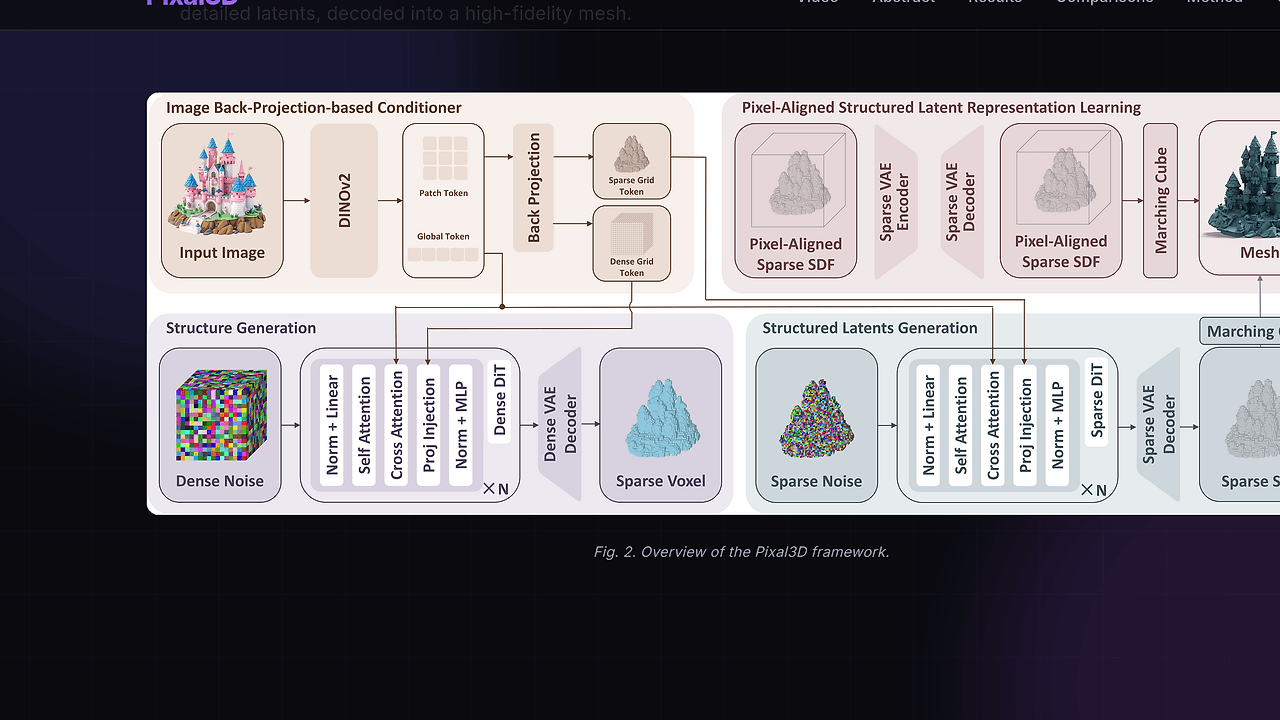
The technical point is simple: Pixal3D does not rely on loose image feature injection alone. It explicitly maps pixel features into 3D space, which is the reason it can preserve object boundaries, material cues, and local geometric detail better than many image-to-3D baselines.
Quick Overview
| Attribute | Details |
|---|---|
| Type | Image-to-3D Generation |
| Best For | researchers, 3D artists, and generative AI teams |
| Language/Stack | Python, pip-based dependencies, Gradio, GLB export, TRELLIS.2 backbone |
| License | N/A |
| GitHub Stars | N/A as of Jun 2026 |
| Pricing | Open-Source |
| Last Release | Improved main branch — May 2026 |
Who Should Use Pixal3D?
- Research teams evaluating single-image 3D reconstruction quality, especially when they need a paper-backed baseline with a clear architectural claim around pixel-to-3D alignment.
- 3D artists and technical artists who want fast GLB outputs from reference images without building a full photogrammetry pipeline.
- Generative AI product teams shipping image-to-asset workflows where texture fidelity and geometry consistency matter more than toy demos.
- Benchmark authors comparing attention-based conditioning against explicit back-projection methods in an image-to-3D pipeline.
Not ideal for:
- Teams that need a fully managed SaaS with support contracts and uptime guarantees.
- Users who want zero setup and expect a one-command install on every GPU stack.
- Pipelines that require multi-view reconstruction first, because Pixal3D is optimized around single-image input.
Key Features of Pixal3D
- Pixel-aligned back-projection — Pixal3D lifts image features into 3D explicitly instead of injecting them loosely through attention. That design keeps correspondence between the source image and the generated mesh much tighter.
- Single-image mesh generation — the inference path accepts one input image and produces a 3D asset in GLB format. That makes Pixal3D useful for reference-image workflows, concept art conversion, and rapid asset prototyping.
- PBR texture output — the repository emphasizes physically based rendering textures rather than flat color baking. That matters if the mesh needs to look acceptable in a standard real-time viewer, DCC tool, or web scene.
- Branch-based reproducibility — the
paperbranch maps to the original SIGGRAPH 2026 paper implementation, whilemaintracks the improved Trellis.2-based version. That split is useful when you need either reproducible paper results or the newer implementation. - Browser demo via Hugging Face — Pixal3D exposes a Gradio demo, so you can validate output quality before touching a local environment. That reduces the cost of benchmarking the model on your own images.
- Dependency layering — the setup explicitly separates the base TRELLIS.2 environment from Pixal3D-specific requirements and a custom
utils3dwheel. That makes the stack more reproducible than a monolithic script dump, even if installation is still non-trivial. - Research-grade release path — the project ships with a citation, a paper branch, and an inference entry point, which makes it usable for both experimentation and academic comparison.
Pixal3D vs Alternatives
| Tool | Best For | Key Differentiator | Pricing |
|---|---|---|---|
| Pixal3D | Single-image 3D generation with strong pixel-to-geometry alignment | Explicit back-projection from pixels into 3D and GLB output | Open-Source |
| TRELLIS.2 | General scalable 3D generation backbone | Broader base system that Pixal3D main is built on | Open-Source |
| Direct3D-S2 | Reproducible paper-era image-to-3D experiments | Earlier implementation used for Pixal3D paper branch | Open-Source |
| TripoSR | Fast baseline image-to-3D conversion | Popular low-friction baseline for quick comparisons | Open-Source |
Pixal3D makes sense when you want the specific pixel-aligned method and the SIGGRAPH 2026 paper trail. If you need the broader upstream platform or want to study a more general backbone, TRELLIS.2 is the better anchor.
Pick Direct3D-S2 if your goal is strict reproduction of the paper branch or if you want to trace lineage from the older implementation. Pick TripoSR if you need a simpler baseline to compare against in a benchmark suite, then move to Pixal3D when output quality matters more than lowest-friction setup.
For a wider survey of this space, browse all 3D generation tools.
How Pixal3D Works
Pixal3D is built around a design choice that matters: it treats image features as spatial evidence rather than as generic conditioning tokens. The core abstraction is pixel-to-3D correspondence, where features are back-projected into 3D before the model assembles the mesh and texture representation.
That matters because attention-only conditioning can blur local details, especially around thin structures, hard edges, and reflective materials. Pixal3D tries to reduce that failure mode by preserving where each visual cue came from in the source image, which is why it can produce cleaner geometry and more stable PBR texture placement.
The repository has two practical execution paths. The main branch uses an improved Trellis.2 backbone, while the paper branch keeps the original Direct3D-S2-based implementation for reproduction. In other words, one branch is for newer performance, and the other branch is for the exact paper path.
python inference.py --image assets/test_image/0.png --output ./output.glb
This command reads one image and writes a 3D asset to output.glb. Expect a mesh-centric workflow: input image, model inference, then a GLB file you can inspect in a viewer, import into Blender, or hand off to another asset pipeline.
Pros and Cons of Pixal3D
Pros:
- Direct pixel alignment improves correspondence between source image details and generated 3D structure.
- GLB output is easy to move into standard 3D tooling without extra conversion steps.
- PBR texture emphasis makes the output more useful for real-time rendering and product mockups.
- Paper branch plus improved main branch gives you both reproducibility and a newer implementation.
- Hugging Face demo lets teams evaluate output quality before local setup.
- Research citations and branch notes make Pixal3D easier to defend in internal benchmarks.
Cons:
- Setup is heavier than a lightweight CLI utility because it depends on TRELLIS.2 and an extra
utils3dwheel. - Single-image input limits it for workflows that already have multi-view capture data and want a multi-view fusion pipeline.
- License is not stated in the scraped page, so commercial users need to verify reuse terms directly in the repository.
- Hugging Face demo dependencies may not match all GPU architectures, especially outside the hinted H-series environment.
- Branch choice matters because
mainandpaperare not interchangeable if you care about exact paper reproduction.
Getting Started with Pixal3D
The fastest path is to start with the demo, then move to local inference once you know the quality is good enough for your use case. Pixal3D expects the TRELLIS.2 environment first, then its own requirements and the utils3d wheel.
git clone https://github.com/TencentARC/Pixal3D.git
cd Pixal3D
# first, install the TRELLIS.2 base environment as documented by the upstream project
pip install -r requirements.txt
pip install https://github.com/LDYang694/Storages/releases/download/20260430/utils3d-0.0.2-py3-none-any.whl
python inference.py --image assets/test_image/0.png --output ./output.glb
After that, Pixal3D will generate a 3D mesh from the sample image and save it as output.glb. If you want the browser path instead, run python app.py and use the Gradio interface for interactive testing. If your goal is paper reproduction, switch to the paper branch before running the same workflow.
Verdict
Pixal3D is the strongest option for single-image 3D asset generation when fidelity matters more than setup simplicity. Its pixel-aligned back-projection produces tighter geometry-texture correspondence than attention-only baselines, but the environment is heavier because it depends on TRELLIS.2 and extra wheels. Use Pixal3D if you want research-grade output and can tolerate setup friction.