What Is vphone-cli?
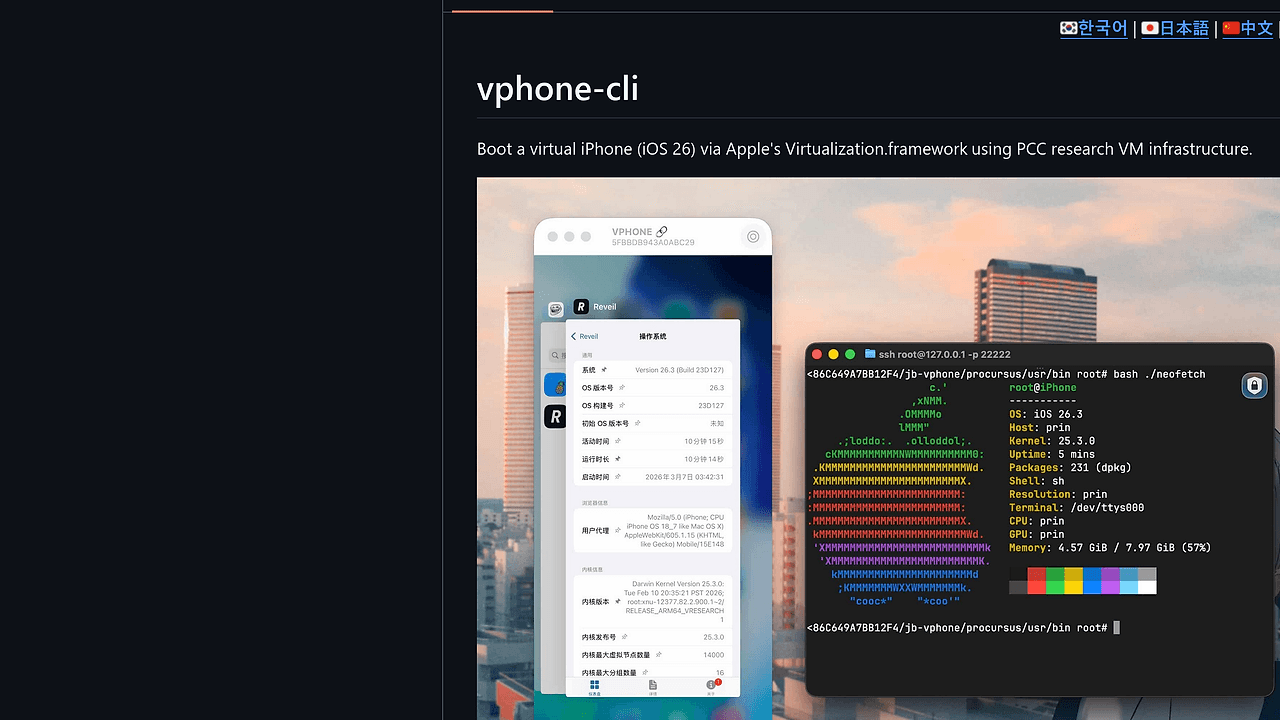
vphone-cli is a command-line tool built by Lakr233 that boots virtual iPhone environments running iOS 26 via Apple's Virtualization.framework on macOS hosts. It applies 41 to 112 firmware patches across Regular, Development, and Jailbreak variants to enable full iOS execution, including custom firmware installation and automated jailbreak setup with Sileo and TrollStore. vphone-cli is one of the best Virtualization CLI Tools for iOS Security Researchers and macOS Developers, with 3.7k GitHub stars and 620 forks as of February 2026. Tested on Mac16,12 hardware with macOS 26.3 hosting iPhone 17,3 firmware up to 26.3.1_23D8133.
Quick Overview
| Attribute | Details |
|---|---|
| Type | Virtualization CLI Tools |
| Best For | iOS Security Researchers and macOS Developers |
| Language/Stack | macOS / Swift / Python / Virtualization.framework |
| License | MIT |
| GitHub Stars | 3.7k as of Feb 2026 |
| Pricing | Open-Source |
| Last Release | e189b80 — recent commit on main branch |
Who Should Use vphone-cli?
- iOS firmware researchers analyzing boot chains and patch requirements on emulated hardware without physical devices.
- macOS developers testing jailbreak workflows who need automated CFW installation and first-boot symlinking for Sileo/apt/TrollStore.
- Security analysts bypassing AMFI/SIP in virtual environments to prototype exploits on iOS 26 variants like 17,3_26.3_23D127.
- Virtualization framework experimenters extending Apple's PV=3 API with custom manifests and vphoned modules.
Not ideal for:
- Developers needing production-scale iOS simulation; Xcode Simulator handles app testing faster without full OS boot.
- Windows/Linux users; requires macOS 15+ Sequoia for private entitlements.
- Beginners avoiding SIP reconfiguration; demands Recovery mode csrutil changes and nvram boot-args.
Key Features of vphone-cli
- Firmware Patching Variants — Applies 41 patches for Regular (10 phases), 52 for Development (12 phases), or 112 for Jailbreak (14 phases) using make targets like
fw_patch_jbandcfw_install_jb. - Automated Jailbreak Finalization — Runs
/cores/vphone_jb_setup.shLaunchDaemon on first boot, creating symlinks, installing Sileo/apt/TrollStore; logs at/var/log/vphone_jb_setup.log. - VM Manifest System — Generates VM directories with
make vm_new, supports vphoned modules and SwiftUI App Browser for resource management. - Trustcache and Signing — Builds trustcache during
make setup_tools, signs binaries with ldid-procursus, integrates insert_dylib for JB entitlements preservation. - Submodule Resource Archives — Clones git submodules for firmware/ramdisk archives; supports ideviceinstaller for guest management.
- CloudOS Compatibility — Tested with CloudOS 26.1-23B85 to 26.3-23D128 on iPhone firmware up to 26.3.1_23D8133.
- Bootstrap Automation —
make setup_machinehandles restore/ramdisk/CFW through first boot, with NONE_INTERACTIVE=1 and SUDO_PASSWORD env vars.
vphone-cli vs Alternatives
| Tool | Best For | Key Differentiator | Pricing |
|---|---|---|---|
| vphone-cli | iOS 26 jailbreak research on macOS | 112-patch JB chain with auto-setup | Open-Source |
| Xcode Simulator | iOS app debugging | No full OS boot, H.264 accelerated | Free (Apple) |
| QEMU-iOS | Cross-platform ARM emulation | TCG-based, no Virtualization.framework | Open-Source |
| Corellium | Enterprise iOS virtualization | Cloud-hosted, commercial support | Enterprise |
Xcode Simulator suits rapid app iteration with sub-second launches but lacks kernel access or jailbreak simulation. QEMU-iOS runs on any host via user-mode emulation yet delivers 10x slower performance than native PV=3 on Apple Silicon. Corellium offers scaled fleets for teams but charges per-instance without open patch details. For local research, pair vphone-cli with awsim for hybrid AWS testing workflows or browse all Virtualization CLI Tools.
How vphone-cli Works
vphone-cli leverages Apple's Virtualization.framework (PV=3 mode) to instantiate iPhone VMs from patched firmware images. Core workflow patches baseband/CFW components—detailed in research/0_binary_patch_comparison.md—using keystone for code caves and openssl@3 for signature forgery. Python venv handles amfidont for AMFI bypass, while Swift Package.swift builds the CLI binary signed via ldid-procursus.
VM creation starts with make vm_new, generating a manifest directory under sources/ with vphoned modules for runtime services. Boot chain applies phases sequentially: ramdisk restore, CFW injection, LaunchDaemon triggers for JB. insert_dylib hooks preserve entitlements across reboots; gnu-tar extracts submodules like skills/kernel-analysis-vphone600.
First-boot automation drops dropbear SSH, bootstraps /cores/, and logs progress. Here's a getting-started sequence:
# Clone with submodules
git clone --recurse-submodules https://github.com/Lakr233/vphone-cli.git
cd vphone-cli

# Full automation
make setup_machine NONE_INTERACTIVE=1 SUDO_PASSWORD=yourpass
setup_machine installs brew deps (ideviceinstaller, wget, etc.), builds tools, patches firmware per variant, creates VM, and boots to desktop. Expect 5-10 minute first run on Mac16,12; monitor via tail -f /var/log/vphone_jb_setup.log. Subsequent boots hit desktop in under 60 seconds.
Pros and Cons of vphone-cli
Pros:
- Zero physical devices needed; emulates full iPhone 17,3 boot chain with precise patch counts (112 for JB).
- Native Apple Silicon performance via Virtualization.framework; sub-60s boots post-setup on M-series.
- Extensible modules like SwiftUI App Browser and kernel-analysis for custom research.
- Full JB stack auto-installed: Sileo, apt, TrollStore via LaunchDaemon—no manual tweaks.
- Cross-firmware support: 26.1 to 26.3.1, including CloudOS variants.
- MIT-licensed with active main branch (165 commits, latest e189b80 adds vphoned).
Cons:
- macOS 15+ only; SIP/AMFI reconfiguration mandatory via Recovery csrutil.
- High first-boot time (10+ mins) due to 14-phase patching and restore.
- No Windows/Linux ports; tied to Apple entitlements.
- Submodule-heavy clone; 500MB+ download for resources.
- Debug-focused; lacks multi-VM orchestration or snapshot persistence.
Getting Started with vphone-cli
Prep host: Boot to Recovery, run csrutil disable and csrutil allow-research-guests enable, then sudo nvram boot-args="amfi_get_out_of_my_way=1 -v". Install deps: brew install ideviceinstaller wget gnu-tar openssl@3 ldid-procursus sshpass keystone autoconf automake pkg-config libtool cmake. For partial SIP: csrutil enable --without debug and sudo amfidont.
# Clone and setup
git clone --recurse-submodules https://github.com/Lakr233/vphone-cli.git
cd vphone-cli
make setup_tools  # Brew deps, trustcache, libimobiledevice venv
make build        # Sign vphone-cli binary
make setup_machine  # Full VM creation and first boot
setup_machine automates patching (choose variant via env, e.g., FW_VARIANT=jb), VM manifest gen, and boot. Post-run, VM lands at lockscreen; JB completes in background. Configure via AGENTS.md or CLAUDE.md for advanced scripting; test with make vm_new for fresh instances.
Verdict
vphone-cli stands as the strongest open-source option for local iOS 26 jailbreak research on macOS when SIP tweaks are feasible. Its 112-patch depth and auto-JB deliver unmatched fidelity versus Simulator's limits. Caveat: 10-minute setups deter casual use—ideal for committed analysts committing to Apple's Virtualization.framework stack.