What Is adbc-driver-quack?
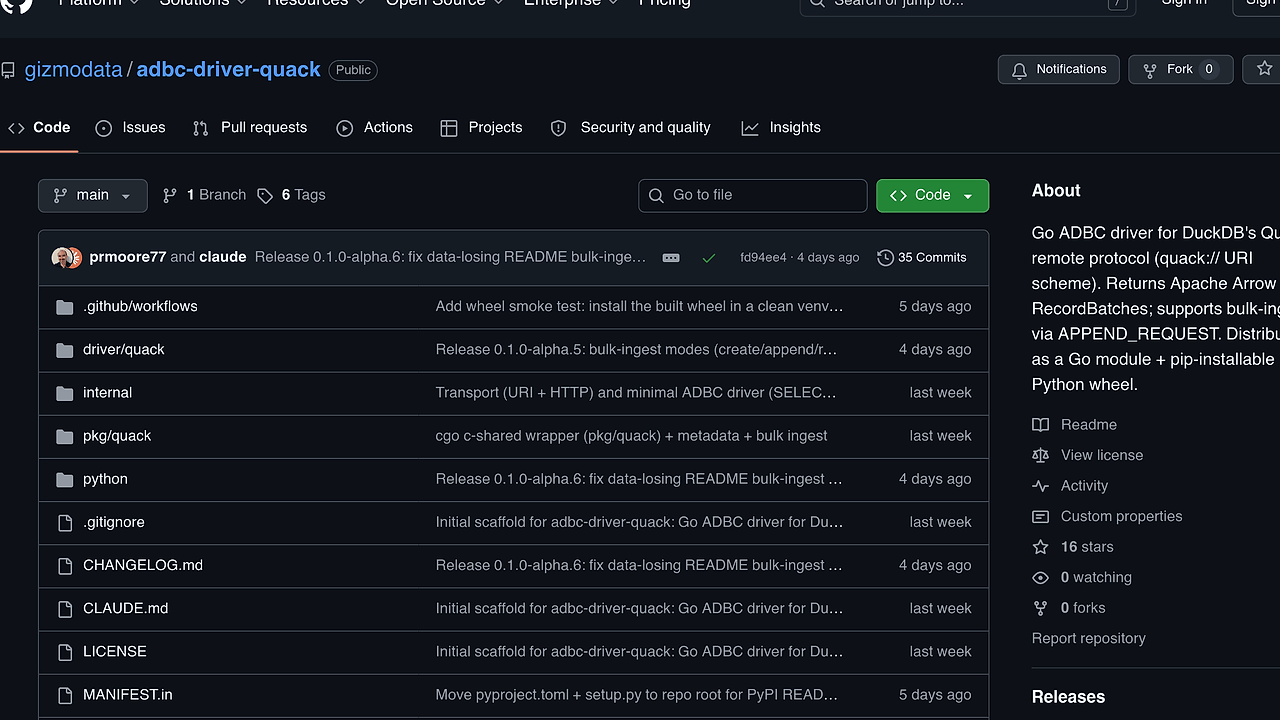
adbc-driver-quack is one of the best Arrow Database Drivers tools for Python and Go developers moving data in and out of DuckDB. Built by GizmoData, it wraps DuckDB's Quack remote protocol so clients can fetch Apache Arrow RecordBatches from a remote server and bulk ingest Arrow streams back through ADBC; the project ships a PyPI wheel for macOS, Linux, and Windows on x64 and arm64, plus a Go module, and the first release is v0.1.0-alpha.1.
This matters when you want a remote database session to behave like an Arrow pipe instead of a row-oriented driver. adbc-driver-quack is one of the best adbc-driver-quack for Python and Go developers moving Arrow data into DuckDB because it preserves columnar semantics end to end and keeps the client API close to the standard ADBC model.
Quick Overview
| Attribute | Details |
|---|---|
| Type | Arrow Database Drivers |
| Best For | Python and Go developers moving Arrow data into DuckDB |
| Language/Stack | Apache Arrow, ADBC, DuckDB Quack, Python DB-API, Go |
| License | MIT |
| GitHub Stars | N/A |
| Pricing | Open-Source |
| Last Release | v0.1.0-alpha.1 |
Who Should Use adbc-driver-quack?
- Data engineers piping Arrow tables between services who want a remote DuckDB endpoint without converting to CSV, JSON, or ad hoc row loops.
- Platform teams standardizing on ADBC and Apache Arrow who need one transport that works from Python and Go against the same DuckDB Quack server.
- Backend developers building ingestion jobs that need
create_append,replace, orappendsemantics over a network connection. - Analytics engineers who already consume
pyarrow.Table, Polars, Pandas, or ibis and want the source or sink to stay Arrow-native.
Not ideal for:
- Embedded-only DuckDB workloads where an in-process
duckdbpackage is simpler and the network hop adds no value. - Teams that want GA stability only, because
adbc-driver-quackis still alpha and should be treated as pre-1.0 software. - Systems where you cannot manage the server token or Quack extension because the client expects a Quack-capable DuckDB server and an auth string.
Key Features of adbc-driver-quack
- Arrow
RecordBatchquery path — adbc-driver-quack returns remote query results as Arrow batches instead of row objects. That makes the output directly usable inpyarrow, Polars, Pandas, ibis, or any downstream code that already speaks Arrow. - Bulk ingest via
Statement.BindStream— adbc-driver-quack supports the standard ADBC bulk-load path and maps each Arrow batch into anAPPEND_REQUEST. That is the right shape for column-oriented loads and avoids row-by-row inserts. - Streaming reads with bounded memory —
Cursor.fetch_record_batch()exposes apyarrow.RecordBatchReaderthat pulls one server-sideDataChunkperread_next_batch()call. Memory stays bounded by the server chunk size, which the README describes as roughly 2k rows per chunk. - Python and Go distribution — the same project ships as a Python wheel and a Go module. That matters if one service uses
adbc_driver_quack.dbapiand another loadsgithub.com/gizmodata/adbc-driver-quackdirectly. - DB-API wrapper plus direct driver loading — adbc-driver-quack works through
quack.connect()for the common Python path, and it also works throughadbc_driver_manager.dbapi.connectwhen you want to manage the bundled shared library yourself. - Token-based Quack connection config — the client uses a simple URI format,
quack://host[:port], withadbc.quack.tokenpassed indb_kwargs. That keeps the transport explicit and avoids hidden connection state. - Transaction control is explicit —
autocommitis off by default, so writes only persist afterconn.commit()unless you opt into autocommit. That is safer for multi-statement ingest jobs, but it will surprise anyone expecting implicit commit-on-close behavior.
adbc-driver-quack vs Alternatives
| Tool | Best For | Key Differentiator | Pricing |
|---|---|---|---|
| adbc-driver-quack | Remote DuckDB over Quack with Arrow reads and writes | Native ADBC support for Quack plus Arrow RecordBatch streaming | Open-Source |
| adbc-driver-manager | Generic ADBC client loading many different drivers | One client API across many backends, not Quack-specific | Open-Source |
| quack-jdbc | JVM services that need Quack over JDBC | Java/Kotlin/Scala friendly driver surface | Open-Source |
| duckdb Python package | Embedded local analytics and SQL in-process | No remote driver layer, just the DuckDB engine in Python | Open-Source |
Pick adbc-driver-quack when your code already depends on Arrow and the server is DuckDB with Quack enabled. Pick DataHaven when the real goal is storing or sharing the resulting data set instead of moving it, because adbc-driver-quack is the transport layer, not the warehouse.
Pick adbc-driver-manager when you need one Python entry point for several database engines and do not want a Quack-specific dependency. Pick quack-jdbc when the application stack is JVM-first, and pick duckdb when the best answer is to skip the network and run SQL in process.
If you are tracing a failed login, host binding mismatch, or an unexpected rollback, OpenTrace is useful around the driver because the failure mode is usually in the request path, not in Arrow itself. The driver only moves batches; the surrounding observability has to explain why the server refused them.
How adbc-driver-quack Works
adbc-driver-quack sits between an ADBC client and a DuckDB server that has the Quack extension loaded. The client opens quack://host[:port], passes adbc.quack.token for auth, and then talks to the server in Arrow-shaped batches instead of fetching one row at a time.
The design is intentionally small. Query execution returns Arrow RecordBatches, while ingest uses the ADBC bulk path so each Arrow batch becomes an APPEND_REQUEST on the wire. That keeps the protocol aligned with columnar storage and makes the same driver useful for reads, writes, and streaming transforms.
from adbc_driver_manager import dbapi
import adbc_driver_quack

with dbapi.connect(
    driver=adbc_driver_quack._driver_path(),
    entrypoint='QuackDriverInit',
    db_kwargs={
        'uri': 'quack://localhost:9494',
        'adbc.quack.token': 'my-secret-token',
    },
) as conn, conn.cursor() as cur:
    cur.execute('SELECT 42 AS answer')
    table = cur.fetch_arrow_table()
That example loads the bundled driver directly, connects to a Quack endpoint, and fetches the result as a real Arrow table. The important part is that the data stays columnar the whole time, so downstream code can pass it to Polars, Pandas, or another Arrow consumer without a copy-heavy rewrite.
On the server side, DuckDB must be new enough to support Quack, and the README uses DuckDB v1.5.2+ with INSTALL quack FROM core_nightly; LOAD quack;. The server lives inside the DuckDB session until that session exits, which makes the deployment model lightweight but also means the lifetime is tied to the REPL or process that started it.
Pros and Cons of adbc-driver-quack
Pros:
- Arrow-native output — results come back as
pyarrow.TableorRecordBatchReader, which keeps the client path aligned with columnar processing. - Fast bulk ingest path —
adbc_ingestuses the standard ADBC create/append modes, so large loads can stay batch-oriented instead of paying per-row overhead. - Works in Python and Go — one protocol, two client surfaces, which is useful for mixed-language data platforms.
- Direct driver loading is supported — you can use the wrapper or hand the driver to
adbc_driver_manager, which makes integration into existing ADBC code easier. - Memory stays bounded during streaming — record batches are pulled incrementally, so giant queries do not have to materialize the whole result at once.
Cons:
- Alpha status —
v0.1.0-alpha.1means API and behavior can still change, so this is not a drop-in choice for conservative production fleets. - Quack server dependency — the client only works when DuckDB is running the Quack extension, so there is extra server setup compared with local DuckDB.
- Transaction defaults are easy to miss — autocommit is off by default, and forgetting
conn.commit()can roll back a load that looked successful. - Protocol scope is narrow — adbc-driver-quack is specific to DuckDB's Quack remote protocol, not a universal driver for arbitrary databases.
- Auth and host binding can be fiddly — the README calls out
localhostversus127.0.0.1edge cases, which is the kind of networking detail that shows up in real deployments.
Getting Started with adbc-driver-quack
Install the Python wheel first, or grab the Go module if your service is written in Go.
pip install adbc-driver-quack pyarrow
# or
# go get github.com/gizmodata/adbc-driver-quack@latest
Start a Quack-enabled DuckDB session, then launch the server endpoint.
INSTALL quack FROM core_nightly;
LOAD quack;
CALL quack_serve('quack:localhost:9494', token=>'my-secret-token');
After the server starts, connect from Python with quack.connect() and run a simple query or an ingest job. If you are writing data, set autocommit=True or call conn.commit() before the connection closes, because adbc-driver-quack follows ADBC transaction rules and will roll back uncommitted work.
Verdict
adbc-driver-quack is the strongest option for Arrow-native access to DuckDB over Quack when you want Python and Go clients on the same wire protocol. Its best strength is returning real Arrow batches with bounded-memory streaming, while the main caveat is alpha status and explicit transaction handling. Choose it when you value columnar I/O over row APIs.