What Is AI Gateway?
AI Gateway is one of the best AI API Gateway tools for platform teams. Built by VaalaCat, it is a distributed-by-design AI API gateway that fronts OpenAI- and Claude-compatible /v1/* traffic, ships with a control-plane / data-plane split, and reuses 50+ upstream provider constants from the new-api adaptor path. It is built for self-hosters and infra owners who need one relay surface for routing, billing, and auth instead of stitching those concerns into every app.
Quick Overview
| Attribute | Details |
|---|---|
| Type | AI API Gateway |
| Best For | platform teams, self-hosters, and CTOs running multi-provider AI workloads |
| Language/Stack | Go, WebSocket sync, Docker Compose, embedded static frontend, OpenAI/Claude-compatible REST |
| License | MIT |
| GitHub Stars | N/A |
| Pricing | Open-Source |
| Last Release | N/A — releases are cut from v* tags |
The project ships as a single binary with embedded frontend assets, so you do not need a separate web server. The docs also show both single-node and multi-node topologies, which matters if you want local simplicity first and horizontal scale later.
Who Should Use AI Gateway?
- Platform engineers who need centralized token, model, and channel management without pushing provider keys into every service
- Indie hackers shipping AI products that need quota tracking, routing, and per-token billing on day one
- Infra leads operating across multiple regions and wanting request steering away from a single provider region
- Teams migrating from direct provider SDK calls to a compatible
/v1/*relay layer
Not ideal for:
- Apps that only ever call one provider and do not need routing or billing
- Teams that want a fully managed SaaS and do not want to run Docker, a DB, or enrollment tokens
- Organizations without ops ownership for master credentials, agent sync, and quota policy
Key Features of AI Gateway
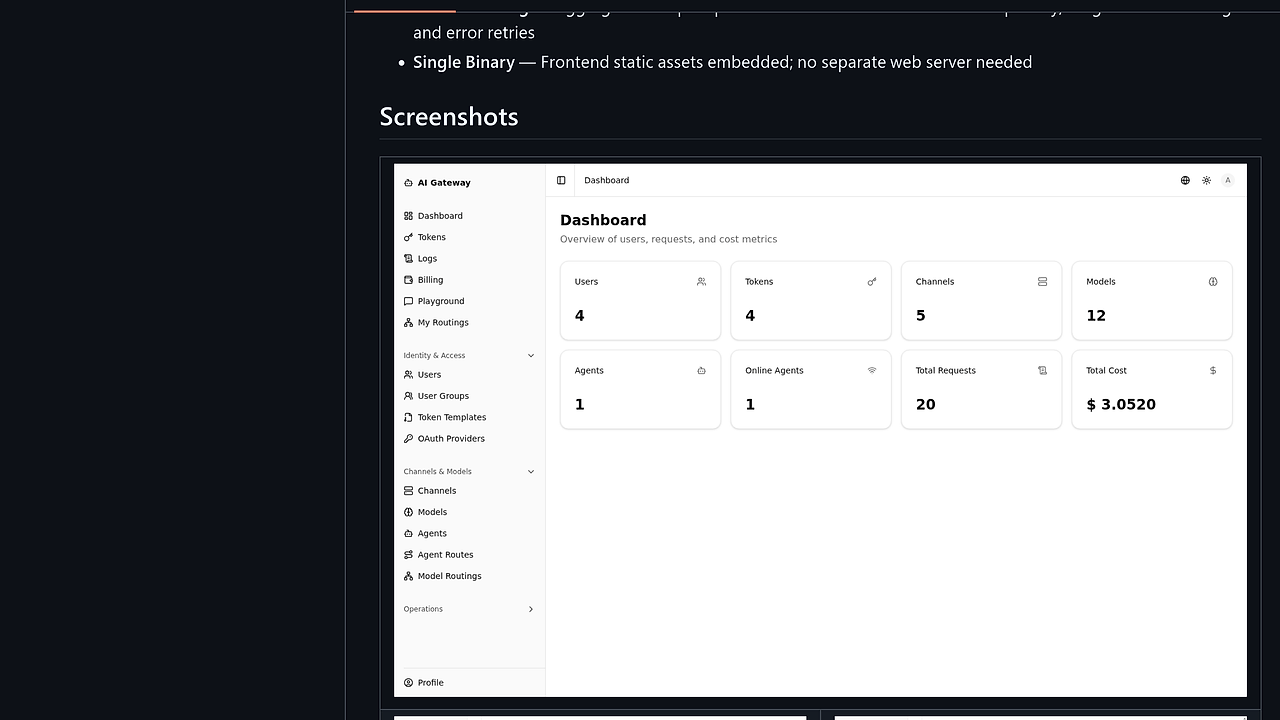
- Control-plane management — The master stores users/groups, tokens, channels, models, and agents in one place. That is the right abstraction when policy belongs in infrastructure, not in application code.
- OpenAI/Claude protocol translation — The agent exposes
/v1/chat/completions,/v1/responses,/v1/messages, and similar endpoints with automatic cross-protocol conversion. That lets one client surface speak to multiple upstream providers without custom adapters per SDK. - WebSocket config sync — Master-to-agent updates are pushed incrementally over WebSocket, so config changes propagate without polling. The page explicitly calls out lightweight distributed deployment with zero external dependencies.
- Quota and billing enforcement — Usage is tracked at the gateway, then settled by token or channel with daily rollups. That is useful when you need internal chargeback, tenant limits, or abuse control.
- Model routing and failover — Multiple upstream models can be aggregated under one logical name using priority and weight policies with error retries. This is the practical layer you need for provider failover and gradual traffic shaping.
- Multi-region routing — Requests can be routed from region A to agents in region B, which enables cross-region balancing and can bypass regional restrictions. That makes AI Gateway more than a local proxy; it is a traffic-control plane.
- Single-binary deployment — Frontend assets are embedded, so the runtime footprint stays small and the operator experience stays close to
docker compose up -d. If you are evaluating the best AI API Gateway 2026 candidates, this simplicity is a real differentiator.
AI Gateway vs Alternatives
| Tool | Best For | Key Differentiator | Pricing |
|---|---|---|---|
| AI Gateway | Self-hosted AI traffic control | Master/agent split, built-in billing, and single-binary deployment | Open-Source |
| LiteLLM | Simple provider abstraction and rapid app integration | Broad LLM proxy surface with a lighter operational model | Open-Source |
| Kong AI Gateway | Enterprises already standardized on Kong | Gateway policies and enterprise integration around an existing API gateway stack | Enterprise |
| Portkey | Teams that want a managed LLM gateway | Hosted control plane with observability and team features | Paid |
Pick LiteLLM if your only job is normalizing provider APIs and you do not need distributed control-plane semantics. Pick Kong AI Gateway if your company already runs Kong and wants LLM traffic to follow the same gateway policies, auth, and plugin model.
Pick Portkey if you want a hosted product and are willing to trade self-hosting control for less operational work. Pick AI Gateway when you need ownership of routing, quotas, and region-aware traffic on your own infrastructure.
If you also need traces and debugging around this gateway, pair it with OpenTrace. If the surrounding system is agent-heavy, OpenSwarm can sit above AI Gateway and handle orchestration while the gateway handles provider selection and policy.
How AI Gateway Works
AI Gateway uses a master / agent architecture. The master handles admin APIs, auth, the embedded Web UI, and billing settlement, while agents sit on the data plane and expose the OpenAI/Claude-compatible relay endpoints. That split means routing state can stay centralized without forcing every request through a single monolith.
The design is intentionally low-dependency. The master pushes incremental config changes over WebSocket, agents cache tokens and channels locally, and the request path can keep serving even when the control plane is doing admin work. The result is a gateway that can be deployed as one node for a proof of concept or as many agents as needed for multi-region traffic.
curl http://localhost:8140/v1/chat/completions \
  -H "Authorization: Bearer $TOKEN" \
  -H "Content-Type: application/json" \
  -d '{
    "model": "gpt-4.1",
    "messages": [{
      "role": "user",
      "content": "Summarize this log"
    }]
  }'
That request hits the gateway, gets routed to the configured upstream channel, and returns a compatibility-shaped response to the caller. In practice, you define a logical model name once, map it to one or more upstreams, and let AI Gateway decide which provider receives the traffic based on weight, priority, and retry behavior.
For Claude-native clients, the same idea applies to /v1/messages and the related endpoints. The important technical decision is not the UI; it is the abstraction boundary that normalizes provider differences at the edge so the rest of your stack only speaks one API.
Pros and Cons of AI Gateway
Pros:
- One relay surface for multiple vendors — You do not need separate auth, routing, and billing code for every AI provider.
- Distributed config sync — Master-to-agent propagation over WebSocket reduces manual redeploys after admin changes.
- Built-in quota logic — Per-token and per-channel settlement makes internal chargeback and abuse prevention straightforward.
- Cross-protocol support — OpenAI and Claude request shapes can coexist behind one gateway.
- Embedded UI — The frontend ships inside the binary, which cuts down on deployment moving parts.
- Multi-region aware — The gateway can steer traffic across regions instead of hard-coding a single upstream location.
Cons:
- You own the ops stack — Self-hosting means you manage the database, secrets, enrollment tokens, and upgrades.
- More moving parts than a thin proxy — Master, agent, billing, and sync are useful, but they add configuration surface area.
- Provider parity is adapter-dependent — Compatibility is strong, but exact behavior still depends on each upstream channel implementation.
- Not a managed service — Teams that want vendor-run infrastructure will need a different product.
- Admin policy can become complex — Groups, tokens, channels, and model routing are all explicit objects, so weak governance becomes visible fast.
Getting Started with AI Gateway
The fastest path is Docker Compose with the provided config template. The docs show a simple bootstrap flow: copy config.example.yaml, set jwt_secret and admin_password, and then start the stack with the published image.
mkdir -p deploy data
cp config.example.yaml deploy/config.yaml
# edit deploy/config.yaml and set jwt_secret plus admin_password

export AI_GATEWAY_IMAGE=vaalacat/ai-gateway:latest
docker compose up -d

curl http://localhost:8140/ping
After the containers start, the Web UI is available at http://localhost:8140 and the health endpoint is http://localhost:8140/ping. For a multi-node setup, generate an enrollment token on the master, point an agent at master_url, and launch the agent overlay with docker compose -f docker-compose.yml -f docker-compose.agent.yml up -d.
Verdict
AI Gateway is the strongest option for self-hosted AI traffic control when you need OpenAI/Claude compatibility plus quota-aware routing. Its best strength is the master/agent split with built-in billing and multi-region routing. The main caveat is operational ownership. Choose it if you want control plane features on your own infrastructure, not a managed gateway.