Beehive: What Scattered Terminals and VS Code Multi-Root Fail
Beehive kills the chaos of juggling multiple terminal tabs across apps for multi-repo workflows. Developers waste hours cd-ing between cloned dirs or alt-tabbing VS Code instances when experimenting with AI coding agents like Claude Code. Beehive centralizes GitHub repos as hives, spawns branch-specific combs with zero interference, and pins agent panes next to live-updating branch trackers—no more lost git state or repo mixups.
Under the Hood: Beehive's Hive-Comb-Pane Model
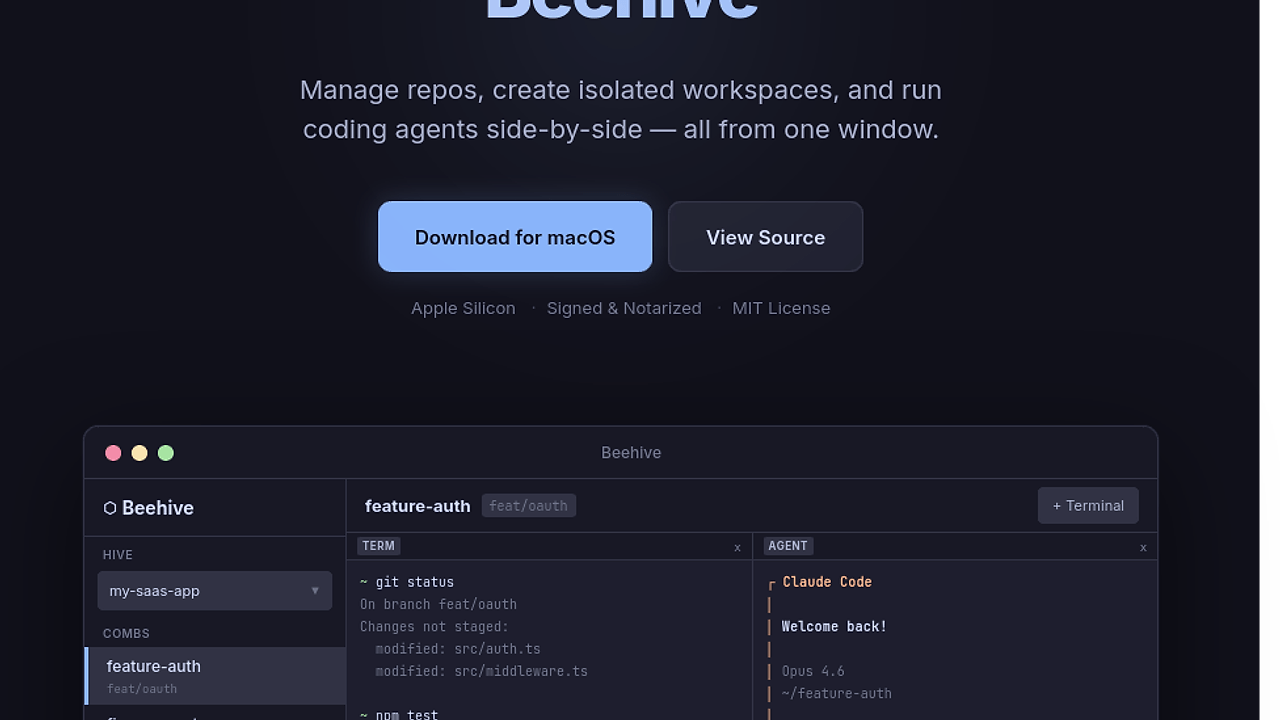
Beehive structures work around three primitives: hives store GitHub repo URLs and metadata without cloning; combs trigger full git clone into isolated local dirs on chosen branches like feat/oauth; panes multiplex PTY terminals and CLI agents in a grid layout. It uses real PTY for terminals that persist across switches, syncing sidebar branch status via git hooks or polling. Agent integration launches subprocesses for tools like Claude Code Opus 4.6 directly in the comb's dir, piping stdin/stdout without context loss. Built for Apple Silicon, it's notarized with MIT license, sidestepping Electron bloat for native macOS performance.
The Good & The Bad
Pros:
- Instant repo switching via hives keeps all projects in one window, faster than VS Code's multi-root workspaces.
- Isolated combs prevent branch contamination during
experiment-v2forks, with copy-duplicate for safe forking uncommitted changes. - Persistent PTY terminals retain
~ git statusandnpm testsessions across hive swaps—no re-cdhell. - Agent panes run Claude Code inline with
❯ add OAuth2 flow to src/auth.tsprompts, grid-flexible for multi-tasking. - Live branch tracking updates sidebar on terminal
git checkout, always visible without manual refreshes. - Lightweight macOS native: signed, no runtime deps beyond git and your shell.
Cons:
- macOS-only; Linux/Windows devs stuck rebuilding from source or waiting for ports.
- No built-in editor—terminals and agents dominate, forcing external VS Code for heavy typing.
- Hive metadata is local-only; no cloud sync for team-shared workspaces.
- Comb clones eat disk space quickly with multiple branches per repo.
- Agent support limited to CLI-launchable like Claude Code; no native GUI LLM embeds.
Quickstart
# Download DMG from site, mount, drag to Applications
open /Applications/Beehive.app
# Or build: git clone https://github.com/storozhenko98/beehive && cd beehive && make release
Launch Beehive, paste a GitHub URL like https://github.com/user/my-saas-app to create a hive. Hit + New Comb, pick feature-auth branch—it clones to ~/Beehive/combs/my-saas-app/feature-auth. Open terminal pane for git status, agent pane for Claude Code. Sidebar tracks branches live; duplicate comb to test npm test fixes without risk.
Who Should Use This (and Who Shouldn't)
Use it if: You're an indie hacker spinning up Claude-driven features across 5+ GitHub repos daily. Perfect for AI coding agents developers chaining feat/oauth experiments with fix-payments in parallel. Wins on solo macOS setups where terminal state persistence trumps full IDEs.
Skip it if: You code in VS Code full-time and hate terminal-heavy flows—stick to extensions. Teams needing Windows/Linux cross-platform get nothing here. Heavy GUI editing without agents? Beehive's pane model underdelivers.
Alternatives & When to Switch
VS Code with multi-root workspaces handles basic repo switching but chokes on persistent terminals for Beehive-style agent multitasking—switch if you need editor integration over isolation.
If pure CLI agent workflows suffice without a GUI window, grab Ghist for local-first AI coding agents scripting.
For Claude-focused tools, Claude Code Canvas offers canvas-style agent interaction but lacks Beehive's multi-repo git combs.
Cursor beats Beehive for inline AI edits in a real editor; pick it when agent prompts need file diffs over terminal PTYs. browse all Multi-Repo Workspaces tools