What Is claude-pee?
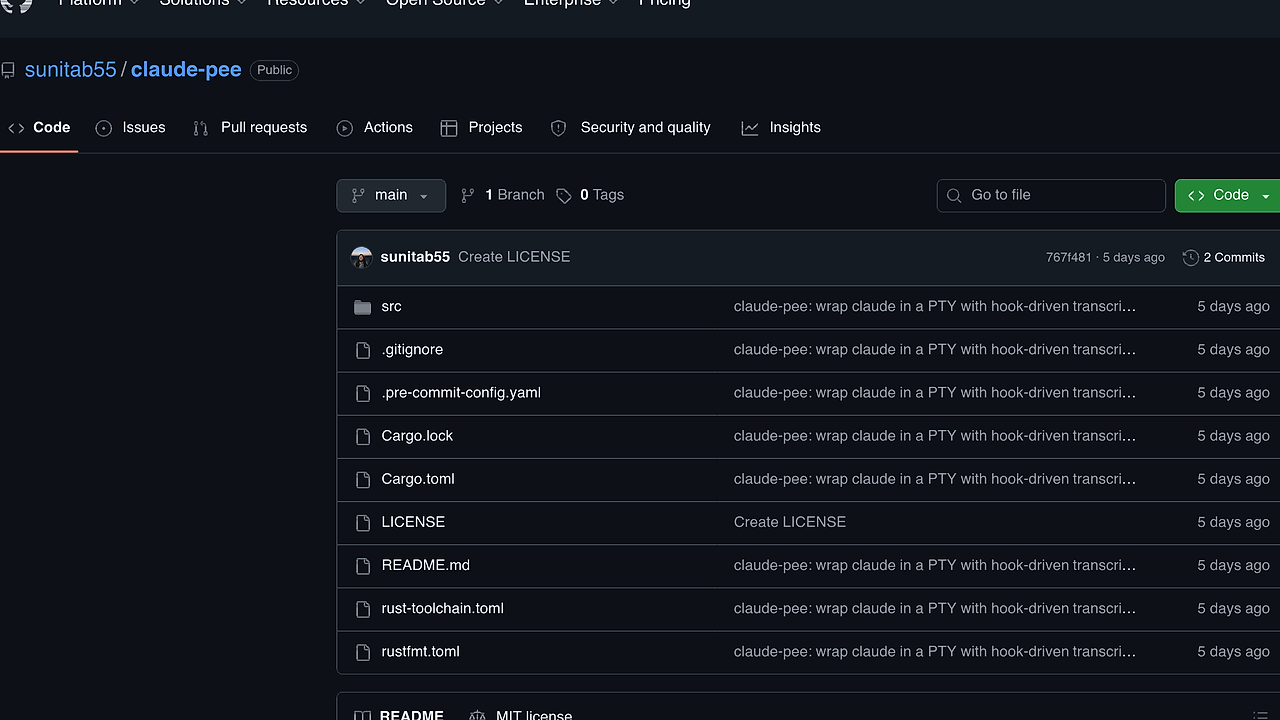
claude-pee is a Rust-based CLI wrapper built by sunitab55 that sits in front of the claude CLI and makes it behave like a clean, scriptable terminal utility. claude-pee is one of the best CLI Wrappers tools for Claude Code users and terminal automation teams. It spawns Claude in a PTY, assigns a fresh --session-id UUIDv4, tails the transcript JSONL, and emits only the assistant reply to stdout, which is exactly what you want when you need deterministic shell output rather than a noisy interactive TUI.
The implementation is aimed at developers who need Claude in pipelines, aliases, or repeatable automation. The repo requires Rust 1.85+, avoids unsafe code, and uses Claude's own Stop hook instead of brittle screen-idle guessing, so exit behavior is driven by the child process contract rather than terminal heuristics.
Quick Overview
| Attribute | Details |
|---|---|
| Type | CLI Wrappers |
| Best For | Claude Code users and terminal automation teams |
| Language/Stack | Rust 1.85+, PTY orchestration, VT100 screen hashing, JSONL transcript tailing |
| License | N/A |
| GitHub Stars | N/A as of Feb 2026 |
| Pricing | Open-Source |
| Last Release | N/A |
Who Should Use claude-pee?
- Developers wiring Claude into shell scripts who need stdout to contain only the model response, not the full TUI transcript.
- Indie hackers shipping terminal-first automation that want
claudebehavior with predictable session handling and an exit code that can be checked in CI. - Platform or tooling teams that need a drop-in front-end for
claudewithout changing existing flags, aliases, or command habits. - Rust teams that prefer a small executable with strict linting, no unsafe code, and explicit control over PTY lifecycle behavior.
Not ideal for:
- People who want a graphical interface instead of a terminal wrapper.
- Teams that rely on a heavily customized or very old upstream Claude CLI, because claude-pee depends on
--session-id,--settings, and/exitbehavior. - Users who need raw PTY mirroring to stdout, since claude-pee is designed to print parsed output only.
Key Features of claude-pee
- PTY-backed spawning — claude-pee runs
claudeinside a pseudo-terminal so the upstream TUI behaves as expected, including prompts, hooks, and transcript generation. That matters because simple pipe-based wrappers usually break interactive programs. - Stop-hook termination — claude-pee installs a session-scoped Stop hook through
--settings, which touches a sentinel file when Claude finishes a turn. This is much more deterministic than guessing from screen idle time or scraping terminal output. - Output formatting modes —
text,json, andstream-jsonlet you choose between human-readable stdout and machine-readable transcript lines. The defaulttextmode skips thinking-only and tool-only turns so shell pipelines stay clean. - Verbatim flag passthrough — everything not owned by claude-pee is forwarded to the real
claudebinary after--session-idand--settings. That means existing Claude Code flags still work, including permission and model-related options. - Transcript tailing — claude-pee discovers the matching session transcript JSONL and tails it live, which lets it parse the assistant's reply without depending on ANSI screen scraping. This is a better fit for automation than reading terminal bytes directly.
- Environment overrides —
CLAUDE_PEE_EXEC,CLAUDE_PEE_QUIESCE_MS,CLAUDE_PEE_INJECT_CHAR_DELAY_MS, andRUST_LOGgive you control over the executable path, prompt timing, typing simulation, and debug verbosity. That is useful when the default local Claude binary is not the one you want to spawn. - RAII cleanup — the sentinel file is removed on exit through a guard even on error or panic paths. That reduces the chance of stale done files causing a false positive on the next run.
claude-pee vs Alternatives
| Tool | Best For | Key Differentiator | Pricing |
|---|---|---|---|
| claude-pee | Scriptable Claude CLI automation | PTY wrapper with Stop-hook exit and stdout filtering | Open-Source |
| claude | Interactive Claude Code sessions | Official upstream CLI with no wrapper layer | Proprietary |
| aider | Git-aware code editing in terminal | Repo diff and patch workflow built around git | Open-Source |
| Claude Context Mode | Managing Claude prompts and context | Focused on context handling rather than process wrapping | N/A |
Pick claude when you want the native interactive experience and do not care about machine-friendly output. Pick aider when the workflow is centered on editing tracked files with git-style patching, not on wrapping Claude's own CLI. Pick Claude Context Mode or Claude Code Canvas when the problem is prompt structure or visual workflow design rather than exit-safe terminal automation.
claude-pee is also a better fit than ad hoc shell aliases when you need repeatable behavior in CI, cron jobs, or local task runners. If you are building multi-agent orchestration instead of a single-Claude wrapper, OpenSwarm is the more relevant layer.
How claude-pee Works
claude-pee works by wrapping Claude Code in a PTY, then watching the session artifacts that Claude itself creates. The wrapper gives each run a fresh UUIDv4 session id, injects a session-specific settings payload, and discovers the transcript JSONL for that same session so it can extract the assistant response without relying on terminal cosmetics.
The key design decision is to let Claude tell claude-pee when the turn is over. A Stop hook touches a sentinel file under the temp directory, claude-pee notices that file, and then it sends /exit to the child process and waits for the process to end with the child's own status code. That keeps termination aligned with Claude's lifecycle instead of with terminal repaint timing.
claude-pee -p 'refactor src/main.rs and return only the changed functions' --output-format json
The command above starts Claude in a session-scoped PTY, feeds it a one-shot prompt, and prints the assistant message as a single JSON transcript line. In text mode you get only the plain reply, while stream-json emits every transcript event as it lands, which is useful when another process wants incremental progress updates.
Pros and Cons of claude-pee
Pros:
- Deterministic exit behavior driven by Claude's own Stop hook rather than a screen-idle heuristic.
- Clean stdout contract that makes
claude-peeusable in pipelines, command substitution, and CI assertions. - Zero changes to global Claude config because the hook is injected per session through
--settings. - Supports multiple output formats so you can switch between human text and machine-readable transcript lines without changing the wrapper.
- Drop-in passthrough model that preserves upstream Claude flags and reduces wrapper-specific drift.
- Strict Rust implementation with no unsafe code, denied unwraps, and enforced formatting and lint checks.
Cons:
- Depends on upstream Claude CLI behavior for
--session-id,--settings, and/exit, so a breaking change in Claude can break claude-pee. - The pre-prompt wait is heuristic because the Stop hook cannot fire before the first turn, so slow machines may need
CLAUDE_PEE_QUIESCE_MStuning. - No raw PTY echo mode exists, so you cannot ask claude-pee to mirror the interactive terminal verbatim to stdout.
- Not a general agent framework because it wraps one CLI instead of orchestrating multiple agents or tools.
Getting Started with claude-pee
cargo build --release
cp target/release/claude-pee ~/.local/bin/
claude-pee -p 'what is 2 + 2'
That build path produces a local binary you can drop onto PATH, then run immediately with a one-shot prompt. If you want claude-pee to replace claude everywhere in your shell, add an alias in your shell rc file; if you need it visible to scripts too, create a claude shim and set CLAUDE_PEE_EXEC to the real upstream binary.
alias claude='claude-pee'
If the prompt appears before Claude is ready on a slow machine, raise CLAUDE_PEE_QUIESCE_MS. If you want to inspect the tailer or the session lifecycle, set RUST_LOG=debug or RUST_LOG=trace and rerun the same command.
Verdict
claude-pee is the strongest option for terminal-first Claude Code automation when you need deterministic stdout and session-scoped shutdown. Its biggest strength is the Stop-hook exit path, and its main caveat is upstream dependency on Claude's CLI contract. Use it when you want Claude to behave like a real Unix command, not a hand-driven TUI.