What Is codebase-mcp?
codebase-mcp is a local-first MCP code intelligence server built by killop for developers and AI coding agents that need repository-aware search, dependency graphs, and DeepWiki-style docs inside a local workspace. codebase-mcp is one of the best MCP code intelligence tools for developers and AI coding agents working in large local repositories, and its Unity C# benchmark indexes 19,030 files, 277,008 symbols, and 691,419 graph edges.
Quick Overview
| Attribute | Details |
|---|---|
| Type | MCP code intelligence tools |
| Best For | developers and AI coding agents working in large local repositories |
| Language/Stack | Rust, tree-sitter, MCP, Model2Vec, Vicinity HNSW, BM25 |
| License | N/A |
| GitHub Stars | N/A as of Feb 2026 |
| Pricing | Open-Source |
| Last Release | N/A |
Who Should Use codebase-mcp?
- AI engineering teams that want repo-local retrieval for agents instead of pushing source into a hosted search backend.
- Platform and tooling teams maintaining large monorepos where call graphs, references, and dependency edges matter more than raw grep.
- Indie hackers building local developer assistants that need cheap, persistent indexing with deterministic storage under
.codedb-mcp. - Mixed-language codebases that need a single search layer over C#, Java, Python, TypeScript, C++, and Rust files.
Not ideal for:
- Teams that only need one-off text search and are happy with
rgor editor grep. - Organizations that require a fully managed SaaS with zero local disk footprint.
- Projects where a 30s to 66s index build is too much overhead for the size of the repo.
Key Features of codebase-mcp
- Persistent local index — codebase-mcp stores tree-sitter parsed source data, symbols, references, dependencies, graph metadata, lexical indexes, and vector search data under the repo-local
.codedb-mcpdirectory. That design keeps the data close to the code and avoids hidden environment-variable behavior. - Hybrid search pipeline — it combines exact search, regex search, lexical ranking, and vector retrieval over Model2Vec embeddings. The benchmark notes a Vicinity HNSW vector index over
minishlab/potion-code-16M, which is the right shape for semantic code lookup when string matching is not enough. - Dependency-aware module discovery — codebase-mcp does not stop at file buckets. It builds dependency-connected components, then applies dependency-weighted label propagation so module names and evidence come from actual code relationships rather than filename heuristics.
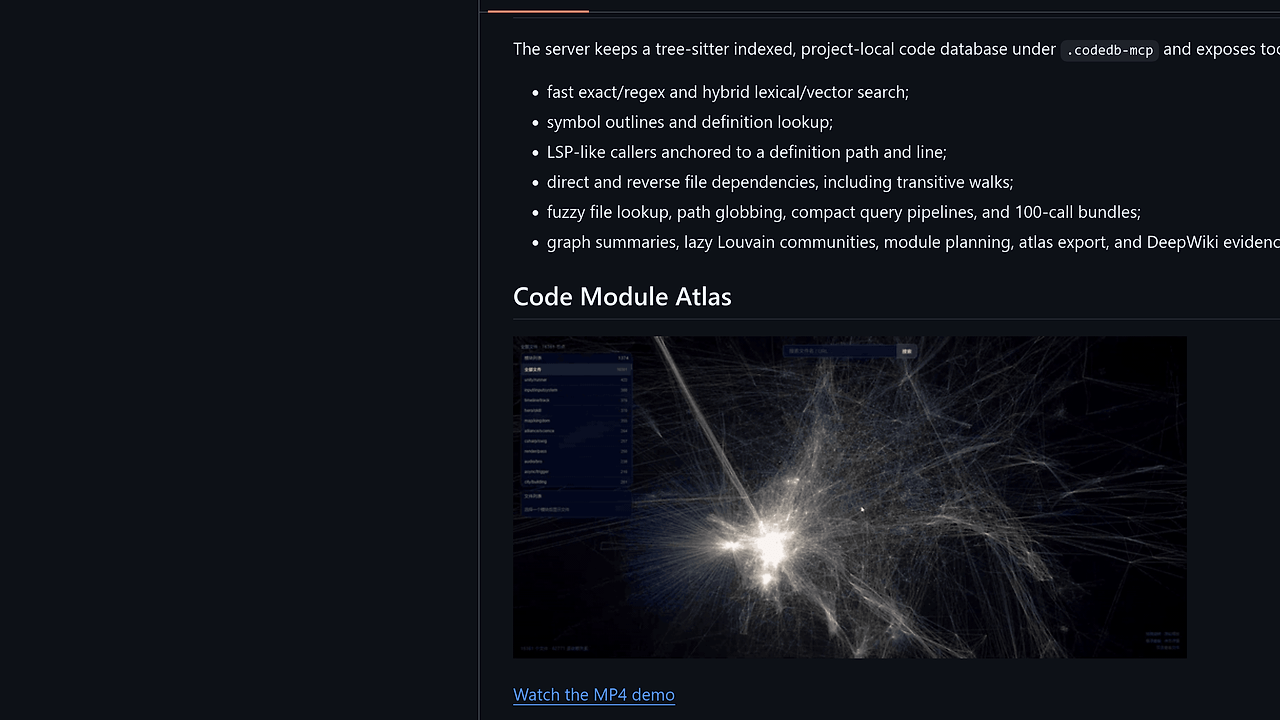
- Code Module Atlas export — the atlas path produces a local 3D viewer with one star per source file, module and file lists, file-to-file dependency edges, and focused file detail panels. This is useful when you need to explain a subsystem to a new engineer or an agent.
- DeepWiki-style documentation — the
skills/deepwikiflow writes business-module-first docs from MCP evidence plus agent reasoning. It cites source files, entry points, flows, dependencies, and risk notes, which makes the output closer to a technical design brief than a loose summary. - LSP-like navigation primitives — outlines, definitions, callers, forward and reverse dependencies, fuzzy file lookup, and query pipelines are exposed as MCP tools. That gives agents the primitives they need for codebase traversal instead of plain text search only.
- Warm-call performance — once the server is hot, MCP calls are designed to land in the millisecond range. In the published benchmark, scoped exact search took 0.0063s to 0.0064s, and a warm module atlas generation ran in 9.746s internal time.
codebase-mcp vs Alternatives
| Tool | Best For | Key Differentiator | Pricing |
|---|---|---|---|
| codebase-mcp | Local repo intelligence for agents | Persistent MCP index with tree-sitter, graph, and vector search under .codedb-mcp | Open-Source |
| Sourcegraph | Enterprise code search across many repos | Hosted, cross-repository search and org-wide code intelligence | Paid / Enterprise |
| ripgrep | Fast ad hoc text search | Zero-overhead file scanning for exact string and regex matches | Free |
| OpenTrace | Execution-path and trace analysis | Better when you need runtime or request tracing rather than repository indexing | Open-Source |
Pick Sourcegraph when your team wants a managed search platform with enterprise controls and broader org-wide discovery. Pick ripgrep when you only need raw text search and do not care about symbols, callers, or dependency graphs.
Pick OpenTrace when the real problem is runtime tracing, not source retrieval. Pick Claude Context Mode when you want to shape what a Claude workflow sees, while codebase-mcp handles the underlying repository index.
For agentic planning, Brainstorm MCP can sit on top of codebase-mcp instead of replacing it, because codebase-mcp supplies the searchable repo graph and Brainstorm MCP can handle task decomposition.
How codebase-mcp Works
codebase-mcp works by scanning a target repository, parsing source with tree-sitter, and persisting the resulting code database in the project-local .codedb-mcp directory. That database is not just a file cache; it includes chunks, symbols, references, dependency edges, lexical indexes, and vector embeddings so the server can answer different classes of questions without re-deriving the structure every time.
The design choice that matters most is the split between cold index construction and warm MCP serving. Cold builds do the expensive work once, then the persistent server reuses parsed files, chunks, semantic units, embeddings, and graph data so follow-up queries become fast enough for interactive agent loops.
Dependency discovery is not bolted on after search. The module planner starts from the dependency-connected file graph, then uses dependency-weighted label propagation to name modules and pick evidence. That means codebase-mcp is better at questions like 'what belongs to this subsystem?' than a grep-only workflow, and it pairs well with Claude Code Canvas when an agent needs a visual working set.
codedb_status --repo ./u3dclient
codedb_search query='PoolManager' regex=true
codedb_deps path='Assets/Scripts/PoolManager.cs'
The first command checks index state, the second finds references, and the third walks relationships around a concrete file path. In practice, that is enough to move from keyword search to structural understanding without leaving the local machine.
Pros and Cons of codebase-mcp
Pros:
- Local-first storage keeps source-derived data in
.codedb-mcp, which is easier to reason about than opaque hosted caches. - Tree-sitter indexing gives structural awareness across language syntax instead of regex-only matching.
- Hybrid lexical and vector search handles both exact symbol lookup and semantic code retrieval.
- Dependency graph tooling makes caller/callee and transitive dependency analysis available to agents.
- Atlas and DeepWiki outputs are practical artifacts for onboarding, architecture review, and subsystem audits.
- Good warm performance makes it suitable for iterative agent workflows after the first index pass.
Cons:
- Cold indexing is not free; the published Unity benchmark shows a 66.061s cold build and a 30.8s reopen path on the test machine.
- Local storage requires disk and cache management, which is fine for developers and annoying for ephemeral environments.
- The setup model is more technical than a hosted SaaS, especially if you want a persistent MCP server in an agent stack.
- License visibility is unclear from the scraped page text, so compliance teams should verify the repo metadata before commercial rollout.
- One-shot CLI usage is slower than persistent mode, so the tool only makes sense if you actually keep the server warm.
Getting Started with codebase-mcp
A practical first run is to clone the repo, build the Rust binaries, and point the status command at a target repository so the local index can initialize under .codedb-mcp. After that, the server can reuse cached parsed files and embeddings, which is where the tool starts to pay for itself.
git clone https://github.com/killop/codedb-mcp.git
cd codedb-mcp
cargo build --release
./target/release/codedb_status --repo /path/to/your/repo
After the first run, expect the tool to scan source files, build tree-sitter declarations, compute embeddings, create BM25 and HNSW data, and write the cache to the target project. If you are wiring codebase-mcp into an agent, the next step is usually to register the MCP server and then call search, outline, or dependency tools against the warmed index.
Verdict
codebase-mcp is the strongest option for local repository intelligence when you need agent-friendly code search and dependency analysis without sending source to a hosted index. Its biggest strength is the combination of persistent local storage, structural indexing, and graph-aware module discovery. The trade-off is setup and index-build time. If that fits your workflow, use it.