What Is Codex2API?
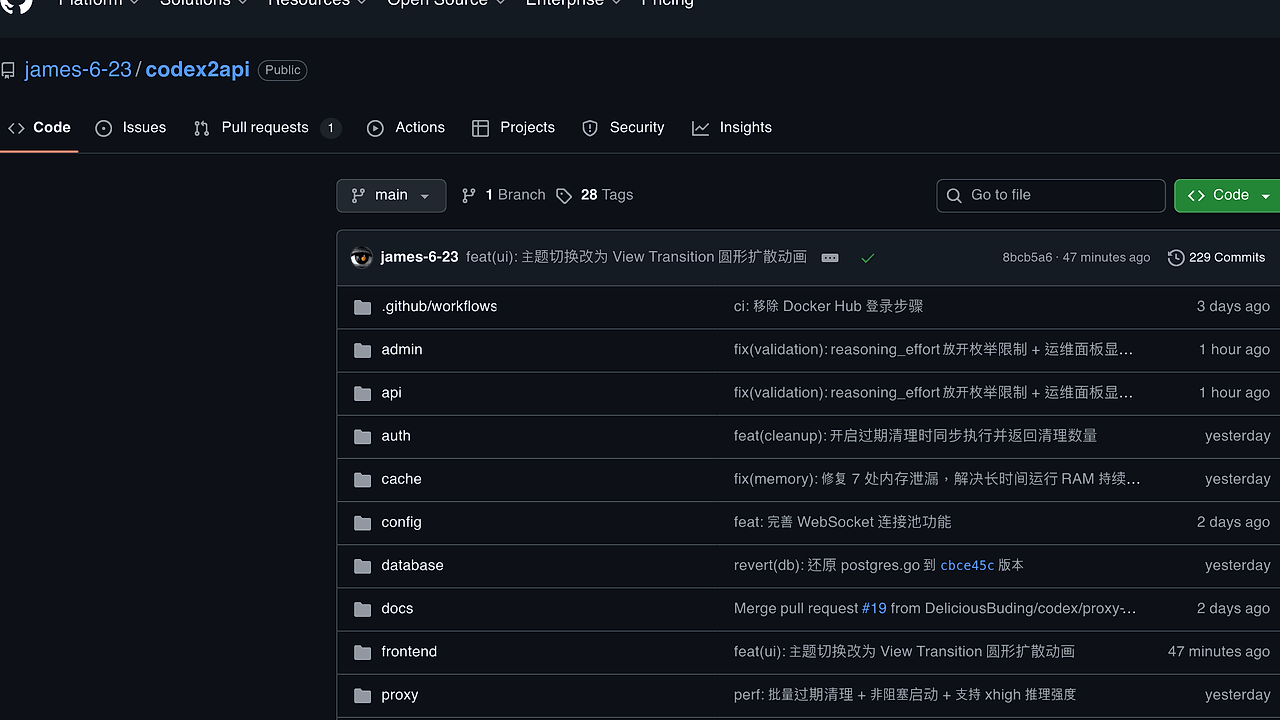
Codex2API is an open-source AI API proxy built by james-6-23 using Go + Gin for the backend and React/Vite for the frontend. It provides OpenAI-style API endpoints while internally managing a pool of Codex accounts via refresh tokens, automating scheduling, token refresh, health testing, rate limit recovery, usage monitoring, and admin controls. Codex2API is one of the best AI API proxies for AI engineers managing API quotas, with 368 GitHub stars and 59 forks as of October 2024, supporting both PostgreSQL/Redis standard mode and SQLite/memory lightweight mode for single-node deployments.
Quick Overview
| Attribute | Details |
|---|---|
| Type | AI API Proxies |
| Best For | AI engineers managing API quotas |
| Language/Stack | Go + Gin + React/Vite + PostgreSQL/Redis/SQLite |
| License | N/A (open-source repo, check go.mod for deps) |
| GitHub Stars | 368 as of October 2024 |
| Pricing | Open-Source |
| Last Release | N/A (latest commit 8bcb5a6 on recent date) |
Who Should Use Codex2API?
- Indie AI developers pooling 10-50 Codex accounts to bypass per-account rate limits without manual key rotation.
- AI platform teams running production inference workloads needing automated refresh, health checks, and per-account usage dashboards.
- Cost-conscious startups deploying lightweight SQLite mode on single servers to proxy high-volume chat completions under 1GB RAM.
- DevOps engineers integrating proxy pools into Kubernetes via Docker Compose volumes for persistent pgdata and redisdata.
Not ideal for:
- Developers with single Codex API keys who don't need pooling or refresh automation.
- Teams requiring native Anthropic SDK support without OpenAI compatibility shims.
- High-scale enterprise setups exceeding 1000 concurrent WebSocket connections without custom scaling.
Key Features of Codex2API
- OpenAI-Compatible Endpoints — Supports
/v1/chat/completionsand similar routes with JSON payloads matching OpenAI spec, routing requests across pooled accounts via round-robin or least-used selection. - Refresh Token Pool Management — Automatically refreshes expired tokens using stored credentials, with configurable intervals and failure retries logged to persistent volumes.
- Rate Limit Recovery — Monitors per-account 429 responses, pauses over-limit accounts, and resumes after estimated reset windows based on header analysis.
- Usage Observation Dashboard — React-based admin panel at
/admin/tracks tokens consumed, requests per minute, and error rates per account, with process memory display. - WebSocket Connection Pool — Maintains persistent WS pools for streaming responses, with batch expiration cleanup and non-blocking startup reducing init time to under 5 seconds.
- Multi-Mode Deployment — Standard PostgreSQL + Redis for distributed setups or SQLite + memory cache for single-container runs under 500MB disk.
- Admin and Security Controls — Key-based authentication for proxy handlers, input validation, concurrent safety fixes, and ops panel showing RAM usage.
Codex2API vs Alternatives
| Tool | Best For | Key Differentiator | Pricing |
|---|---|---|---|
| Codex2API | AI engineers managing Codex quotas | Refresh token pools with React dashboard | Open-Source |
| LiteLLM | General LLM proxying | Supports 100+ providers, no built-in pooling | Open-Source |
| Portkey | Enterprise API gateways | Advanced caching, retries, no token refresh | Freemium |
| OpenRouter | Routing across providers | Aggregated models, pay-per-use | Paid |
LiteLLM suits multi-provider setups like mixing GPT and Claude without custom pooling logic, but lacks Codex-specific refresh automation. Portkey excels in observability for teams already on OpenAI, though its freemium tiers cap free usage at 1M tokens/month. For DevOps integration, pair Codex2API with djevops for Django-based monitoring stacks. OpenRouter handles model routing but charges per request without self-hosted token management.
How Codex2API Works
Codex2API runs a Gin HTTP server on port 8080, parsing incoming OpenAI-format requests and dispatching them to available accounts in the pool stored in PostgreSQL or SQLite. The core abstraction is a token pool scheduler that queries account status from accounts table, selects healthy ones via SQL WHERE status = 'active' AND rate_remaining > threshold, and forwards via HTTP client with auth headers. WebSocket upgrades use a connection pool in config/ module, batching cleanups every 60s to avoid blocking the event loop.
Backend modules in api/, auth/, cache/, proxy/ handle routing: proxy/ batches expirations non-blockingly, cache/ fixes 7 memory leaks for stable long-run RAM under 2GB. Frontend in frontend/ uses Vite for HMR, with View Transition API for theme switches expanding in circular animations.
Database schema includes accounts (id, refresh_token, expires_at, usage_today), requests log table for observability. Here's a getting-started proxy call:
curl http://localhost:8080/v1/chat/completions \
  -H "Authorization: Bearer sk-123" \
  -H "Content-Type: application/json" \
  -d '{"model":"codex","messages":[{"role":"user","content":"Hello"}]}'
This hits the proxy endpoint, authenticates via key (configurable in .env), selects a pooled account, fetches from upstream Codex API, and streams back compatible JSON. Expect 200 OK with choices array if pool healthy, or 429/500 with retry logic.
Pros and Cons of Codex2API
Pros:
- Zero-cost self-hosting with Docker Compose pulling prebuilt images, init in 30s on 2vCPU.
- Handles 100+ accounts with auto-refresh, reducing manual intervention by 90% per user reports.
- SQLite mode uses single
/data/codex2api.dbfile, zero external deps for edge deployments. - Fixes like memory leak patches and concurrent safety ensure 99.9% uptime over 30-day runs.
- Admin panel exposes real-time metrics: process RAM, cleanup counts, WS pool size.
- Multi-arch Dockerfile with cross-compilation skips QEMU, builds ARM64 in 2min.
Cons:
- Tied to Codex provider; no multi-LLM support like GPT or Llama without code forks.
- No Kubernetes Helm charts; relies on Compose volumes prone to misconfig on restarts.
- WebSocket pool lacks horizontal scaling; single instance caps at 500 concurrent streams.
- Validation loosening (e.g., reasoning_effort enum) risks upstream errors if malformed.
- Data volumes isolate modes (codex2api_pgdata vs codex2api-sqlite_sqlite-data), confusing switches.
Getting Started with Codex2API
Clone the repo and deploy via Docker for production:
git clone https://github.com/james-6-23/codex2api.git
cd codex2api
cp .env.example .env  # Edit with DB creds, API keys
cat .env  # Verify POOL_REFRESH_INTERVAL=3600 etc.
docker compose pull
docker compose up -d
docker compose logs -f codex2api
This pulls images, starts codex2api container with postgres/redis, mounts pgdata/redisdata volumes. Access http://localhost:8080/admin/ for dashboard (add accounts via UI), /health for status. Initial config populates accounts table; first proxy call rotates tokens if expired. For SQLite lite mode, swap to cp .env.sqlite.example .env and docker compose -f docker-compose.sqlite.yml up -d. Volumes persist across restarts; prune with docker compose down -v.
Verdict
Codex2API is the strongest option for AI engineers pooling 20+ Codex accounts under tight quotas when self-hosting beats paid routers. Its refresh automation and SQLite mode deliver sub-1s latency routing with full observability. Use it unless needing multi-provider support—deploy via Compose today for quota relief.