What Is Concord?
Concord is a feature-rich TUI client for Discord built by chojs23 in Rust with ratatui, and it is one of the best Terminal Discord Clients tools for developers and terminal power users. The repo text documents five install paths: Homebrew, Cargo, direct Git install, Nix, and source builds, which makes Concord easy to drop into a Linux, macOS, or Nix-driven workstation. It is designed for people who want Discord access without opening a browser or desktop app.
Concord aims to cover the full chat workflow from authentication to threads, forum posts, reactions, and inline images. The trade-off is clear: you get a keyboard-first terminal interface instead of voice calls or a plugin ecosystem.
Quick Overview
| Attribute | Details |
|---|---|
| Type | Terminal Discord Clients |
| Best For | developers, indie hackers, and terminal power users |
| Language/Stack | Rust, ratatui, Discord API, terminal graphics protocols |
| License | N/A |
| GitHub Stars | N/A in scraped page text |
| Pricing | Open-Source |
| Last Release | N/A in scraped page text |
Who Should Use Concord?
- Terminal-first developers who want to read, reply, and moderate Discord without switching to a browser or Electron app.
- Indie hackers who keep a split-screen shell workflow open all day and prefer
j/knavigation over mouse-driven UIs. - Moderators and community operators who need fast access to channels, threads, unread counts, reactions, and pinned messages.
- Nix and Rust users who prefer reproducible installs, local builds, and a terminal app they can audit and run from source.
Not ideal for:
- People who need voice calls today, because Concord explicitly says voice support is not implemented yet.
- Users who cannot accept plain-text token storage in the config directory.
- Teams that rely on browser extensions, desktop-only integrations, or a heavy visual Discord workflow.
Key Features of Concord
- Authentication flexibility — Concord supports token login, email/password login, QR code login, and MFA with TOTP or SMS. The repo also warns that email and QR flows can trigger CAPTCHA challenges, so token auth is the safest path.
- Guild and channel navigation — It handles guild folder grouping, text channels, threads, and forum channels with active/archived post filtering. That makes Concord usable for large servers where channel sprawl is the main pain point.
- Message actions — You can send, edit, delete, reply, and paginate through full message history. Direct message shortcuts also expose copy, reply, edit, delete, pin, unpin, reactions, image viewing, and profile lookup.
- Reactions and polls — Concord can view, add, and remove Unicode and custom emoji reactions, show who reacted, and render polls for voting. That covers common community workflows that many terminal clients ignore.
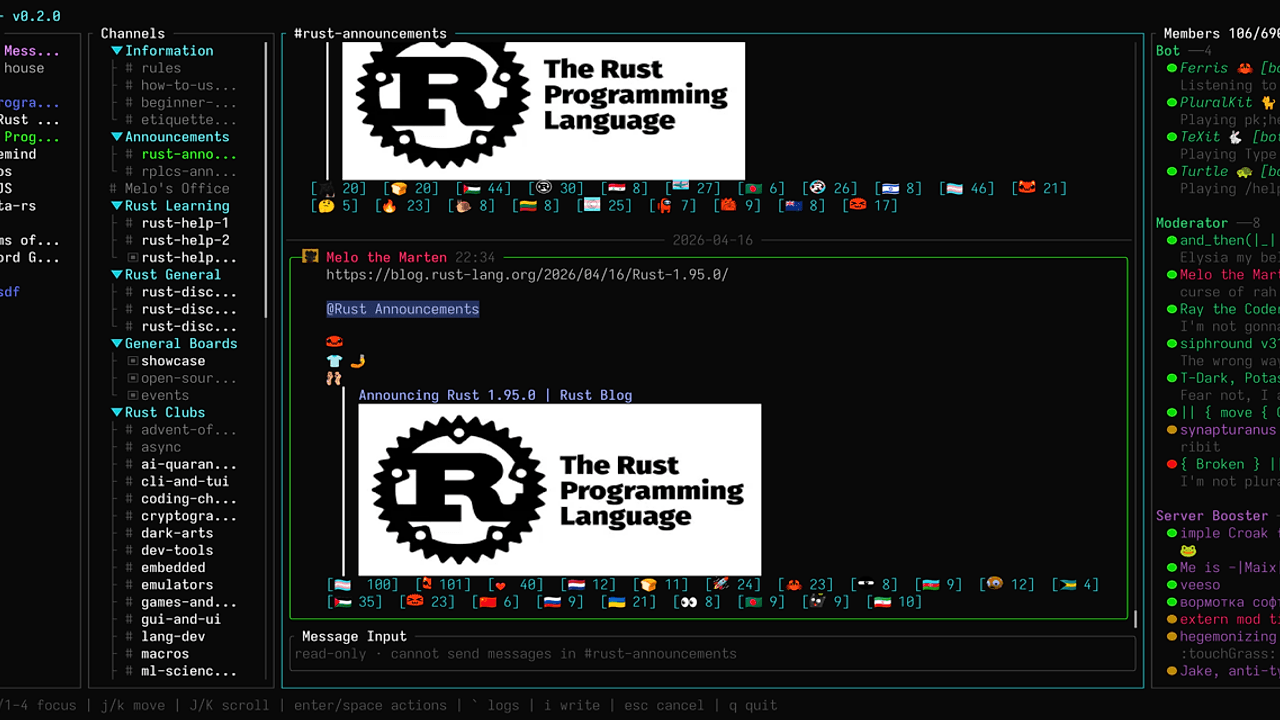
- Media rendering — Images, avatars, custom emoji, and attachments can render inline in the terminal. Concord uses
ratatui-imageand detects Kitty Graphics Protocol, iTerm2 inline images, Sixel, or a halfblock fallback. - Unread state and presence — The app tracks unread messages, mention counts, presence indicators, typing indicators, and mark-as-read actions. That keeps it viable for active servers where unread state is part of the workflow.
- Keyboard-first layout — Concord uses a four-pane Discord-style layout for guilds, channels, messages, and members. The leader key and vim-style shortcuts make it feel closer to a terminal multiplexer than a traditional chat app.
Concord vs Alternatives
| Tool | Best For | Key Differentiator | Pricing |
|---|---|---|---|
| Concord | Terminal-native Discord access with rich chat features | Rust TUI with images, threads, polls, and deep keyboard navigation | Open-Source |
| Discord Desktop App | Voice, video, and official client features | Full official experience with calls and native integrations | Free |
| discordo | Lightweight terminal Discord usage | Simpler terminal client surface with less UI depth | Open-Source |
| Discord Web | Quick access from any browser | Zero install and full official web feature coverage | Free |
Pick Discord Desktop App when voice calls, screen sharing, and official support matter more than terminal ergonomics. Concord is not trying to replace that stack.
Pick discordo when you want a leaner terminal client and do not need Concord’s richer media handling or dense pane layout. Teams already living in keyboard-first shells like MiniVim usually adapt faster to Concord’s navigation model.
Pick Discord Web when you need the least friction and the broadest compatibility. If you prefer a terminal-native workflow similar to Ghist, Concord is the better fit because it keeps your chat loop inside the same environment as your editor and shell.
How Concord Works
Concord is built around a four-pane state model: guilds, channels, messages, and members. That design keeps Discord’s information hierarchy visible without forcing nested menus, and the leader key plus pane focus shortcuts make navigation deterministic instead of pointer-driven.
Under the hood, Concord talks to Discord through the normal account flow, then renders state through ratatui on every frame. The app uses ratatui-image for inline image support and probes the terminal at startup to choose the best graphics backend, falling back to halfblocks when the terminal cannot do real pixel-like rendering. The result is a terminal UI that still exposes embeds, avatars, attachments, and emoji without leaving the shell.
cargo install concord
concord
The first command installs the binary from crates.io, and the second launches the TUI so you can authenticate with a token, password, or QR flow. If your terminal supports Kitty, iTerm2, or Sixel graphics, Concord will try to use that path automatically; otherwise, it renders images as text-friendly block approximations.
Pros and Cons of Concord
Pros:
- Keyboard density is high — the four-pane layout, leader key, and direct message shortcuts reduce pointer dependency.
- Real Discord coverage — Concord handles threads, forum channels, polls, reactions, unread counts, and mentions, not just plain text chat.
- Multiple login paths — token, email/password, QR code, and MFA support make it flexible across account setups.
- Inline media support — image previews, avatar rendering, and attachment downloads keep visual context inside the terminal.
- Cross-terminal fallback — Kitty, iTerm2, and Sixel are preferred, but halfblocks keep it usable on more terminals.
- Source-friendly install story — Cargo, Homebrew, Nix, and direct Git builds cover the common developer distributions.
Cons:
- No voice calls yet — if voice is a daily requirement, Concord cannot replace the official app.
- Plain-text token storage — the repo states that tokens are saved in the config directory in plain text.
- CAPTCHA risk on some logins — email/password and QR flows may trigger Discord-side CAPTCHA that Concord cannot solve.
- Terminal graphics dependence — the best media experience requires a terminal that supports the right protocol.
- Feature parity is not complete — the project explicitly says some UI/UX and convenience work is still evolving.
Getting Started with Concord
# Homebrew on macOS
brew install chojs23/tap/concord
concord

# Or install from Cargo
cargo install concord
concord
After launch, Concord will prompt you to authenticate and then load the four-pane Discord layout. If you plan to use token auth, store it carefully because the repo says tokens live in the config directory as plain text. If image rendering looks wrong, check your terminal’s graphics protocol support before assuming the app is broken.
Verdict
Concord is the strongest option for terminal-native Discord access when you want rich chat features without leaving the shell. Its biggest strength is the depth of its keyboard-first UI and image handling; the main caveat is that it still lacks voice calls and uses plain-text token storage. If that trade-off works for you, Concord is worth installing.