What Is DeepSeek TUI?
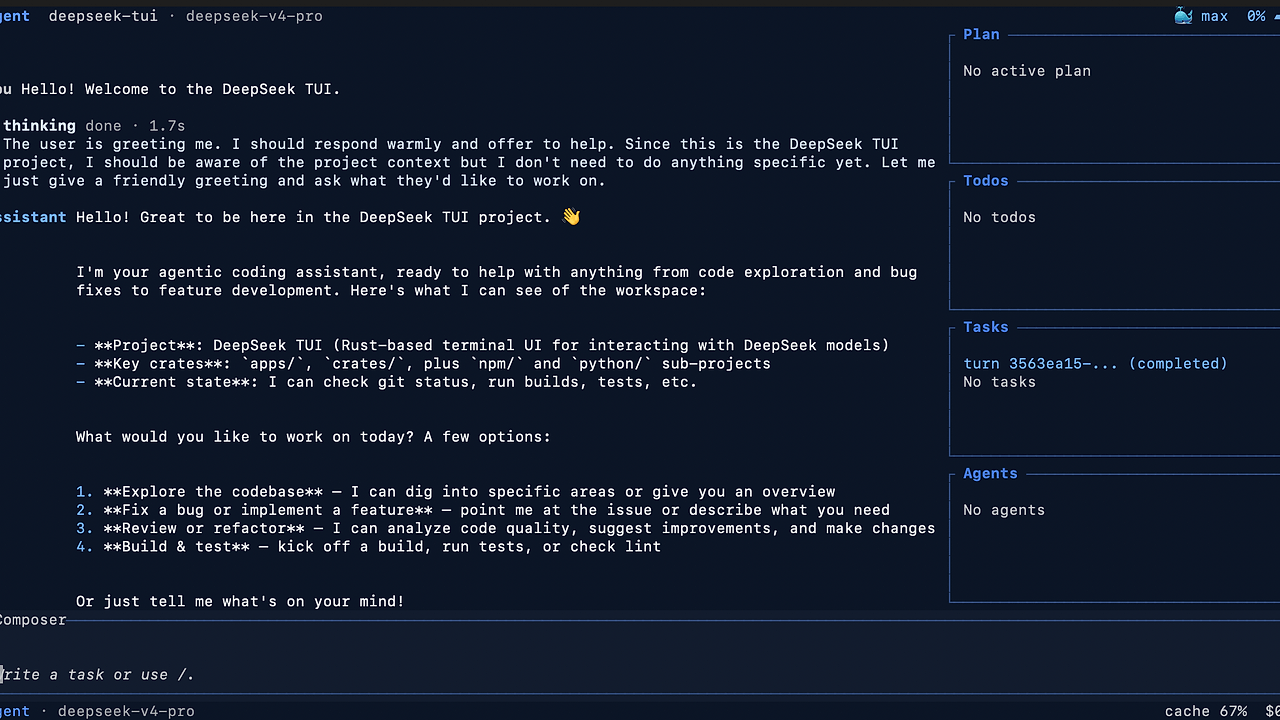
DeepSeek TUI is a terminal coding agent built by the DeepSeek-TUI project on GitHub. DeepSeek TUI is one of the best Terminal Coding Agents tools for developers who work in the terminal, because it runs as the deepseek command, streams reasoning blocks, edits local workspaces with approval gates, and supports 1M-token context windows. It is built around DeepSeek V4 (deepseek-v4-pro and deepseek-v4-flash) and is aimed at people who want agentic coding without leaving the shell.
The important detail is that DeepSeek TUI is not a thin prompt wrapper. It exposes plan, agent, and YOLO modes, tracks turn state, supports sub-agents, and can run headless through HTTP or SSE. The latest visible release on the repository page is v0.8.14, which focuses on auto routing, cost accounting, first-run setup, and provider support.
Quick Overview
| Attribute | Details |
|---|---|
| Type | Terminal Coding Agents |
| Best For | Developers who work in the terminal |
| Language/Stack | Rust, ratatui, async OpenAI-compatible streaming, MCP, LSP |
| License | N/A |
| GitHub Stars | N/A as of Feb 2026 |
| Pricing | Open-Source |
| Last Release | v0.8.14 — N/A |
Who Should Use DeepSeek TUI?
- Terminal-first developers who want an interactive coding agent that can read files, edit workspaces, run shell commands, and manage git from one CLI.
- Indie hackers shipping fast who need approval-gated automation, session resume, and rollback without wiring together a separate agent stack.
- Platform and tooling teams that care about cost telemetry, model routing, and repeatable workflows across local shells, CI-like headless runs, and editor integrations.
- Teams using DeepSeek APIs that want native support for
deepseek-v4-flash,deepseek-v4-pro, and local routing logic instead of manual model selection.
Not ideal for:
- Users who want a SaaS dashboard and do not want to manage a local binary or API key.
- Teams that need every action to be fully deterministic, because auto mode can change the model and thinking level per turn.
- Developers who want a visual canvas-first flow; they may prefer Claude Code Canvas instead.
Key Features of DeepSeek TUI
- Auto model and thinking routing —
--model autoand/model autopick both the model and thinking level per turn. DeepSeek TUI makes a lightweight routing call first, then sends the real request to the chosen model, which keeps simple prompts on Flash and pushes harder work to Pro. - Thinking-block streaming — DeepSeek TUI streams reasoning blocks as the model works, so you can watch the agent reason before edits land. That matters when you are debugging a multi-step refactor and need visibility into why a patch was proposed.
- Approval-gated workspace edits — the agent can read files, apply patches, and run commands, but the execution path depends on mode. Plan is read-only, Agent asks for approval, and YOLO auto-approves tools when you want maximum throughput.
- 1M-token context handling — DeepSeek TUI tracks long sessions, supports manual or configured compaction, and reports prefix-cache telemetry. That makes it suitable for large monorepo work where prompt history and cache hit rate matter.
- Session resume and fork — you can save, resume, or fork a session by UUID. This is useful when a debugging thread branches into two solutions and you want to preserve both paths without rebuilding the prompt.
- Workspace rollback snapshots — DeepSeek TUI keeps side-git pre and post-turn snapshots and exposes
/restoreandrevert_turn. Because it does not touch your repo's.git, you get rollback semantics without polluting project history. - MCP, LSP, and headless runtime support — the tool can connect to Model Context Protocol servers, surface diagnostics from
rust-analyzer,pyright,typescript-language-server,gopls, andclangd, and exposedeepseek serve --httpfor automation. If you are building a wider agent stack, this pairs well with Brainstorm MCP or OpenSwarm.
DeepSeek TUI vs Alternatives
| Tool | Best For | Key Differentiator | Pricing |
|---|---|---|---|
| DeepSeek TUI | Terminal-based coding agents with approval gates | DeepSeek routing, 1M-token context, rollback snapshots, and headless serving | Open-Source |
| Claude Code Canvas | Claude-centric terminal and canvas workflows | Better fit if your stack is centered on Anthropic models and visual editing | Varies |
| OpenSwarm | Multi-agent orchestration | Better when you need coordinating agents more than a single interactive shell agent | Varies |
| Brainstorm MCP | MCP-backed planning and research workflows | Better for MCP-heavy task planning than full local workspace control | Varies |
Pick Claude Code Canvas when your team is already standardized on Claude and wants a different interaction model. Pick OpenSwarm when the main problem is coordinating multiple agents across tasks, not running one terminal-native coding loop.
Pick Brainstorm MCP when the bottleneck is context gathering and tool-rich research through MCP servers. Pick DeepSeek TUI when the bottleneck is actually editing files, running commands, and keeping the whole loop inside one shell session.
How DeepSeek TUI Works
DeepSeek TUI uses a dispatcher CLI, a companion binary, a ratatui interface, and an async engine connected to an OpenAI-compatible streaming client. The core abstraction is a typed tool registry, which routes shell, file, git, web, sub-agent, MCP, and RLM requests through one execution pipeline. That design keeps the UI thin and pushes state management into the engine layer, where turn tracking and session persistence live.
The routing model is the part that makes DeepSeek TUI different from a plain chat wrapper. Auto mode runs a small deepseek-v4-flash classifier pass first, then chooses a concrete model and thinking level for the real turn. That means the upstream API never receives model: auto; it receives an actual model selection plus the selected thinking tier, which keeps cost reporting aligned with what actually ran.
deepseek --model auto audit-this-pr
deepseek serve --http
deepseek resume --last
The first command asks DeepSeek TUI to choose the model and reasoning level for a code review task. The second command turns the agent into a headless HTTP or SSE service, which is useful for integration tests or custom automation. The third command resumes the last saved session in the current workspace, which shows how DeepSeek TUI treats long-lived work as a stateful object rather than a throwaway chat.
Pros and Cons of DeepSeek TUI
Pros:
- Terminal-native workflow means you can inspect, edit, and run code without context switching to a separate UI.
- Approval gates and mode switching give you a real control surface for risky actions, which is safer than always-on auto execution.
- Long-context support with 1M-token windows makes it better suited to large repositories and long review threads than short-context assistants.
- Rollback and resume are built in, so you can recover from a bad turn or fork an investigation without manual cleanup.
- Headless API support via
deepseek serve --httpmakes it useful beyond interactive use, including local automation and editor integrations. - Cost telemetry helps teams watch token spend and cache behavior instead of guessing where the bill came from.
Cons:
- You need a DeepSeek API key before the agent is useful, so it is not a zero-config offline tool.
- Auto mode trades repeatability for convenience, which is bad for strict benchmarking or deterministic regression tests.
- Prebuilt binaries are limited on the page to macOS ARM64 and Windows x64, so some Linux users may need to build from source or wait for a release artifact.
- MCP and LSP features add setup work, especially if your editor, language server, or remote toolchain is not already configured.
- Workspace snapshots consume local disk, which matters on very large repositories or ephemeral machines.
Getting Started with DeepSeek TUI
Install DeepSeek TUI from the repository Releases page, then launch it once to save your API key and create the local config file. The first run writes settings to ~/.deepseek/config.toml, which makes the tool usable from any directory without repeated prompts.
# download the release artifact from GitHub Releases first
# then run the installed binary
deepseek auth set --provider deepseek
deepseek doctor
deepseek --model auto fix-this-bug
deepseek sessions
After the install step, deepseek auth set stores the API key for the selected provider, and deepseek doctor checks connectivity plus local setup. Once that passes, you can start with a small fix or review task, then move to deepseek resume --last when you want to continue the same workspace thread.
If you are wiring DeepSeek TUI into a larger workflow, start with the terminal loop first and add deepseek serve --http, deepseek serve --acp, or MCP servers only after the core edit-review cycle is stable. That keeps the initial setup focused on one local agent path instead of three partially configured ones.
Verdict
DeepSeek TUI is the strongest option for terminal-first coding when you want agentic edits with approval gates and local session control. Its best strength is the combination of DeepSeek model routing, rollback snapshots, and long-context session state. The main caveat is that it depends on DeepSeek API access and is less deterministic in auto mode. Use it if you want a serious shell-native coding agent, not a chat toy.