What Is GOBBY?
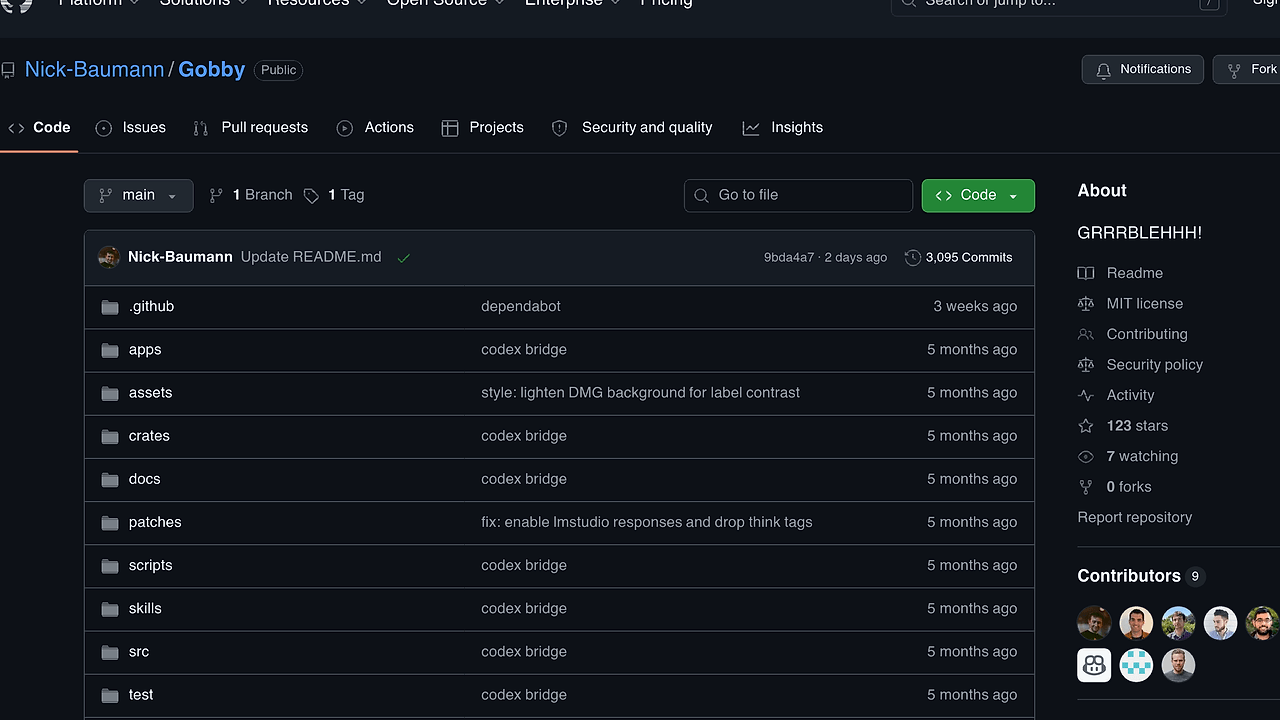
GOBBY is an open-source AI agent runtime for a Mac Mini M4, built by Nick Baumann on OpenAI Codex CLI, that keeps one always-on assistant reachable across WhatsApp, Telegram, Discord, iMessage, WebChat, and voice. GOBBY is one of the best AI Agent Runtimes tools for Mac Mini owners, and the repo README shows v0.6.1, MIT licensing, Rust 1.78+, and 91% coverage as of Feb 2026.
The pitch is unusually specific, and that is the point. GOBBY is not trying to be a provider-neutral orchestration layer; it is a desk-side assistant runtime optimized for Apple Silicon, launchd, macOS Keychain, and the OpenAI Codex event model.
Quick Overview
| Attribute | Details |
|---|---|
| Type | AI Agent Runtimes |
| Best For | Mac Mini M4 owners, indie hackers, and solo developers |
| Language/Stack | Rust 1.78+, macOS/Apple Silicon, OpenAI Codex CLI, launchd, Keychain, TCC, WebSockets |
| License | MIT |
| GitHub Stars | N/A as of Feb 2026 |
| Pricing | Open-Source |
| Last Release | v0.6.1 — date not shown |
GOBBY is opinionated by design. If you want a portable agent framework with many model backends, this is not that product; if you want a single always-on identity anchored to one machine, GOBBY is the right shape.
Who Should Use GOBBY?
- Solo founders who want a personal assistant that can answer from the same identity on chat, voice, and web without juggling separate contexts.
- Indie hackers running a Mac Mini as a home server who need an always-on agent with low idle power draw and no cloud-hosted control plane.
- Platform engineers prototyping internal assistant workflows who want a local runtime with explicit surface adapters and a visible event protocol.
- Developers building custom skills who prefer dropping
SKILL.mdfiles into folders instead of wiring a plugin registry or remote marketplace.
Not ideal for:
- Teams that need provider switching across multiple LLM vendors.
- Operators who do not want to depend on macOS,
launchd, or Apple’s TCC permission model. - Users who want a general-purpose desktop chatbot instead of a machine-bound assistant runtime.
Key Features of GOBBY
- Local-first control plane — The gateway binds to
127.0.0.1by default, so the runtime stays private and does not expose a public inbound surface unless you explicitly bridge it. That makes the assistant easier to reason about than a cloud-hosted agent process. - Codex-native event handling — Every reasoning step runs through OpenAI Codex CLI as a child process per turn, and the runtime streams the JSON event protocol back to the originating surface. That preserves structured tool calls, outputs, and finish reasons instead of flattening everything into plain text.
- Multi-surface adapters — GOBBY ships with WhatsApp, Telegram, Discord, iMessage, WebChat, and voice support, so one session graph can answer from the same assistant identity everywhere. That matters when the same user pings the agent from two channels and expects consistent state.
- Skills as folders — Drop a
SKILL.mdinto a directory and the runtime picks it up live. This is a low-friction extension model compared with plugin stores, remote registries, or opaque tool manifests. launchdpersistence — The repository includes a LaunchAgent template, which means the runtime can survive logout, sleep, and reboot without a custom daemon supervisor. For an always-on assistant, restart behavior is not a nice-to-have.- macOS Keychain and TCC integration — Credentials stay in Keychain instead of plaintext config files, and microphone, camera, screen, and notification access follow Apple’s permission model. That reduces secret sprawl and keeps the security posture aligned with the host OS.
- Single shared session graph — GOBBY uses one identity across every messaging surface, which avoids context fragmentation and duplicated state. The idempotency cache and presence engine also help avoid duplicate deliveries and stale replies when multiple surfaces are active.
GOBBY vs Alternatives
| Tool | Best For | Key Differentiator | Pricing |
|---|---|---|---|
| GOBBY | Mac Mini-based personal assistant runtimes | One machine, one backend, one identity graph | Open-Source |
| OpenSwarm | Broader agent orchestration | More model and workflow flexibility | Open-Source |
| Claude Code Canvas | Claude-centric coding sessions | Editing-first workflow rather than surface routing | N/A |
| Brainstorm MCP | MCP experimentation and prototyping | MCP-first abstraction instead of desk-bound runtime | Open-Source |
Pick OpenSwarm if you need a wider orchestration layer and do not want to commit to one hardware target. Pick Claude Code Canvas if your main use case is interactive coding inside Claude rather than a long-lived assistant with chat and voice surfaces.
Pick Brainstorm MCP when you care more about MCP workflows than about Apple Silicon integration or launchd persistence. If you want trace-level visibility into what GOBBY is doing while it calls tools, pair it with OpenTrace for observability instead of trying to bolt logging on after the fact.
How GOBBY Works
GOBBY works as a single Rust process on the Mac Mini, with the Codex CLI spawned as a child process for each assistant turn. The runtime receives JSON events such as reasoning deltas, tool calls, tool results, and completion signals, then routes those events back to the correct surface without losing structure.
That architecture is intentionally boring in the best way. The control plane is local, the runtime is arm64-native, and the state model is a shared session graph rather than a pile of unrelated webhooks, which makes debugging much easier than a generic cloud relay.
The key design choice is that GOBBY treats skills, adapters, and credentials as host-local primitives instead of remote services. Skills load from folders, secrets live in Keychain, permissions come from TCC, and process supervision comes from launchd, which means the machine itself is the product boundary.
git clone https://github.com/Nick-Baumann/Gobby.git
cd Gobby
cargo run --release
That command sequence clones the repository, builds the Rust runtime, and starts the gateway on the local machine. Once it is running, the Codex bridge can spawn codex per turn, stream the event protocol, and hand structured output back to the selected surface.
Pros and Cons of GOBBY
Pros:
- True local-first control — The runtime binds to localhost and keeps the assistant off the public network by default.
- Apple Silicon native — Rust plus arm64 means no Rosetta penalty on a Mac Mini M4.
- Persistent by default —
launchdsupport keeps the assistant alive across reboots and sleep cycles. - One identity across surfaces — Session state does not fragment when the same person talks from chat, voice, and web.
- Low secret sprawl — Keychain integration keeps credentials out of plaintext files.
- Simple extension model — Folder-based skills are easier to audit than remote plugin systems.
Cons:
- Hard dependency on macOS — The best experience depends on Apple’s supervisor, permissions, and secret store.
- Single-backend bias — GOBBY is tied to Codex, so it is not the right choice if you want model switching.
- Hardware-specific tuning — The README is written around the Mac Mini M4, so portability is a lower priority than depth.
- Surface complexity — Supporting multiple chat and voice channels means more integration points to maintain.
- No public stars or release dates in the README — Evaluation requires looking at the repository itself rather than just badge metadata.
Getting Started with GOBBY
The fastest way to try GOBBY is to clone the repository, build the Rust binary, and run it locally on macOS. If you want persistent behavior, install the LaunchAgent template so launchd restarts the assistant after logout or reboot.
git clone https://github.com/Nick-Baumann/Gobby.git
cd Gobby
cargo build --release
cargo run --release
cp launchd/com.nickbaumann.gobby.plist ~/Library/LaunchAgents/
launchctl bootstrap gui/$UID ~/Library/LaunchAgents/com.nickbaumann.gobby.plist
After the first run, you should expect to configure Codex credentials in Keychain and grant any required TCC permissions for voice, screen, or notification features. If you plan to use messaging surfaces, verify each connector’s credentials before treating the runtime as production-ready.
Verdict
GOBBY is the strongest option for a self-hosted Mac Mini assistant when you want one always-on identity across chat, voice, and web surfaces. Its biggest strength is the tight Codex-plus-Apple-Silicon integration; its main caveat is the hard dependency on macOS and Codex. Pick GOBBY if you want a desk-bound agent runtime, not a generic framework.