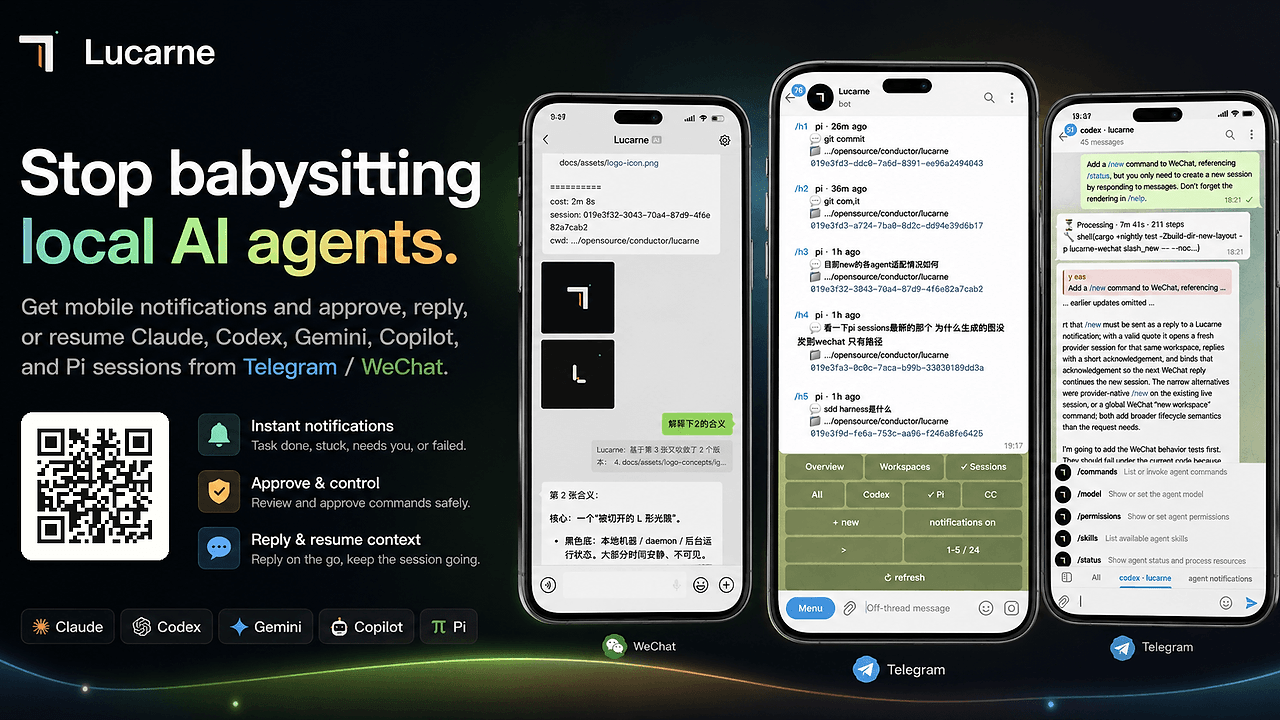
What Is Lucarne?
Lucarne is an open-source local AI agent control plane built by tuchg for developers who run Claude, Codex, Gemini, Copilot, or Pi on their own machines. Lucarne is one of the best AI Coding Agents tools for developers and indie hackers because it turns Telegram and WeChat into a mobile console, ships under an MIT license, and advertises 67/67 journey coverage in the repo badges as of Feb 2026.
It is designed for people who want agent oversight without another desktop app. The core use case is simple: keep the agent on the workstation, keep the operator on the phone, and route approvals and context through chat instead of browser tabs.
Quick Overview
| Attribute | Details |
|---|---|
| Type | AI Coding Agents |
| Best For | developers running local agents from Telegram or WeChat |
| Language/Stack | Rust CLI/daemon with Telegram Bot API, WeChat QR login, and native OS service managers |
| License | MIT |
| GitHub Stars | N/A as of Feb 2026 |
| Pricing | Open-Source |
| Last Release | N/A |
Lucarne is not trying to replace your agent model. It sits above the agent runtime and handles transport, session state, approvals, and history so the operator can stay away from the terminal while still controlling the work.
The implementation details matter. The repo shows a plugin-style adapter layer, a runtime bus, a history store, and a daemonized process model that runs as a user-level service on macOS, Windows, or Linux. That design makes Lucarne better suited to long-lived local workflows than a one-off chat relay.
Who Should Use Lucarne?
- Solo indie hackers shipping with local agents who need approvals and status updates without staying glued to the laptop.
- Platform engineers running multiple agent sessions on a workstation and needing a phone-friendly way to interrupt, resume, or fork work.
- Teams standardizing on Telegram or WeChat for operational comms and wanting a separate control lane for agent traffic.
- Developers using several providers such as Claude, Codex, Gemini, Copilot, or Pi and wanting one interface to supervise them.
Not ideal for:
- People who want a cloud-hosted agent UI with no local daemon or OS service setup.
- Teams that do not use Telegram or WeChat and do not want to wire up either channel.
- Users looking for a repo-embedded coding assistant rather than an external control plane.
Key Features of Lucarne
- Zero-intrusion onboarding — Lucarne does not require project hooks, skills, or MCP setup. You install the daemon, run
lucarned init, and it generates~/.lucarned/lucarned.yamlwith the channel and agent settings. - Telegram mobile console — The Telegram panel supports
/panel,/status,/interrupt, and/fork, which makes the phone a real operator console rather than a notification sink. Workspaces map to Forum Topics, and one topic binds to one live agent session. - WeChat quote-to-route — Lucarne can restore the matching agent session when you quote a notification and reply. It prefers
message_idand falls back to a quoted-text hash, which gives you deterministic context recovery when message metadata is incomplete. - Multi-agent provider support — The capability matrix includes Claude, Codex, Gemini, Copilot, and Pi. Structured approvals, tool calls, resumes, and forks are supported across the providers that expose those primitives.
- Native background execution —
lucarned autostartintegrates with LaunchAgent on macOS, Task Scheduler on Windows, and systemd user services on Linux. That matters because a local agent router is only useful if it survives reboots and user logouts. - Session history and agent inventory — Lucarne tracks local agent session history and the agents currently running on the machine. That gives operators a durable audit trail when a model asks for permission or fails mid-task.
- Lightweight resident process — The repo claims low memory use and automatic release of idle agents. For a local control plane, that is more relevant than cosmetic UI polish because the daemon needs to stay out of the way while the actual coding agent works.
Lucarne vs Alternatives
| Tool | Best For | Key Differentiator | Pricing |
|---|---|---|---|
| Lucarne | Local agent supervision through chat | Telegram and WeChat become a remote control surface for approvals, resumes, and session routing | Open-Source |
| OpenSwarm | Coordinating multiple agent workers | Better fit when you want a broader swarm/orchestration model instead of channel-based mobile ops | Open-Source |
| Claude Code Canvas | Interactive Claude workflow management | More focused on the Claude editing loop and visual context handling | Open-Source |
| Claude Context Mode | Managing model context and prompt state | Better if the main problem is context switching rather than messaging and approvals | Open-Source |
Pick OpenSwarm when your problem is distributed agent coordination across many worker processes, not mobile notification routing. Lucarne is narrower and more operational, which is useful if your agents already run locally and you only need a clean control plane.
Pick Claude Code Canvas when your workflow is centered on Claude and you want a more direct editing experience. Pick Claude Context Mode when the issue is prompt/state management, not channel delivery, approvals, or session recovery.
How Lucarne Works
Lucarne is built as a daemon-first control plane with channel adapters on top and agent session discovery underneath. The architecture in the README shows three layers that matter: lucarne-telegram and lucarne-wechat handle commands and notifications, lucarne-adapter acts as the plugin registry, and lucarne manages the runtime bus, history, and daemon state.
The abstraction is practical rather than academic. Agent providers are treated as external CLI processes, which means Lucarne watches, parses, and resumes sessions instead of embedding model logic itself. That keeps the system compatible with provider CLIs like Claude Code, Codex, Gemini, Copilot, and Pi while preserving local execution on the developer machine.
curl -LsSf https://github.com/tuchg/Lucarne/releases/latest/download/lucarned-installer.sh | sh
lucarned init
lucarned autostart install --start
The first command installs the daemon, the second writes the config file and asks which agents and channels should be enabled, and the third registers Lucarne as a background service. After that, /panel in Telegram opens the operator surface, while WeChat users can quote a message to continue the exact matching session context.
The design choice to use native OS service managers is the part that makes this tool feel production-ready. macOS gets a LaunchAgent, Windows gets a logon task in Task Scheduler, and Linux gets a systemd user service, which means Lucarne behaves like infrastructure instead of a one-shot script.
Pros and Cons of Lucarne
Pros:
- No repo changes required — you do not need to wire hooks into each codebase or commit bot-specific files.
- Works with existing chat apps — Telegram and WeChat are already deployed on many phones, so operators do not need a new mobile client.
- Supports multiple agent providers — the matrix covers Claude, Codex, Gemini, Copilot, and Pi, which reduces lock-in to a single CLI.
- Good operational controls — approvals, interrupts, forks, and resumes are available from the mobile panel.
- Cross-platform autostart — macOS, Windows, and Linux are covered with native background service primitives.
- Session history is first-class — historical sessions and running agents are visible from the control surface.
Cons:
- Depends on chat platforms — if your organization blocks Telegram or WeChat, the main UX loses value.
- Requires a local machine — Lucarne is not a cloud service, so you still need a workstation or server running the daemon.
- Not a full IDE replacement — it controls agents, but it does not replace an editor, terminal, or code review workflow.
- WeChat flow is opinionated — quote routing is clever, but it assumes users understand how message quoting behaves.
- Feature breadth is still on the roadmap — Discord, Slack, Feishu, DingTalk, Matrix, and QQ are planned, not shipped.
Getting Started with Lucarne
The fastest path is the release installer, then init, then background service registration. That gets you from zero to a working local control plane with minimal manual setup.
# macOS / Linux
curl -LsSf https://github.com/tuchg/Lucarne/releases/latest/download/lucarned-installer.sh | sh
lucarned init
lucarned autostart install --start

# Windows PowerShell
powershell -c "irm https://github.com/tuchg/Lucarne/releases/latest/download/lucarned-installer.ps1 | iex"
lucarned init
lucarned autostart install --start
During initialization, Lucarne asks which agents you want enabled and whether Telegram or WeChat should be configured. If you choose Telegram, you will also need a bot token and entry chat with Topics/thread mode enabled; if you choose WeChat, the login flow uses a QR code.
After the service is running, use lucarned doctor to verify the environment, lucarned paths to locate logs and config, and /panel in Telegram to open the workspace UI. For day-two operations, lucarned update and lucarned autostart status are the commands you will use most often.
Verdict
Lucarne is the strongest option for remote supervising of local coding agents when you want Telegram or WeChat to act as the control plane. Its biggest strength is zero-intrusion operator workflow with approvals and session recovery; its main caveat is that it depends on chat-channel setup and a local daemon. Recommend it if you want agent ops, not another chatbot.


