What Is markit?
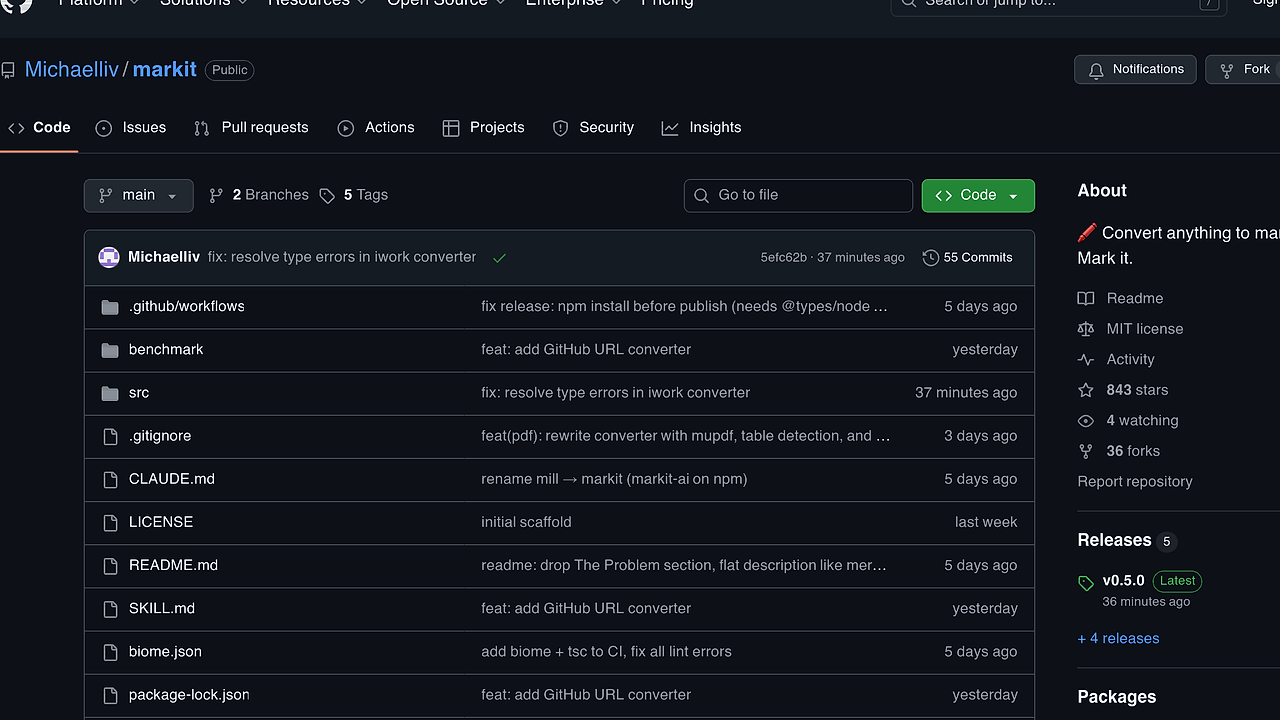
markit is an open-source CLI tool and Node.js library built by Michaelliv that converts diverse file formats including PDFs, DOCX, PPTX, XLSX, HTML, EPUB, Jupyter notebooks, RSS feeds, images, audio, and URLs directly to clean Markdown. It supports pluggable converters and integrates LLM providers like OpenAI or Anthropic for image descriptions and audio transcriptions. With 843 GitHub stars as of October 2024 and version 0.5.0 released recently, markit is one of the best CLI Tools for developers converting documents to Markdown who need zero-config handling of mixed media workflows. markit processes ZIP archives recursively, extracts Wikipedia main content, and handles code files with fenced blocks.
Quick Overview
| Attribute | Details |
|---|---|
| Type | CLI Tools |
| Best For | developers converting documents to Markdown |
| Language/Stack | TypeScript/Node.js |
| License | MIT |
| GitHub Stars | 843 as of Oct 2024 |
| Pricing | Open-Source |
| Last Release | 0.5.0 — Oct 2024 |
Who Should Use markit?
- Frontend developers ingesting design docs, PPTX slides, or whiteboard photos into MD for Notion or GitHub READMEs without manual reformatting.
- Data engineers converting XLSX sheets or CSV files to MD tables for documentation or quick reports in tools like Napkin.
- DevOps teams pulling RSS feeds, Wikipedia pages, or HTML reports into MD for changelog automation or knowledge bases.
- Indie hackers processing mixed media like receipt scans or meeting recordings into structured notes via single CLI commands.
Not ideal for:
- Users needing pixel-perfect PDF layout preservation, as markit prioritizes semantic Markdown over visual fidelity.
- High-volume enterprise batch jobs without custom scripting, since it lacks built-in parallelism beyond recursive ZIP handling.
- Developers avoiding LLM dependencies for media, as AI features require API keys for full image/audio processing.
Key Features of markit
- PDF conversion — Uses unpdf for text extraction and mupdf in v0.5.0 for table detection and image handling, outputting headings, paragraphs, and tables as native MD.
- DOCX/PPTX support — Mammoth.js parses Word docs into turndown MD preserving headings and tables; PPTX extracts slides, notes, and tables via XML parsing.
- Spreadsheet handling — XLSX files convert each sheet to a separate MD table with headers; CSV/TSV become single tables with pipe-delimited rows.
- Web and feed extraction — Fetches URLs with Accept: text/markdown header; RSS/Atom feeds list items chronologically with embedded content; Wikipedia pulls main article text.
- Media processing — Images yield EXIF metadata plus optional LLM descriptions (e.g., architecture diagrams); audio files provide tags and transcriptions via OpenAI/Anthropic.
- Pluggable architecture — Install plugins like markit-plugin-dwg or custom TS modules to add formats; overrides builtins via
markit plugin install. - CLI piping and output — Supports
-o file.mdfor direct writes, stdin/stdout piping (e.g.,markit file | pbcopy), and custom prompts like-p "Extract text verbatim".
markit vs Alternatives
| Tool | Best For | Key Differentiator | Pricing |
|---|---|---|---|
| markit | developers converting documents to Markdown with media/URL support | Pluggable converters + LLM for images/audio in single CLI | Open-Source |
| Pandoc | Multi-format document conversion | Lua filters for complex transformations, broader LaTeX output | Open-Source |
| Mammoth.js | DOCX to HTML/MD | Style map customization for enterprise docs | Open-Source |
| Turndown | HTML to MD | Plugin ecosystem for GitHub Flavored MD | Open-Source |
Pandoc excels in bidirectional conversions like MD to PDF with citations, pick it for academic papers or when needing Beamer slides from MD source. Mammoth.js handles intricate Word styles better for legal/contract docs but lacks markit's multi-format CLI breadth. Turndown suits pure HTML scraping without file I/O, use it in Node scripts for web-to-MD pipelines. For similar CLI workflows, browse all CLI Tools.
How markit Works
markit uses a plugin-based converter registry where each format maps to a dedicated handler: PDFs route to unpdf/mupdf pipelines, DOCX to mammoth → turndown, XLSX to sheet parsers outputting pipe tables. Core runtime is TypeScript on Node.js with Biome linting and TSC checks in CI; LLMs hook via configurable providers (OpenAI default, Anthropic, or OpenAI-compatible like Ollama) for media. ZIPs unpack recursively, applying converters per file; URLs fetch via HTTP with MD negotiation.
Design prioritizes lossy semantic extraction over fidelity: tables become pipes, images get alt-text descriptions, code stays fenced. Config persists via markit config set (e.g., LLM base URL), plugins load as npm/git/local TS modules with typed interfaces.
# Install globally
npm install -g markit-ai

# Convert PDF with custom output
markit report.pdf -o report.md -p "Preserve all tables"

# Media with Anthropic
export ANTHROPIC_API_KEY=sk-ant-...
markit photo.jpg
The install adds markit to PATH; report.pdf extracts text/tables via mupdf, applies prompt if set, writes to report.md. For photo.jpg, it pulls EXIF then queries LLM for description, outputting MD with image link and alt-text. Expect 1-5s per file depending on size/LLM latency.
Pros and Cons of markit
Pros:
- Single binary handles 20+ formats including niche ones like Jupyter/RSS, reducing tool sprawl in dev workflows.
- LLM integration adds value to media without extra steps: photo.jpg yields MD-ready descriptions in under 10s on GPT-4o.
- Plugin system uses standard npm/TS, enabling quick extensions like OCR without forking core.
- Piping support fits Unix pipelines:
markit xlsx | grep tableor chain tonapkin create. - Zero-config for basics; TypeScript types ensure library use in Node apps with autocomplete.
- Recent v0.5.0 fixes iWork converter types and adds GitHub URL handling for repo README pulls.
Cons:
- LLM features gatekeep full media support behind API keys, adding $0.01-0.10 per file cost.
- Table extraction from PDFs scans imperfectly on rotated/scanned docs without plugins.
- No native parallelism; large ZIPs process sequentially, bottlenecking at 100+ files.
- Lacks preview mode; outputs go straight to MD without diff/validation step.
- Windows paths need escaping in CLI, minor friction for non-Unix users.
Getting Started with markit
# Global install via npm
npm install -g markit-ai

# Basic document conversion
markit slides.pptx -o slides.md

# Web URL with pipe
markit https://example.com | pbcopy

# Image with custom prompt (set key first)
export OPENAI_API_KEY=sk-...
markit diagram.png -p "Describe components and connections"
Running slides.pptx -o slides.md parses XML for slides/notes/tables, converts to MD sections in 2-4s. Piped URL fetches content, strips scripts, outputs turndown MD to clipboard. For images, after key export, it generates descriptive alt-text; no further config needed unless switching providers via markit config set llm.provider anthropic. Test on sample files to verify table fidelity.
Verdict
markit is the strongest option for developers converting documents to Markdown when handling mixed PDFs, slides, media, and URLs in daily workflows. Its pluggable converters and LLM hooks deliver structured output faster than cobbling Pandoc scripts. Caveat: budget for LLM costs on heavy image/audio use. Install it now for streamlined doc ingestion.


