What Is OpenAI Plus VXT?
OpenAI Plus VXT is one of the best Browser Automation Extensions tools for OpenAI operators and growth engineers. Built by suyancc on top of WXT for Chrome and Chromium, it also targets Firefox and injects into five OpenAI and PayPal URL patterns to automate ChatGPT registration, checkout link extraction, random address generation, and payment-page autofill.
The repo is organized like a small browser automation app, not a generic user script. The split between background and content scripts, plus local persistence, makes it useful when you need repeatable form handling instead of one-off manual clicks.
Quick Overview
| Attribute | Details |
|---|---|
| Type | Browser Automation Extensions |
| Best For | OpenAI operators and growth engineers who need browser-side signup, checkout, and autofill automation |
| Language/Stack | WXT, TypeScript, Chrome/Chromium, Firefox, browser extension APIs |
| License | N/A |
| GitHub Stars | N/A as of the scraped snapshot |
| Pricing | Open-Source |
| Last Release | N/A |
Who Should Use OpenAI Plus VXT?
- Browser automation builders who need a focused extension scaffold for OpenAI and PayPal flows instead of a full bot framework.
- Ops and support teams validating signup, checkout, and payment-page behavior across multiple accounts and regions.
- Indie hackers who need to inspect ChatGPT session data, generate address records, and keep test inputs local between refreshes.
- Localization and QA engineers who want country and city selection for address fixtures while testing page selectors.
Not ideal for:
- Teams that only need simple text expansion or generic autofill, because OpenAI Plus VXT is tailored to a narrow set of auth and checkout pages.
- Workflows that depend on stable third-party APIs, because the project is tightly coupled to changing page layouts and selector logic.
- Users who want a hosted service instead of a local extension, because this tool is designed around browser execution and local state.
Key Features of OpenAI Plus VXT
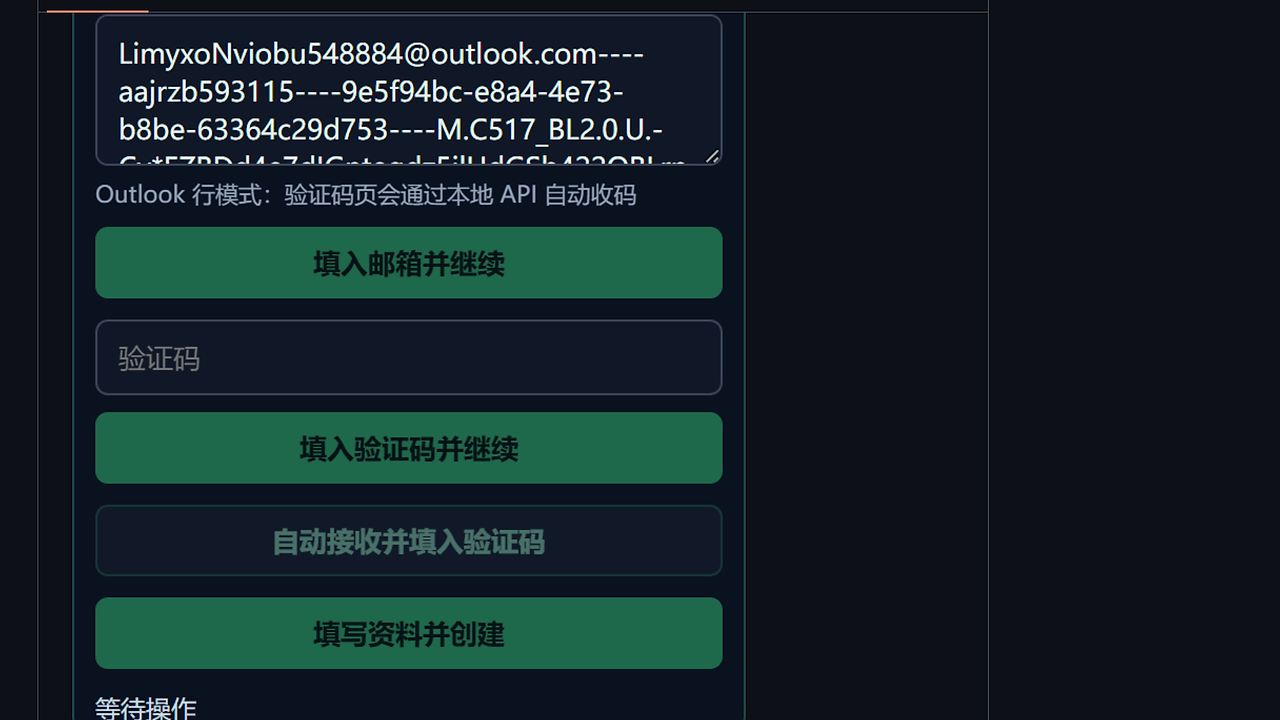
- ChatGPT registration assistance — Supports both a single email input and an Outlook line format like
email----password----client_id----refresh_token. That means the extension can either work manually or pull verification mail from a local Outlook API. - Checkout link extraction — When you switch to the 提链接 tab, OpenAI Plus VXT reads
https://chatgpt.com/api/auth/sessionand extractsaccessToken,user.email, andaccount.planType. It can then generate long and short ChatGPT checkout links with parameters that persist in the panel. - Random address profile generation — It pulls address data from
https://www.meiguodizhi.com/and supports country selection, city selection, random country, and random city modes. The generated identity, job, address, and credit-card-related fields stay visible in the panel and are saved locally after refresh. - OpenAI payment-page autofill — On
pay.openai.com/c/pay, OpenAI Plus VXT can choose PayPal, fill name, country, address, ZIP, and phone, then tick the terms checkbox. This is a direct browser-side form automation path, not a server-side integration. - PayPal checkout autofill — On
paypal.com/checkoutweb/signup, it fills country, email, card data, name, address, and password, and it warns when the current password matches the current email. The OpenAI and PayPal autofill toggles are independent and enabled by default. - Local state persistence — The panel stores collapse state, active tab, current inputs, and settings in local storage. That is useful when you are iterating across refreshes and do not want to re-enter test data every time.
- GitHub Release version checks — The settings page shows the current version and can query GitHub Releases for updates. OpenAI Plus VXT uses that path to display update prompts, download links, and release notes when a newer tag is available.
OpenAI Plus VXT vs Alternatives
| Tool | Best For | Key Differentiator | Pricing |
|---|---|---|---|
| OpenAI Plus VXT | OpenAI signup, checkout, and payment-page automation in the browser | Opinionated workflow for ChatGPT session parsing, address staging, and payment autofill | Open-Source |
| Tampermonkey | Running custom user scripts on arbitrary pages | More flexible scripting model, but you build the workflow yourself | Free |
| Violentmonkey | Lightweight userscript execution and browser automation | Cleaner userscript management for ad hoc DOM tweaks | Free |
| OpenTrace | Inspecting request flow, headers, and network behavior | Better for tracing API calls and debugging sessions than for form automation | Open-Source |
Pick Tampermonkey if you want a broad userscript runtime and are comfortable writing your own DOM logic. Pick Violentmonkey if you want a similar userscript workflow with less extension overhead.
Use OpenTrace when the problem is not autofill but understanding what the browser is actually sending over the wire. For local auth handling and machine-bound identity flows, MachineAuth is a closer fit, while DataHaven makes more sense if your priority is local-first storage for generated records.
How OpenAI Plus VXT Works
OpenAI Plus VXT is built around a classic extension architecture: a background script handles long-lived coordination, while a content script mounts the right-side panel and manipulates page forms. The repo structure shows the main abstractions clearly: entrypoints/background.ts for message handling and checkout creation, and entrypoints/content.ts for panel rendering and autofill logic.
The core technical decision is to keep the sensitive work in the browser context. Instead of pushing data to a remote SaaS, OpenAI Plus VXT reads the current session from chatgpt.com, derives checkout fields from the session payload, and writes form values directly into the active page DOM.
That architecture also explains the local Outlook flow. If you provide the account line format, the extension can call http://127.0.0.1:8787 and wait for verification mail locally, which keeps the mailbox lookup outside the OpenAI page itself.
pnpm install
pnpm dev
# or, for manual browser attachment:
pnpm dev:manual
After the dev server starts, WXT launches a browser profile and loads the extension. Open a supported page such as https://chatgpt.com/, https://auth.openai.com/, or https://pay.openai.com/ and the content script mounts the floating panel.
The page matching is explicit, so nothing happens on unrelated sites. That reduces the blast radius, but it also means selector maintenance is mandatory whenever OpenAI or PayPal changes markup.
Pros and Cons of OpenAI Plus VXT
Pros:
- Narrow, practical scope — The extension focuses on signup, session extraction, and payment autofill instead of pretending to be a full automation platform.
- Local persistence — Inputs, current tab state, and settings survive refreshes, which is important during repetitive QA passes.
- Multi-browser support — The repo includes Firefox build commands, so it is not locked to Chromium-only workflows.
- Session-aware checkout generation — Reading
accessToken, email, and plan type from/api/auth/sessiongives the tool enough context to build checkout links without manual scraping. - Local Outlook integration path — The
127.0.0.1:8787flow keeps verification handling on your machine rather than inside a third-party service. - Release update checking — GitHub Releases integration gives you a simple way to see whether the installed extension is behind.
Cons:
- Page-selector fragility — OpenAI and PayPal can change DOM structure or iframe behavior without notice, which can break autofill quickly.
- No broad workflow abstraction — It is useful for a specific browser task set, but it is not a general orchestration engine.
- Local dependency required for auto-receive — The Outlook automation path only works if the local service is running and reachable.
- Sparse metadata in the repo snapshot — The scraped page does not expose a license, star count, or published release version, so evaluation requires checking the GitHub repo directly.
Getting Started with OpenAI Plus VXT
Clone the repo, install dependencies, and start the WXT dev server. The project expects Node.js and pnpm, and it will launch a browser profile with the extension loaded.
git clone https://github.com/suyancc/openai-plus-vxt.git
cd openai-plus-vxt
pnpm install
pnpm dev
If you want to debug the extension without WXT auto-launching the browser, use pnpm dev:manual. After the extension loads, open a supported page and configure the autofill toggles, then optionally point the Outlook helper at http://127.0.0.1:8787 if you are using the local verification flow.
For production packaging, the repo exposes pnpm build, pnpm zip, and Firefox variants such as pnpm build:firefox. That makes the release pipeline straightforward for teams shipping internal browser tooling through GitHub Releases.
Verdict
OpenAI Plus VXT is the strongest option for browser-side OpenAI signup and checkout automation when you need local control over session parsing, address staging, and autofill. Its biggest strength is that it works inside the browser with persistent state and explicit page targeting, while the main caveat is selector fragility on fast-changing OpenAI and PayPal pages. Use it if you want a focused extension, not a hosted automation service.