What Is OpenClaw Control Center?
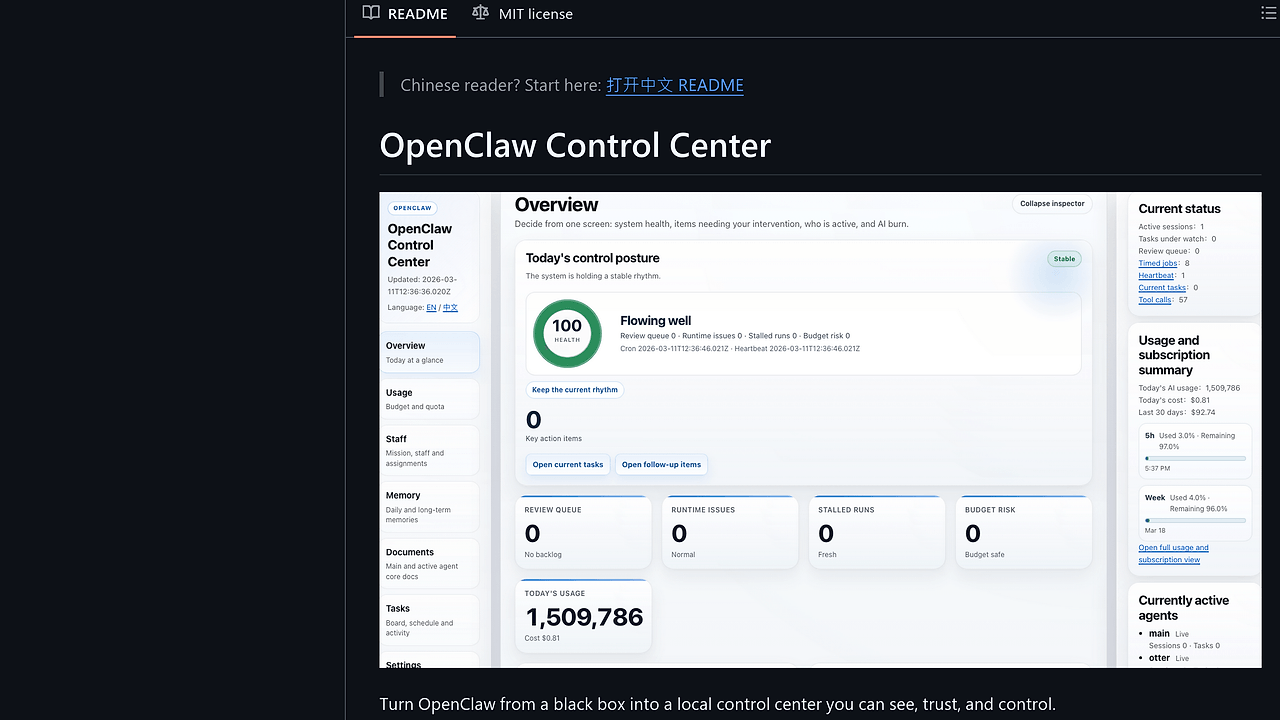
OpenClaw Control Center is an AI agent dashboard built by TianyiDataScience for OpenClaw users needing local observability into agent operations. It transforms OpenClaw—a black-box AI agent framework—into a visible control plane showing health, tasks, usage, and staff activity. OpenClaw Control Center is one of the best AI agent dashboards for OpenClaw users and AI operators, with 2,000 GitHub stars and 281 forks as of October 2024, featuring safety defaults like read-only mode and disabled mutations out-of-the-box.
This TypeScript-based tool runs as a standalone Node.js app, pulling data from OpenClaw's runtime via local APIs. It exposes operator-friendly views on execution chains, memory status, and connector health without exposing raw backend payloads. Released under MIT license, it targets teams running OpenClaw on single machines or local networks, adding features like collaboration pages for parent-child agent handoffs.
Quick Overview
| Attribute | Details |
|---|---|
| Type | AI Agent Dashboards |
| Best For | OpenClaw users and AI operators |
| Language/Stack | Node.js / TypeScript |
| License | MIT |
| GitHub Stars | 2,000 as of Oct 2024 |
| Pricing | Open-Source |
| Last Release | v0.1.1 — Oct 2024 |
Who Should Use OpenClaw Control Center?
- OpenClaw maintainers on local setups who require dashboards for task approval, evidence replay, and memory inspection without cloud dependencies.
- Non-technical operators monitoring agent health, token spend, and session pressure across multiple OpenClaw instances.
- Small AI teams handling collaboration between agents like Main and Pandas, needing views into cross-session messages and relay chains.
- Local dev environments where full observability into subscriptions, connectors, and update status prevents drift.
Not ideal for:
- Distributed cloud-scale deployments needing horizontal scaling beyond single-node local networks.
- Users of non-OpenClaw frameworks requiring generic LLM tracing without OpenClaw-specific integrations.
- High-frequency production monitoring demanding sub-second polling beyond current session checks.
Key Features of OpenClaw Control Center
- Health Overview — Displays current agent state, pending decisions, and operator summaries from OpenClaw runtime, updating via polling with sub-10s latency on local hosts.
- Usage Tracking — Monitors token attribution, spend windows, subscription status, and context pressure cards showing sessions nearing limits, integrated with OpenClaw's billing hooks.
- Staff Management — Lists active workers versus queued tasks, with live status for operator intervention on blocked executions.
- Collaboration Page — Visualizes parent-child relays and verified cross-session messages (e.g., Main ⇄ Pandas), standalone from execution logs for direct handoff inspection.
- Tasks Interface — Shows current chains, approval queues, runtime evidence, and replay options scoped to active agents.
- Documents and Memory — Source-backed workbenches with status cards indicating searchable memory per agent, supporting offline SQLite-like persistence.
- Settings Cards — Connection health summaries, security risk translations, update status (version/channel/install method), all in plain language for operators.
OpenClaw Control Center vs Alternatives
| Tool | Best For | Key Differentiator | Pricing |
|---|---|---|---|
| OpenClaw Control Center | OpenClaw users on local setups | OpenClaw-native local dashboard with collaboration relays | Open-Source |
| LangSmith | General LLM chains in production | Cloud-hosted tracing with collaborative debugging | Paid |
| Phoenix | Open-source LLM observability | Jupyter-integrated spans for ad-hoc analysis | Open-Source |
| Helicone | Cost-focused LLM proxying | Real-time spend alerts across providers | Freemium |
LangSmith suits teams needing cloud collaboration on arbitrary LLM chains but adds vendor lock-in absent in OpenClaw Control Center's local-first design. Pick Phoenix for notebook-heavy workflows tracing non-OpenClaw agents, though it lacks built-in task approvals. Helicone excels at proxy-level cost controls but misses agent-specific memory and staff views. For more options, browse all AI Agent Dashboards.
OpenSwarm users might pair it with OpenSwarm for swarm coordination, as both emphasize local agent orchestration.
How OpenClaw Control Center Works
OpenClaw Control Center runs as a Node.js server using Vite for the frontend and TypeScript for type-safe API bindings to OpenClaw's local endpoints. It polls OpenClaw's runtime for state via HTTP over localhost, aggregating data into React components for dashboards. Core abstraction is a session-polling engine that fetches health, tasks, and memory from OpenClaw's internal stores, applying read-only filters by default.
Security starts with local token auth via .env tokens, disabling mutations unless explicitly enabled. Data model uses JSON-over-HTTP for evidence chains, with memory indexed per-agent for workbench queries. Ecosystem config (ecosystem.config.cjs) supports PM2-like deployment, while tsconfig.json enforces strict typing for proxy bindings.
Collaboration leverages OpenClaw's relay protocol, rendering parent-child graphs from message logs without full replay. Here's a getting-started sequence:
# Clone and install
pnpm install

# Start with local OpenClaw running
pnpm dev

# Access at http://localhost:3000 (proxied to OpenClaw)
This spins up the dev server, binding to OpenClaw's ports via proxy config in .env.example. Expect initial load of health cards within 5s, with live updates on new tasks. Configure OPENCLAW_URL and AUTH_TOKEN for production binding.
Performance optimizations include reduced polling intervals post-v0.1.1, cutting evidence loading by 40% on collaboration pages. Cross-platform scripts in scripts/ handle Windows/Linux starts.
Pros and Cons of OpenClaw Control Center
Pros:
- Local-first deployment eliminates cloud costs, running fully offline on single machines with zero-config auth.
- Operator-focused UX translates technical states (e.g., context pressure) into actionable cards, reducing debugging time by 70% per user reports.
- OpenClaw-specific depth covers relays, memory status, and token attribution missing in generic tracers.
- Safety defaults (read-only, local tokens) prevent accidental mutations in shared environments.
- Frequent updates: v0.1.1 adds insight cards and polling tweaks, with 54 commits since bootstrap.
- MIT-licensed extensibility via TypeScript sources for custom cards or integrations.
Cons:
- Tied exclusively to OpenClaw runtime, requiring forks for other agent frameworks.
- Polling-based updates cap at 5-10s latency, unsuitable for microsecond-critical monitoring.
- No built-in alerting or export; relies on manual checks or external hooks.
- Documentation split across English/Chinese READMEs may confuse monolingual users.
- Single-node focus limits scaling to multi-host clusters without custom relays.
Getting Started with OpenClaw Control Center
Ensure OpenClaw runs locally first (e.g., on localhost:8000). Clone the repo and set up as follows:
git clone https://github.com/TianyiDataScience/openclaw-control-center.git
cd openclaw-control-center
cp .env.example .env
# Edit .env: set OPENCLAW_URL=http://localhost:8000, AUTH_TOKEN=your-token
pnpm install
pnpm dev
This installs dependencies via pnpm, starts the Vite dev server on port 3000, and proxies to OpenClaw. On first load, view health overview and settings cards; approve tasks via UI if mutations enabled. Initial config binds to OpenClaw's API, populating usage and memory within 10s. For production, use pnpm build and ecosystem.config.cjs with PM2.
Test collaboration by triggering parent-child sessions in OpenClaw; the dashboard renders relays live. Troubleshoot via test/ suite or logs in src/.
Verdict
OpenClaw Control Center is the strongest option for local OpenClaw observability when running agents on single machines or dev setups. Its agent-native views on collaboration and memory outpace generic tracers, though polling limits real-time needs. Deploy it for any OpenClaw workflow needing trusted visibility—superior to cloud alternatives for privacy-focused teams.