What Is SmartNode?
SmartNode is a Python/Flask-based Satellite Network Simulation Platform built by Tong89 for visualizing satellite, ground station, relay-link, and task-scheduling interactions. SmartNode is one of the best Satellite Network Simulation Platforms tools for satellite systems engineers, university labs, and space mission developers, and it ships with 8 documented API endpoints for health, state, utilization, and control.
The project is intentionally local-first and split into a backend API plus a browser frontend, which makes it useful for demos, teaching labs, and early-stage system design. Its MIT license and open API shape make it easy to inspect, extend, and embed into a larger research workflow.
Quick Overview
| Attribute | Details |
|---|---|
| Type | Satellite Network Simulation Platforms |
| Best For | satellite systems engineers, university labs, and space mission developers |
| Language/Stack | Python, Flask, vanilla JavaScript, HTML/CSS |
| License | MIT |
| GitHub Stars | N/A as of Feb 2026 |
| Pricing | Open-Source |
| Last Release | N/A — not listed on the repo page |
Who Should Use SmartNode?
- Satellite systems engineers who need a lightweight way to model relay links, ground stations, and LEO assets without waiting on a commercial suite.
- University labs and instructors that want a browser-based demo for networked space assets, API calls, and scheduling logic in a single repo.
- Indie developers and researchers building proof-of-concept mission tooling who prefer a readable Python codebase over a black-box simulator.
- Internal platform teams validating how a mission dashboard should expose state, capacity, and task submission APIs before hardening the stack.
Not ideal for:
- Teams that need high-fidelity astrodynamics, validated ephemeris propagation, or formal mission analysis.
- Public-facing deployments that require authentication, rate limits, audit logs, and hard tenancy boundaries out of the box.
- Organizations that expect packaged releases, container images, or a large plugin ecosystem from day one.
Key Features of SmartNode
- 3D space situation view — The UI presents satellite, ground station, and relay relationships in a visual layout rather than a text-only dashboard. That makes it easier to spot scheduling conflicts and resource bottlenecks during a live demo or classroom session.
- Task submission endpoint —
POST /api/requestaccepts data-backhaul jobs, which gives SmartNode a control surface instead of making it a read-only simulator. This is the part that turns the app from a static model into an interactive workflow tool. - Resource state monitoring —
GET /api/resource_statusexposes the current state of satellites, ground stations, and relay resources. The model is suitable for checking whether a node is available, saturated, or idle before a request is pushed through. - Utilization statistics —
GET /api/resource_utilizationreports live resource usage, which is the right abstraction for teaching queue pressure, allocation, and capacity planning. It is more practical than a purely visual simulator because it gives operators a number they can track. - Adjustable constellation parameters —
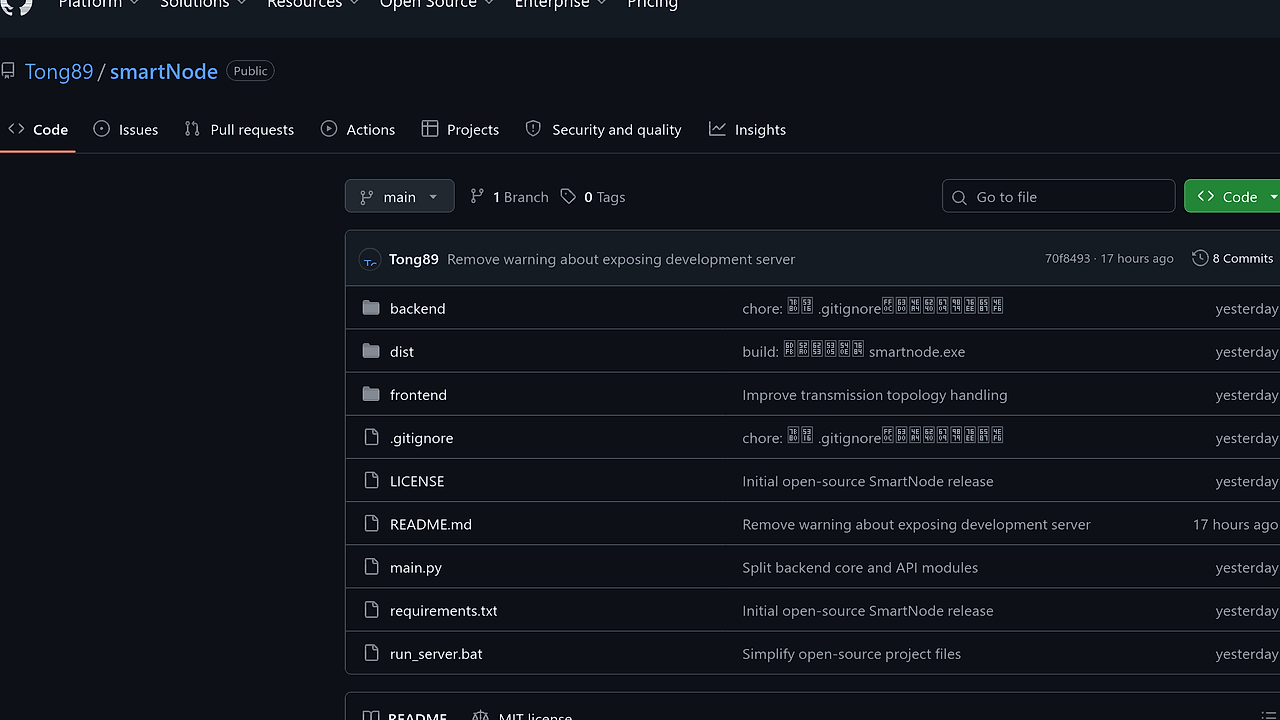
POST /api/update_ground_stationsandPOST /api/update_leo_satelliteslet you change the network shape on the fly. That is useful for testing how the relay path behaves when the constellation or ground footprint changes. - Separation of frontend and backend — The repo keeps Flask logic in
backend/and browser assets infrontend/, which makes the codebase easy to reason about. Developers can modify the simulation engine without rewriting the presentation layer. - Open API with no password dependency — SmartNode exposes endpoints without requiring a login screen, which lowers friction for local labs and internal prototypes. If you need to publish it beyond a trusted network, add a gateway and auth layer in front of it.
SmartNode vs Alternatives
| Tool | Best For | Key Differentiator | Pricing |
|---|---|---|---|
| SmartNode | Local satellite relay simulation and resource dashboards | Browser UI plus Python API for task submission and live resource monitoring | Open-Source |
| GMAT | Mission design and astrodynamics workflows | Mature open-source flight dynamics focus with stronger orbital analysis depth | Open-Source |
| STK | Commercial space systems analysis | Enterprise-grade analysis, visualization, and licensed ecosystem | Paid |
| FreeFlyer | Operational mission planning and scripting | Commercial tooling with validated mission analysis workflows | Paid |
Pick SmartNode when you want a fast, inspectable simulator for relay and scheduling demos rather than a full astrodynamics workbench. Pick GMAT if your team cares more about orbital mechanics and propagation than about a live dashboard.
Choose STK when budget is secondary to analysis depth, support, and a commercial validation path. Choose FreeFlyer when your organization already standardizes on paid flight-dynamics tooling and needs a mature scripting workflow.
If you are hardening a demo or internal service, pair SmartNode with OpenTrace to follow request timing through the Flask API, and use MachineAuth when the simulation needs gateway-level authentication. For adjacent deployment utilities, you can also browse all DevOps Automation tools.
How SmartNode Works
SmartNode uses a simple two-layer architecture: Flask in backend/ serves JSON endpoints and static pages, while the browser in frontend/ renders state and sends control requests back to the API. The simulation logic lives in backend/core.py, which is where the resource model, configuration data, and scheduling engine are kept.
That split is the right design for a tool like this because the frontend stays disposable and the simulation model stays testable. The repo structure also makes the boundaries obvious: api.py handles HTTP and static hosting, app.py is the startup entry, and core.py is the place to inspect if you need to change how resource status or task allocation behaves.
git clone https://github.com/Tong89/smartNode.git
cd smartNode
python -m venv .venv
source .venv/bin/activate
pip install -r requirements.txt
python backend/app.py
curl http://127.0.0.1:5000/api/health
curl http://127.0.0.1:5000/api/resource_status
This boots the Flask server, confirms that the app is alive, and checks that the resource API returns simulation state. After that, the frontend at http://127.0.0.1:5000/frontend/ can consume the JSON and render the 3D view and live metrics without extra setup.
The repo also includes a Windows batch launcher plus syntax checks for both Python and JavaScript, so the intended workflow is local iteration rather than container-first deployment. If you want to extend the model, start with core.py for simulation behavior and frontend/app.js for UI polling or control actions.
Pros and Cons of SmartNode
Pros:
- Small, readable codebase — The repository is organized around a few clear entry points, so new contributors do not have to reverse-engineer a large monolith.
- Direct API surface — The documented endpoints cover health, state, utilization, and control, which is enough for integration tests and dashboard wiring.
- Local demo friendly — The app runs from a virtual environment and does not depend on a password login system for first use.
- Useful for teaching — The combination of visual state and request-driven control makes SmartNode easier to explain than a headless simulator.
- Low setup friction — The project works with
pip install -r requirements.txtand a single backend start command, which keeps onboarding short.
Cons:
- No built-in auth layer — Public exposure requires extra gateway, identity, and rate-limiting work.
- No published container path on the page — Teams that standardize on Docker or Kubernetes will need to package it themselves.
- Simulation fidelity is limited by scope — SmartNode is aimed at relay and resource visualization, not deep orbital mechanics analysis.
- Release maturity is unclear — The scraped page does not list a version history, so you should validate API stability before depending on it.
- Frontend stack is minimal — Plain JavaScript is easy to modify, but it lacks the component model and typed safety of a larger SPA framework.
Getting Started with SmartNode
The fastest path is to clone the repo, create a virtual environment, install dependencies, and start the Flask app. On Windows, you can use run_server.bat instead of typing the activation commands manually.
git clone https://github.com/Tong89/smartNode.git
cd smartNode
python -m venv .venv
source .venv/bin/activate
pip install -r requirements.txt
python backend/app.py
After the server starts, open http://127.0.0.1:5000/frontend/ and verify that the visualization loads and the API calls return state. If you plan to modify the simulation logic, run the syntax checks in the repo with python -m py_compile main.py backend/app.py backend/api.py backend/core.py and node --check frontend/app.js before you commit.
Verdict
SmartNode is the strongest option for local satellite relay simulation demos when you need a simple Flask-backed web UI rather than a commercial mission analysis suite. Its main strength is the clean split between simulation state, HTTP APIs, and browser rendering. The caveat is that you must add security and production packaging yourself, so use it for labs and prototypes first, then harden it for deployment.