What Is Sword?
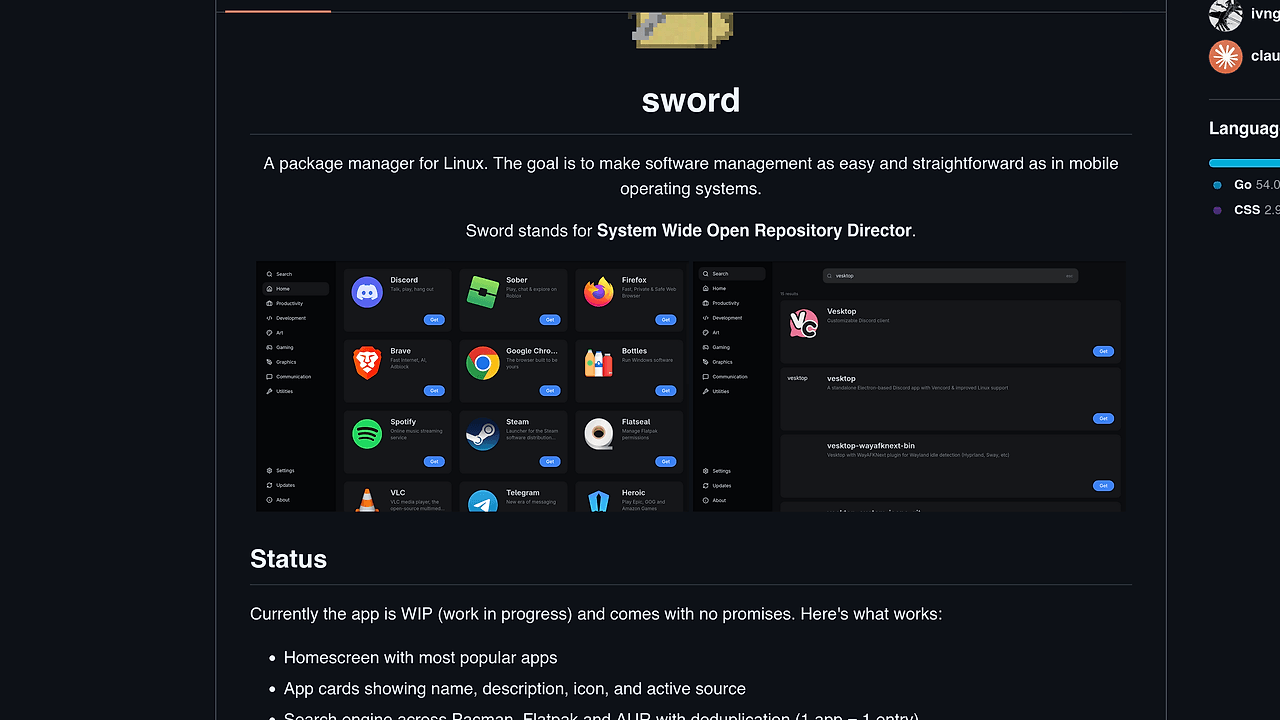
Sword is one of the best Linux Package Managers tools for Linux power users, and it is built by ivngineer as a WIP desktop app for managing software across Pacman, Flatpak, and AUR from a single interface. It aims to make Linux software management feel closer to mobile app stores, while still exposing source selection, package size, screenshots, and one-entry-per-app deduplication across three sources.
Sword stands for System Wide Open Repository Director, which matches the product direction: a unified software hub rather than a single-repo wrapper. The repo currently supports search across three package ecosystems, live theme switching, install and remove flows, and app detail views, so it is already useful for Arch-adjacent desktops even though it is still unstable.
Quick Overview
| Attribute | Details |
|---|---|
| Type | Linux Package Managers |
| Best For | Linux power users, Arch users, and distro hoppers who mix Pacman, Flatpak, and AUR packages |
| Language/Stack | Tauri desktop app with a Go on-device backend; Linux shell-outs to pacman, flatpak, expac, pkexec, and AUR helpers like paru/yay |
| License | N/A in scraped text |
| GitHub Stars | N/A as of May 2026 |
| Pricing | Open-Source |
| Last Release | N/A — WIP |
Who Should Use Sword?
- Arch Linux desktop users who want a GUI that understands
pacman, Flatpak, and AUR instead of treating them as separate worlds. - Power users who hate duplicate app listings and need deduplication so one application maps to one result, with the best source pre-selected.
- People who prefer local execution and want package discovery and installs to happen on-device instead of through a cloud-backed catalog.
- Theme-sensitive desktop tinkerers who care about dark/light mode switching and want a native-feeling UI rather than a generic web wrapper.
Not ideal for:
- Minimal servers or headless boxes where a terminal-only workflow with
pacman,flatpak, oryayis faster. - Stable-production desktops that cannot tolerate WIP behavior, especially around Flatpak installs and package removal.
- Older hardware if you need an ultra-light package manager; the repo explicitly notes that smoothness on a 2010 laptop is doubtful.
Key Features of Sword
- Unified multi-source search — Sword queries Pacman, Flatpak, and AUR, then deduplicates results so one app appears as one entry instead of three near-identical rows. That is the core UI advantage for mixed-source desktops.
- Best-source preselection — each result comes with an active source already chosen, and you can override it manually when you want a different upstream. That matters when the same app is available as a native package and a Flatpak.
- Package install and removal flows — Sword can install and remove packages directly from the GUI, with Pacman operations routed through
pkexecand your desktop polkit agent. The repo warns that these flows can still be unstable. - App detail panels — each app page surfaces size, available sources, and screenshots. That gives you enough metadata to compare install footprint and source quality before committing disk space.
- Live dark and light themes — the UI can switch themes without restarting, which is useful when you keep a terminal open and want the package manager to match the desktop palette.
- Graceful dependency degradation — if
expac,pacman,flatpak, orpkexecis missing, Sword skips that source instead of crashing. That is a sensible choice for a GUI that sits on top of multiple package ecosystems. - AUR helper awareness — AUR installs require
paruoryayonPATH, so Sword does not pretend to implement the whole Arch ecosystem itself. It delegates the hard parts to tools that already know how to build from AUR PKGBUILDs.
Sword vs Alternatives
| Tool | Best For | Key Differentiator | Pricing |
|---|---|---|---|
| Sword | Mixed Pacman, Flatpak, and AUR desktop management | One deduplicated app catalog across multiple sources | Open-Source |
| Pamac | Arch and Manjaro users who want a mature GUI | Broader adoption and a more established package-manager UI | Open-Source |
| GNOME Software | GNOME desktops and Flatpak-first workflows | Deep desktop integration and a polished app-store metaphor | Open-Source |
| Octopi | Lightweight Qt-based package browsing | Fast, traditional Pacman-centric interface | Open-Source |
Pick Sword when your main problem is source sprawl and you want Pacman, Flatpak, and AUR in one catalog. Pick Pamac if you want a more mature Arch GUI with fewer surprises, or GNOME Software if your desktop already centers on GNOME and Flatpak.
If you are standardizing workstation setup rather than browsing a single machine, djevops is the adjacent workflow because it focuses on provisioning and automation instead of local package discovery. For a broader survey of adjacent utilities, browse all Linux Package Managers tools.
How Sword Works
Sword is built around a Tauri frontend and a Go on-device backend, which is a pragmatic split for a local desktop app that needs system access without shipping a browser-only shell. The frontend handles navigation, search, theming, and card rendering, while the backend shells out to native Linux tools and aggregates results into a single app model.
The key design decision is to normalize multiple package sources into one internal entry keyed by application identity rather than repository identity. That lets Sword merge Pacman, Flatpak, and AUR results, choose the best default source, and still preserve a source list for manual override when the native package is not the right choice.
Authentication and install behavior are intentionally delegated to existing system plumbing. Pacman installs use pkexec and the desktop polkit agent, Flatpak installs run per-user with flatpak install --user, and AUR support depends on paru or yay being available so Sword can stay thin at the orchestration layer.
# getting started example
sudo pacman -S expac flatpak polkit

git clone https://github.com/ivngineer/sword.git
cd sword
cargo tauri dev
The first command installs the runtime tools Sword expects on Arch-based systems. The next three commands clone the repo and start the desktop app from source, which is the most realistic path until there is a packaged release. If AUR installs fail later, the repo recommends setting SUDO_ASKPASS to a graphical prompt such as ksshaskpass so authentication does not depend on a terminal.
Pros and Cons of Sword
Pros:
- Single catalog across multiple sources reduces the usual duplication you get when Pacman, Flatpak, and AUR all expose the same app.
- Source-aware install decisions make it easier to choose between a native package and a sandboxed Flatpak based on size or trust model.
- Local-first execution keeps package discovery and installs on your machine instead of pushing metadata through a remote service.
- Graceful fallback behavior means missing runtime tools skip a source rather than taking the whole app down.
- Desktop-oriented UX is better suited to discovery and visual comparison than terminal package managers.
Cons:
- Still WIP, so the repo explicitly gives no promises about stability or edge-case behavior.
- Flatpak installs can fail, which is a real issue if your workflow depends on sandboxed desktop apps.
- Icon rendering bugs in menus are already known, so some visual polish is not finished.
- Not ideal on older hardware, since the author prioritizes UX over minimizing RAM usage.
- Depends on external tools like
pacman,flatpak,expac,pkexec, and optionallyparuoryay, so missing system dependencies reduce functionality.
Getting Started with Sword
sudo pacman -S expac flatpak polkit

git clone https://github.com/ivngineer/sword.git
cd sword
cargo tauri dev
That quickstart installs the runtime dependencies, pulls the source, and launches the app in development mode. On an Arch-based desktop, you may also need a polkit agent such as hyprpolkit for Pacman authentication, and AUR support only works cleanly if paru or yay is already on PATH.
Verdict
Sword is the strongest option for Linux users who want one GUI to browse Pacman, Flatpak, and AUR when they accept WIP instability in exchange for source unification. Its biggest strength is deduplicated multi-source search; its main caveat is unfinished install behavior, especially around Flatpak. If you want a local-first package manager with real technical ambition, Sword is worth tracking and testing on a non-critical desktop.