What Is Meridian?
Meridian is a web control console built by Wangzx233 for managing Codex CLI across multiple devices, and it is one of the best AI Coding Agent Controllers tools for developers running distributed coding tasks. It centralizes projects, tasks, and device state in one browser UI, and the stack is explicit: Go backend, React frontend, PostgreSQL persistence, and device-agent communication over WebSocket. The current workflow supports Linux, macOS, and Windows runner installs, plus three notification paths: UI, browser, and email.
Meridian does not try to replace Codex or invent a new agent runtime. Instead, it gives operators a controllable layer around existing Codex CLI sessions so a single developer or small team can keep multiple workstreams visible, resumable, and auditable.
Quick Overview
| Attribute | Details |
|---|---|
| Type | AI Coding Agent Controllers |
| Best For | developers running Codex CLI across multiple devices |
| Language/Stack | Go 1.25+, Node.js 20.19+, React 19, PostgreSQL 16+, WebSocket/SSE, Codex CLI |
| License | N/A |
| GitHub Stars | N/A as of Feb 2026 |
| Pricing | Open-Source |
| Last Release | N/A |
Who Should Use Meridian?
- Indie hackers with several workstations who want one browser tab to manage tasks without SSHing into each box.
- Platform or infra engineers who need a visible control plane for Codex CLI jobs that run on remote machines with real workdirs.
- Small product teams that want to preserve task context across multiple turns instead of restarting from a blank prompt every time.
- Operators who want human approval in the loop and do not want an autonomous runtime making broad decisions without oversight.
Not ideal for:
- Teams that want a fully autonomous agent runtime with broad tool orchestration and minimal human input.
- Organizations that need self-serve signup, fine-grained RBAC, or mature multi-tenant access control.
- Untrusted environments where you cannot accept installer endpoints or unsigned device-agent artifacts.
Key Features of Meridian
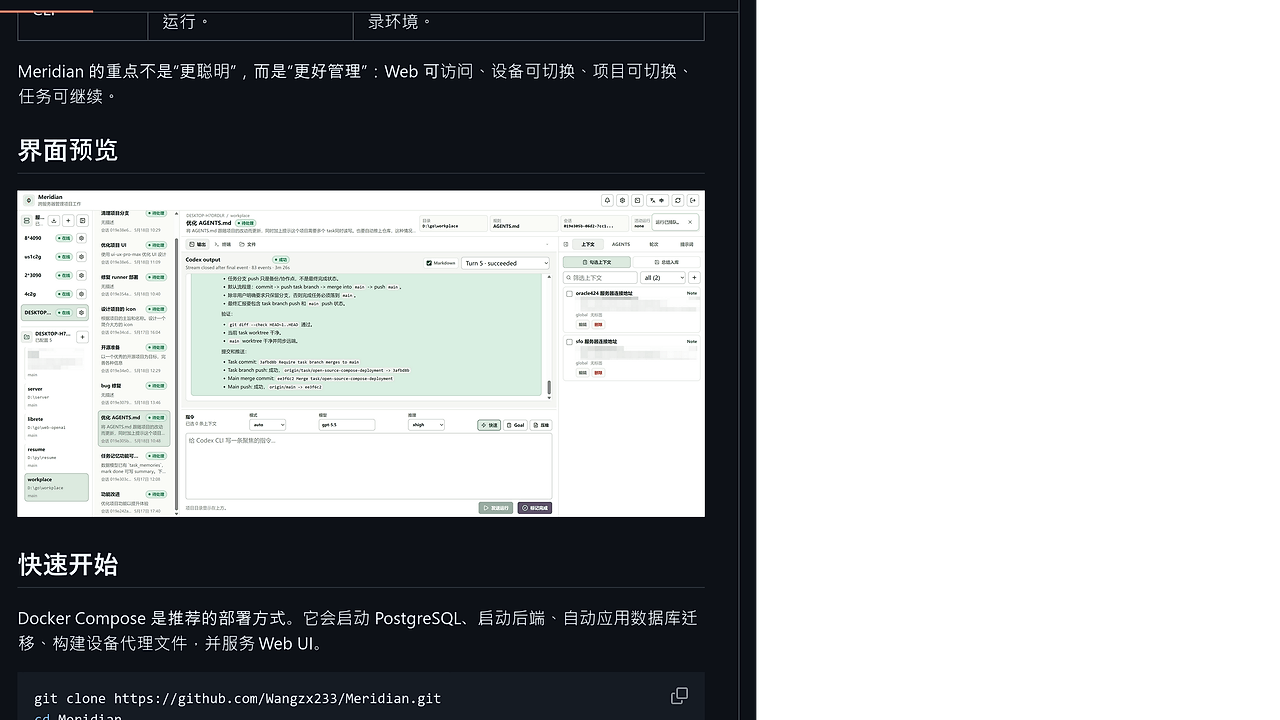
- Multi-device control plane — Meridian tracks multiple machines with device agents, shows online state, and lets you switch between them from the browser. That matters when Codex CLI runs on more than one workstation or server and you need one source of truth.
- Persistent task sessions — A task is not just a single run; it can span multiple Codex turns and preserve the session ID for continuation. This is useful when a change request takes several rounds of edit, test, and follow-up instructions.
- Explicit context selection — Meridian lets you manually choose additional context from prior tasks or other projects instead of auto-injecting everything. That keeps the prompt surface smaller and makes the included context visible to the operator.
- Real-time event streaming — The device agent streams Codex run events back to the UI, so Output, Terminal, and Files update while the job is still active. That is a better operational model than waiting for a terminal to finish before you know what happened.
- Project binding to real workdirs — Each project is attached to a true directory on a target device, not a synthetic container abstraction. That makes file operations, shell commands, and edits line up with the actual filesystem state that Codex sees.
- Cross-platform runner distribution — Meridian provides installation entry points for Linux, macOS, and Windows agents from the UI. You do not have to handcraft a separate deployment path for each platform if the environment is already trusted.
- Long-task supervision — Meridian treats successful execution and task completion as separate states, so a run can succeed while the task remains open. That is useful when the code changes still need verification, review, or an extra turn.
Meridian vs Alternatives
| Tool | Best For | Key Differentiator | Pricing |
|---|---|---|---|
| Meridian | Multi-device Codex CLI operations with human oversight | Web control plane that preserves task/session state across devices | Open-Source |
| OpenSwarm | Broader multi-agent orchestration | More runtime-centric if you want agent-to-agent workflows instead of Codex-centric supervision | Open-Source |
| Claude Code Canvas | Single-agent coding workflows with a visual layer | Better fit when your job is prompt execution inside one interactive coding surface | Open-Source |
| Claude Context Mode | Curated prompt/context management | Narrower, context-first approach for Claude-centric workflows | Open-Source |
Pick Meridian when the real problem is operational control over multiple Codex-enabled machines, not inventing a new agent stack. Pick OpenSwarm when you want a more general orchestration model and are comfortable with a broader automation surface.
Choose Claude Code Canvas if the main pain is interactive coding in one place rather than cross-device supervision. Choose Claude Context Mode if you mostly need disciplined context packing and less emphasis on device management.
Hermes and OpenClaw sit closer to generic agent runtimes, while Meridian is intentionally narrower: it keeps Codex CLI as the executor and treats the web app as the operator console. That separation is the point, because it keeps the autonomy boundary obvious.
How Meridian Works
Meridian uses a three-layer architecture: browser UI, Go backend control plane, and PostgreSQL as the durable store for tasks, runs, and events. The device agent sits on each target machine, opens a WebSocket back to the control plane, and launches local Codex CLI processes in the configured project workdir.
This design avoids putting the intelligence inside Meridian itself. The backend coordinates identity, persistence, and event delivery, while the device keeps the actual execution local to the machine that owns the code and dependencies.
git clone https://github.com/Wangzx233/Meridian.git
cd Meridian
docker compose up -d --build
# then open http://127.0.0.1:18080 in a browser
That startup path brings up PostgreSQL, the backend, the web UI, and the installer endpoints for device agents. After that, the first browser visit walks you through admin initialization, and the runner install flow gives each target machine a control URL that points back to Meridian.
The main architectural decision is that Meridian stores session and task state separately from execution. That means a task can survive multiple turns, a failed run does not erase history, and the operator can inspect output, terminal logs, and file changes before deciding whether the task is actually done.
Pros and Cons of Meridian
Pros:
- Keeps Codex CLI as the executor — Meridian does not hide the underlying agent, so you keep the same command-line behavior while gaining a web control surface.
- Works across multiple machines — The control plane model is built for switching devices, not just tabs or projects.
- Preserves task history — PostgreSQL-backed task/run/event storage makes long tasks traceable and resumable.
- Streams live output — Real-time events reduce blind spots during long coding or debugging sessions.
- Supports explicit context curation — Manual context selection is a good fit when prompt sprawl is the failure mode.
- Fits trusted self-hosted environments — Docker Compose deployment and local networking are straightforward when you control the infrastructure.
Cons:
- No autonomous agent runtime — Meridian is not trying to replace Hermes/OpenClaw-style systems, so it will feel narrow if you want broad automation.
- Simple access control — The current auth model is a gate, not a mature RBAC system.
- Manual completion workflow — A successful Codex run does not automatically mark a task done.
- Requires Codex CLI on each device — Every execution host still needs the agent installed locally.
- Trusted-network assumption — The installer endpoints and unsigned artifacts are fine on private infrastructure, but they are not what you want for hostile or zero-trust exposure.
Getting Started with Meridian
git clone https://github.com/Wangzx233/Meridian.git
cd Meridian
docker compose up -d --build
After the stack starts, open http://<server-ip>:18080 or http://127.0.0.1:18080 for local testing. The first visit initializes the admin account, and you can then use the Runner install flow to connect a machine that already has Codex CLI installed.
If you need to change ports, database credentials, or proxy behavior, copy .env.example to .env, edit it, and restart Compose. For remote machines, do not point the runner at 127.0.0.1 unless Meridian is running on the same host; the control URL must be reachable from the target device.
Verdict
Meridian is the strongest option for teams that already standardize on Codex CLI when they need a browser-based control plane across multiple machines. Its biggest strength is durable task/session management with explicit human-chosen context; its main caveat is that it is not a general-purpose autonomous agent runtime. Use it if operational control matters more than agent autonomy.