What Is Cell Architecture Studio?
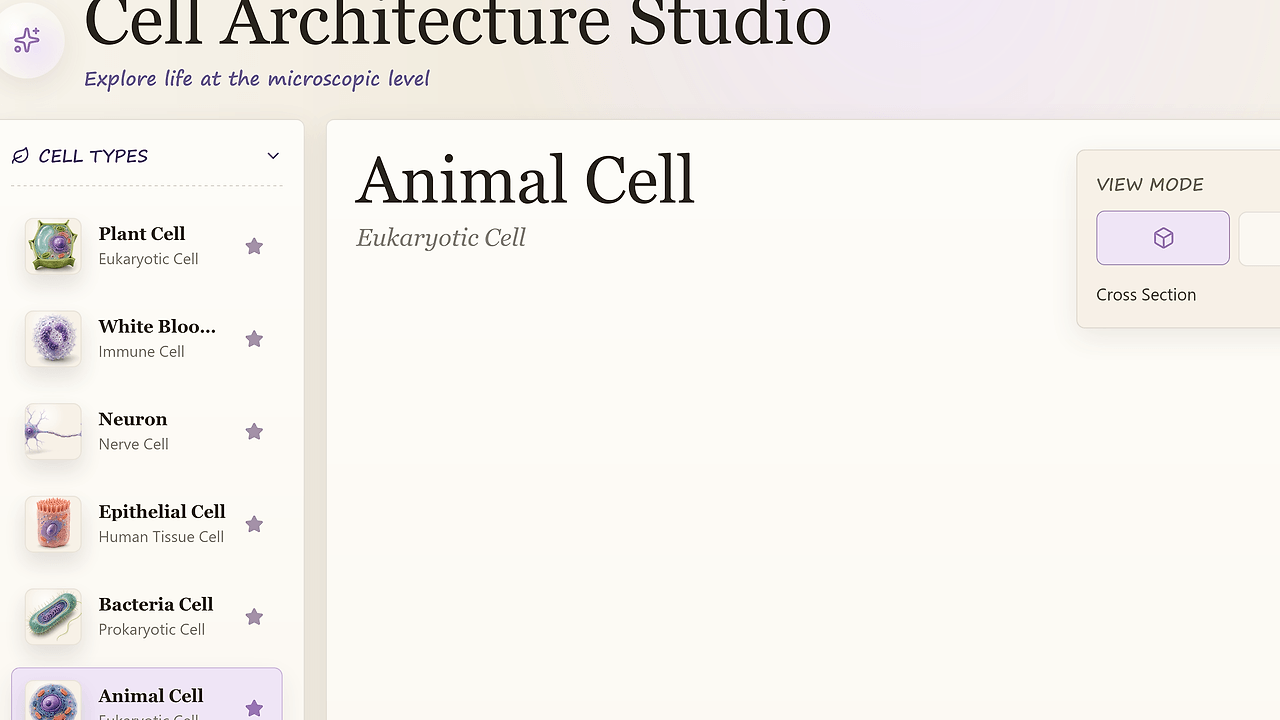
Cell Architecture Studio is a local-prototype 3D biology UI built by cclank with React, Vite, and Three.js. It renders selectable cell specimens, organelle detail panels, comparison mode, and an AI Tutor panel for students and educators, and the repo lists seven specimen views plus Playwright screenshot verification as of Feb 2026. Cell Architecture Studio is one of the best 3D Biology UI tools for students. The live Vercel demo shows the current mesh-first experience and the asset pipeline for GLB or procedural fallback models.
Quick Overview
| Attribute | Details |
|---|---|
| Type | 3D Biology UI |
| Best For | Students who need interactive cell and organelle exploration |
| Language/Stack | React 19, TypeScript 5.9, Vite 7.2, Three.js 0.181, React Three Fiber, Drei, Playwright Core |
| License | MIT |
| GitHub Stars | N/A as of Feb 2026 |
| Pricing | Open-Source |
| Last Release | N/A |
Who Should Use Cell Architecture Studio?
- Biology students who need a browser-based way to inspect cell types, organelles, and specimen labels without installing desktop software.
- Educators and tutors who want a live 3D demonstration for microscopy lessons, comparative morphology, or classroom walkthroughs.
- Frontend engineers prototyping a React Three Fiber scene that depends on GLB assets, loading states, and responsive layouts.
- EdTech teams that need a local prototype they can fork, extend, and verify with screenshots before turning it into a production learning product.
Not ideal for:
- Teams needing a full LMS with auth, quizzes, analytics, gradebooks, and content authoring.
- Projects expecting a complete anatomy catalog on day one, because the current repo still ships a partial specimen set.
- Apps that cannot afford a 3D canvas in memory-constrained mobile browsers.
Key Features of Cell Architecture Studio
- Mesh-first rendering — The app defaults to 3D canvas output instead of flat images, so the first interaction is the specimen itself. Plant Cell and White Blood Cell load high-fidelity GLB assets with native texture preservation, which is the right choice when visual accuracy matters more than page chrome.
- Procedural fallback geometry — Specimens without production GLBs still render in Three.js, which keeps the gallery usable while assets are still in progress. That design prevents the UI from collapsing into empty states when a file is missing or a network connection is slow.
- AI Tutor panel — The interface includes learning prompts, lesson focus, and mastery tracking so the gallery can behave like a guided lesson instead of a static viewer. That is useful for short tutoring sessions where you want a specimen overview, a focus area, and a next-step prompt.
- Comparison mode and organelle detail panel — Users can switch between specimens, inspect organelles, and read metadata in a side panel. The result is a compact workflow for comparing plant, animal, bacterial, and specialized cell structures without opening separate pages.
- Responsive layout coverage — The repo explicitly covers desktop, compact, and mobile states. That matters for classroom tablets and laptop projectors, where 3D apps often fail at breakpoints and overflow on narrow screens.
- Playwright visual verification —
npm run verifylaunches the app, captures screenshots, and checks canvas pixel metrics to catch blank renders or layout regressions. This is more useful than a pure unit test when your main failure mode is a broken WebGL scene. - Asset provenance tracking —
docs/ASSETS.mdrecords the source of each model and image asset, which makes redistribution and replacement much easier. That is an unusually practical detail for an education repo that mixes custom GLBs, PNG previews, and NIH references.
Cell Architecture Studio vs Alternatives
| Tool | Best For | Key Differentiator | Pricing |
|---|---|---|---|
| Cell Architecture Studio | Interactive cell education in a forkable frontend | Local React and Three.js codebase with GLB-first rendering and screenshot verification | Open-Source |
| BioDigital Human | Medical anatomy instruction and enterprise learning | Large curated anatomy library and polished commercial delivery | Paid |
| Sketchfab | Hosting and embedding arbitrary 3D models | Massive model marketplace and browser viewer ecosystem | Freemium |
| Labster | Full virtual lab simulations and LMS delivery | Scenario-based science training with classroom workflow integration | Paid |
BioDigital Human is the better pick when you need a larger curated anatomy catalog and a commercial learning platform. Cell Architecture Studio is the better choice when you want full control over the React components, specimen data, and model loading flow.
Sketchfab is better for distributing or embedding generic 3D assets. Cell Architecture Studio is better when the interaction model is biology-specific and the layout needs organelle metadata, comparison mode, and lesson prompts.
Labster is the right call when you need managed simulations, quizzes, and institution-level rollout. Cell Architecture Studio stays much smaller and easier to inspect, which is why it fits a developer-owned demo or prototype better than a full teaching platform.
If your lesson is better as a scripted explainer than an interactive canvas, manim-web is the adjacent tool. If your team is still shaping the interface and wants AI-assisted React iteration, Claude Code Canvas pairs well with this repo.
How Cell Architecture Studio Works
Cell Architecture Studio is data driven. The specimen registry lives in src/data/cells.ts, and each entry points at a mesh, thumbnail, labels, microscopy mode, and copy that the UI can render without hardcoding specimen logic into components. React 19 handles the shell, while Vite serves the app fast enough for local iteration and Three.js owns the 3D scene.
The rendering path is intentionally mesh first. When a specimen has a GLB in public/models/, the app loads that asset and keeps the native material data, which is how the plant and white blood cell views preserve their original look. When a specimen does not have a production mesh yet, the app falls back to procedural geometry so the user still gets a live scene instead of a broken canvas. The preview modes called Mesh and Focus let the same specimen swap between pure geometry and a detail-led study view without rewriting the page.
npm install
npm run dev
npm run verify
The first command installs the frontend dependencies, the second starts the browser app on 127.0.0.1:5173, and the third runs Playwright-based screenshot checks. That verification pass is the most important technical decision in the repo because it catches blank renders, mobile overflow, and broken comparison modals before anyone reviews the demo.
The design philosophy is simple: keep the biology content declarative, keep the viewer interactive, and keep regressions visible. That is why the project pairs React Three Fiber and Drei for scene composition with Playwright Core for render validation, instead of hiding the 3D layer behind a backend service.
Pros and Cons of Cell Architecture Studio
Pros:
- Forkable frontend architecture — The entire experience is in the repo, so you can modify specimen cards, lesson copy, and scene behavior without waiting on a hosted API.
- Strong 3D asset path — GLB files with preserved materials are the right storage format for biological models because they keep mesh and texture data together.
- Graceful degradation — Procedural fallback geometry means unfinished specimens still render, which keeps the app presentable while assets are being replaced.
- Browser-focused verification — Playwright screenshots plus canvas pixel checks are a good fit for WebGL apps where blank rendering is a real failure mode.
- Responsive UI coverage — Desktop, compact, and mobile layouts are already part of the project, so the app is not locked to a single classroom viewport.
- Clear asset provenance — The repo documents where models came from, which matters when you need to audit licensing or swap one mesh for another.
Cons:
- Incomplete specimen library — The roadmap still calls out missing production GLBs for several specimens, so coverage is not finished.
- No backend product layer — There is no auth, user state sync, analytics pipeline, or LMS integration in the current repo.
- 3D assets can be heavy — GLB meshes and textures add load time and memory pressure, especially on older laptops and mobile browsers.
- Verification is visual, not semantic — Playwright can tell you a canvas is rendering, but it cannot prove the biology labels are pedagogically correct.
- Route and bundle optimization is still on the roadmap — Lazy loading and route-level code splitting are not yet in place, so the current build is still a prototype-sized frontend.
Getting Started with Cell Architecture Studio
git clone https://github.com/cclank/cell-architecture-studio.git
cd cell-architecture-studio
npm install
npm run dev
After the dev server starts, open http://127.0.0.1:5173/ and load a specimen from the gallery. The first run should show the 3D viewer, the detail panel, and the AI Tutor panel; if the canvas is blank, inspect public/models/ and src/data/cells.ts before blaming Three.js.
For a production sanity check, run npm run build and then npm run verify. That catches asset regressions early and gives you a browser-level proof that the cell scenes still render on desktop and mobile.
Verdict
Cell Architecture Studio is the strongest option for local cell-education demos when you want a browser-based 3D viewer with automated render checks. Its biggest strength is the GLB-first pipeline with procedural fallback; its main caveat is the still-incomplete specimen set. Use it if you want an open-source base you can extend, not a finished LMS product.