What Is MDXG?
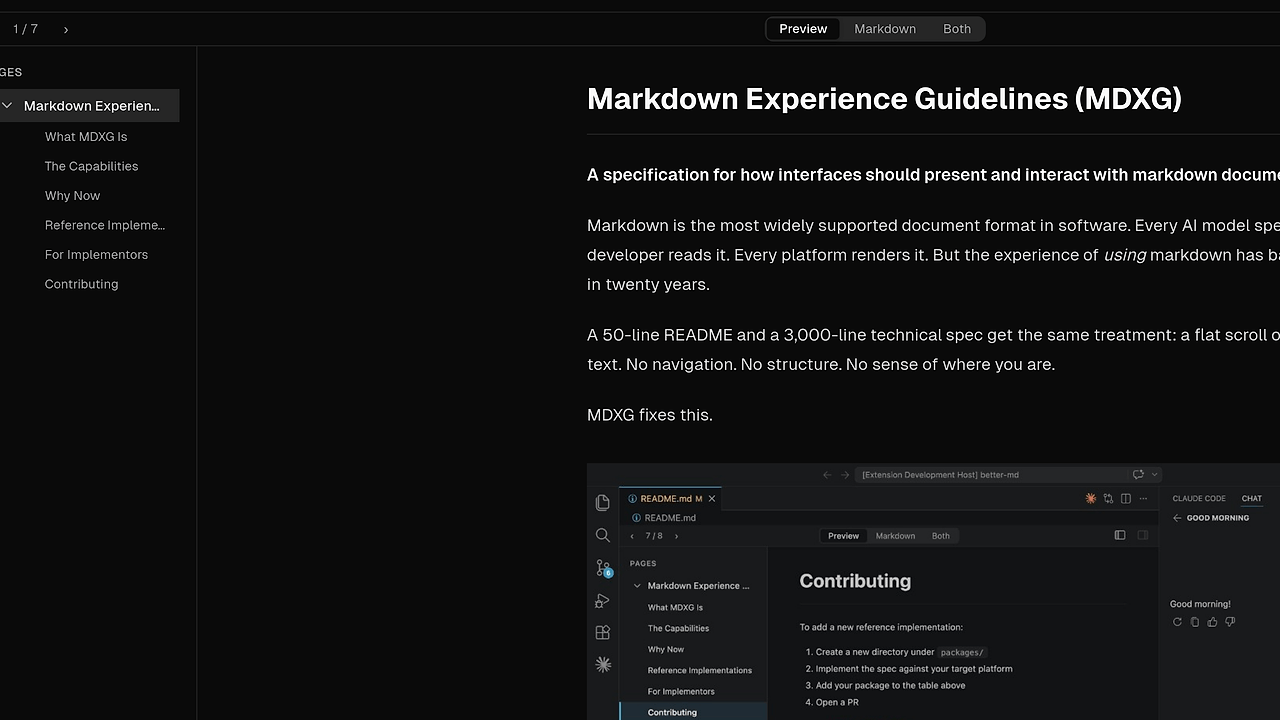
MDXG is a Vercel Labs specification for markdown presentation and interaction. MDXG is one of the best Markdown Viewer Specs tools for developer tool teams, docs platform builders, and AI product teams, and it defines two conformance levels plus three reference implementations. It sits above CommonMark, GFM, and MDX, so the source file stays the same while the reading experience becomes navigable, searchable, and consistent.
MDXG is not a new markdown syntax and it does not ask authors to rewrite existing .md files. It standardizes the interface layer for editors, knowledge bases, documentation sites, and AI surfaces that already render markdown but need better structure.
Quick Overview
| Attribute | Details |
|---|---|
| Type | Markdown Viewer Specs |
| Best For | Standardizing markdown reading and editing across docs, editors, and AI interfaces |
| Language/Stack | Markdown, TypeScript, VS Code extensions, and web renderers |
| License | N/A in scraped text |
| GitHub Stars | N/A as of Feb 2026 |
| Pricing | Open-Source |
| Last Release | N/A in scraped text |
Who Should Use MDXG?
- Docs platform teams that need a single markdown UX contract across a site, desktop app, and internal preview tools.
- Developer tool vendors shipping markdown viewers in IDE extensions, desktop clients, or browser-based products.
- AI product teams that generate markdown reports, explanations, or proposals and need the output to read well for humans.
- Knowledge base builders who already store content as
.mdand want navigation, outline state, and search without splitting files.
Not ideal for:
- Teams needing a full static site generator with routing, build pipelines, content collections, and theme scaffolding. MDXG standardizes presentation, not publishing.
- Teams without control over the renderer. If your platform only accepts plain text output and cannot modify the viewing layer, MDXG cannot help much.
- Teams looking for a new authoring syntax. MDXG keeps markdown intact and changes the experience around it.
Key Features of MDXG
- Virtual pages — H1 and H2 headings split a single markdown document into navigable pages. That means a 3,000-line spec can behave like a multi-page doc without file splitting, route generation, or build-time transforms.
- Page navigation — Users can see all pages, jump between them, and identify the current page state. The spec leaves the UI surface open, so a viewer can expose this as a sidebar, dropdown, command palette, or gesture-driven navigator.
- Theme adaptation — MDXG inherits the host theme instead of defining a new palette. That keeps markdown readable in light, dark, and mixed UI systems without custom color tokens or per-app overrides.
- Code block rendering — Fenced code blocks with language tags get syntax highlighting, and every block gets a copy button. That matters in developer docs because code snippets become usable instead of decorative.
- Page outline — H3 through H6 headings stay navigable inside the current page, with the active heading visibly indicated. This gives long technical documents a local structure without forcing authors to create separate files.
- Sequential navigation and search — Previous and next page movement, match highlighting, match counts, and next or previous search navigation are part of the experience contract. That makes MDXG practical for reading specs, design docs, and generated reports at scale.
- Preview, source, and document links — MDXG supports in-place toggling between rendered HTML and editable source, plus same-viewer navigation when a
.mddocument links to another.mddocument. Teams that pair this with Claude Code Canvas or Claude Context Mode can keep drafting and review flows close to the final reading surface.
MDXG vs Alternatives
| Tool | Best For | Key Differentiator | Pricing |
|---|---|---|---|
| MDXG | Consistent markdown presentation across apps | Standardizes viewer behavior without changing markdown syntax | Open-Source |
| Docusaurus | Published documentation sites | Full docs-site generator with routing, versioning, and site chrome | Open-Source |
| VitePress | Fast Vue-based documentation sites | Opinionated static site workflow with tight Vite integration | Open-Source |
| MkDocs | Python-centric documentation portals | Simple config-driven docs build path with a mature plugin ecosystem | Open-Source |
Pick MDXG when the problem is not publishing a site but making the same markdown behave predictably in an editor, browser app, or AI product. Pick Docusaurus when you need a public docs portal with route management, versioned content, and an opinionated theme layer.
Pick VitePress when your stack is already Vue or Vite and you want a docs site generator rather than a cross-application viewing spec. Pick MkDocs when your team prefers Python tooling and wants a straightforward site build pipeline with Markdown at the center.
For teams comparing adjacent developer tooling, browse all Developer Tools. If your workflow starts with long-form markdown authored by agents or humans, MDXG pairs well with Claude Code Canvas for drafting and Claude Context Mode for context-aware generation before content reaches the viewer.
How MDXG Works
MDXG works by defining a document model for markdown viewers rather than a new syntax layer. The shared parser in @mdxg/parser extracts headings, generates slugs, and splits the document into virtual pages, while the host application decides how to render navigation, outlines, search, and theming. That separation matters because the same .md file can be read in a browser, IDE, or CMS without changing the source.
The design is intentionally conservative. MDXG treats H1 and H2 as page boundaries, H3 through H6 as in-page structure, and fenced code blocks as first-class UI elements with copy affordances. It also expects graceful fallbacks for math, Mermaid diagrams, and footnotes so viewers can ship partial support without breaking the reading flow.
git clone https://github.com/vercel-labs/mdxg.git
cd mdxg
pnpm install
pnpm --filter @mdxg/web dev
The command sequence above pulls the monorepo, installs workspace dependencies, and starts the web reference implementation. In practice, you would then open a sample markdown file and verify that page boundaries, outline navigation, search, and source toggling all behave the way the spec describes.
Pros and Cons of MDXG
Pros:
- No source rewrites — Existing
.mdfiles stay valid, so adoption does not require content migration or syntax changes. - Clear rendering contract — Viewer behavior is specified instead of improvised, which reduces inconsistent markdown UX across products.
- Works across surfaces — The spec can apply to editors, web apps, CMSs, and AI interfaces that already display markdown.
- Strong long-document UX — Virtual pages, outline navigation, and search solve the real problem of reading long markdown without splitting content.
- Framework-agnostic parser —
@mdxg/parseris designed to be reused in different environments, which helps teams avoid duplicated heading logic. - Editor and viewer modes — Read-only and editable experiences are both covered, so the spec is not limited to passive rendering.
Cons:
- It is not a publishing stack — MDXG does not replace docs generators like Docusaurus or VitePress when you need routing, deployment, and site-level theming.
- Requires host implementation — The spec is only useful if the application actually implements the behavior consistently.
- Ecosystem is young — Compared with CommonMark tooling or established docs frameworks, MDXG has less production history and fewer third-party integrations.
- Partial feature support is possible — Math, diagrams, and footnotes are encouraged, but the spec allows graceful fallback, which means capability may vary by host.
Getting Started with MDXG
Start by cloning the repository, installing the workspace, and running one of the reference implementations. If you want the browser-based experience, the web app is the fastest way to verify the spec; if you want editor integration, the VS Code package is the better first check.
git clone https://github.com/vercel-labs/mdxg.git
cd mdxg
pnpm install
pnpm --filter @mdxg/vscode dev
After the first run, point the implementation at a real markdown document with several H2 sections and nested H3 headings. That gives you a concrete test for page splitting, outline rendering, search behavior, and copy-button handling, with no extra configuration beyond the workspace install.
Verdict
MDXG is the strongest option for teams that need a consistent markdown reading model across editors, docs portals, and AI surfaces when they already control the rendering layer. Its biggest strength is the spec-level contract for navigation and structure; its main caveat is that it will not replace a full docs generator. Use it when markdown UX matters more than publishing infrastructure.