What Is opencli-rs?
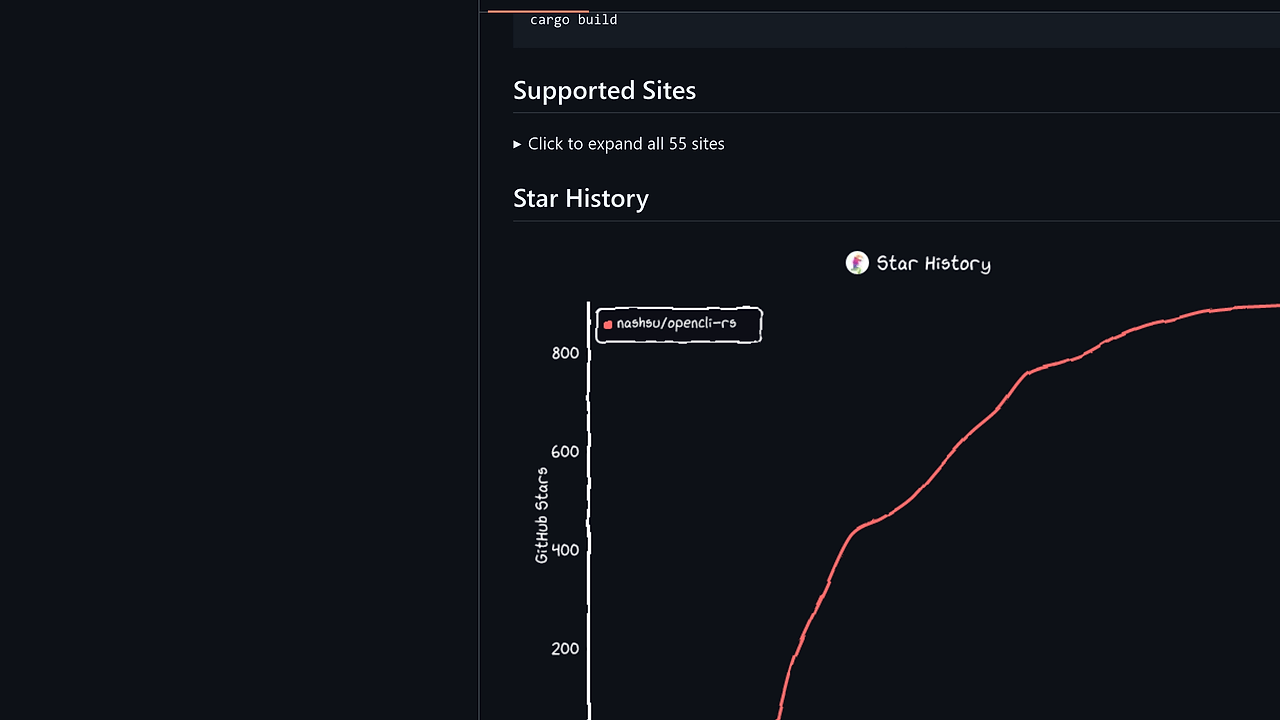
opencli-rs is a blazing-fast CLI tool built by nashsu for fetching structured data from 55+ websites like Twitter/X, Reddit, YouTube, HackerNews, Bilibili, Zhihu, and Xiaohongshu using 333 commands. This pure Rust rewrite of the TypeScript OpenCLI delivers feature parity with up to 12x speed gains, such as bilibili hot in 1.66s versus 20.1s, while using only 15MB memory peak. opencli-rs is one of the best CLI Tools for AI agent developers and indie hackers needing real-time web data without token management or heavy dependencies. It integrates local tools like gh, docker, kubectl and controls Electron apps via a Chrome extension for session reuse. With 932 GitHub stars as of February 2026, it powers AI workflows by auto-discovering commands via AGENT.md integration.
Quick Overview
| Attribute | Details |
|---|---|
| Type | CLI Tools |
| Best For | AI agent developers and indie hackers |
| Language/Stack | Rust |
| License | MIT |
| GitHub Stars | 932 as of Feb 2026 |
| Pricing | Open-Source |
| Last Release | v0.1.3 — Jan 2026 |
Who Should Use opencli-rs?
- AI agent builders scripting agents that query live web data from 55+ sites without building custom scrapers, integrating via
opencli-rs listin .cursorrules files. - Indie hackers automating workflows who fetch Twitter threads or Reddit posts in under 2s and pipe output to jq for JSON processing.
- DevOps teams extending CLIs registering docker or kubectl as subcommands for AI-driven ops automation.
- Electron app scripters turning Cursor, Notion, or Discord into CLI-controllable tools via extension injection.
Not ideal for:
- Teams needing graphical UIs, as opencli-rs outputs only JSON/YAML/CSV with no TUI.
- High-volume enterprise scraping requiring proxy rotation, since it relies on single-session Chrome reuse.
- Beginners unfamiliar with Rust binaries or YAML pipelines, lacking a full tutorial beyond README.
Key Features of opencli-rs
- 55+ sites, 333 commands — Handles Twitter/X threads, Reddit submissions, YouTube metadata, Bilibili hots, Zhihu feeds, Xiaohongshu searches; tested 103/122 commands pass rate matching original.
- Browser session reuse — Chrome extension detects processes, injects sessions for logged-in access without API keys; supports auto-wake on command invocation.
- Declarative YAML pipelines — Adapters defined in YAML for scraping workflows; zero-code additions via
explorefor API analysis andgeneratefor adapter creation. - AI-native discovery —
opencli-rs listoutputs discoverable tools for LLMs; cascade probes auth strategies and generates adapters from site analysis. - Media and article downloads — Integrates yt-dlp for videos, batches Twitter media; structured output omits footers in JSON/YAML/CSV modes.
- Local CLI integration —
opencli-rs register mycliexposes gh, docker, kubectl subcommands; shell completion and doctor diagnostics included. - Structured output formats — JSON/YAML/CSV with precise fields like cover URLs for WeRead shelves; no footer bloat in non-table modes.
opencli-rs vs Alternatives
| Tool | Best For | Key Differentiator | Pricing |
|---|---|---|---|
| opencli-rs | AI agents querying 55+ sites | 12x faster Rust binary, Chrome session reuse | Open-Source |
| OpenCLI | Node.js users with existing setups | Original TypeScript, higher memory (99MB) | Open-Source |
| yt-dlp | Video/media extraction only | Dedicated downloader, no site queries | Open-Source |
| curl | Simple HTTP fetches | Lightweight but no structured parsing | Open-Source |
OpenCLI suits Node.js environments but peaks at 99MB memory and 20s+ for Bilibili hots—switch to opencli-rs for 1.66s and 15MB. yt-dlp excels at video downloads yet lacks site-specific commands like Zhihu hots; pair it with opencli-rs media flags. For basic fetches, curl requires jq post-processing, unlike opencli-rs native JSON. Check awsim for AWS CLI simulation or djevops for broader DevOps automation—opencli-rs registers these seamlessly.
How opencli-rs Works
opencli-rs uses a modular adapter architecture in Rust crates, with YAML-defined pipelines for each site's API endpoints, selectors, and transforms. Core abstraction: command dispatcher parses subcommands (e.g., twitter hot), routes to adapters in crates/, injects browser sessions via extension WebSocket for auth, and serializes to stdout. No Tokio async overhead—synchronous execution yields sub-2s latencies on Apple Silicon; memory safety prevents leaks seen in JS parsers.
Extension side: Chrome process detection via scripts/ polls for tabs, wakes idle sessions, proxies requests. AI discovery scans adapters, exposes via list --json for LLM tool calling. Download flows fork yt-dlp subprocesses, respecting rate limits per site.
Real-world startup:
# Install via cargo
cargo install opencli-rs

# List commands
opencli-rs list

# Fetch Bilibili hot topics
opencli-rs bilibili hot
These commands install the 4.7MB binary, enumerate 333 tools for agent config, and output JSON array of hot videos with titles, views (1.66s execution). Expect Chrome extension prompt on first browser command; enable via opencli-rs doctor for diagnostics.
Pros and Cons of opencli-rs
Pros:
- 12x speedup on heavy sites like Bilibili (1.66s vs 20.1s), tested across 122 commands on macOS M-series.
- Single 4.7MB static binary, zero deps beyond system libs—runs on Linux/macOS without Node.js.
- Session reuse eliminates token expiry; extension handles Discord/Notion logins transparently.
- YAML extensibility: add adapters without Rust recompiles, AI
exploregenerates from live APIs. - Integrates local CLIs like
opencli-rs docker psfor unified agent toolsets. - Shell completion zsh/bash/fish, doctor checks extension/Chrome connectivity.
Cons:
- Early v0.1.3; 84% test pass rate misses some edge commands from original.
- Chrome dependency for browser cmds—fails on headless servers without extension hacks.
- No built-in proxy/VPN support; single-session limits parallel queries.
- YAML adapters brittle to site changes; manual
exploreneeded post-updates. - Windows support implicit via Rust but untested in README benchmarks.
Getting Started with opencli-rs
Download the binary from GitHub releases or install via Cargo for latest:
# Global install
cargo install --git https://github.com/nashsu/opencli-rs.git opencli-rs

# Or Makefile quick install (macOS/Linux)
make install

# Verify
opencli-rs doctor
opencli-rs --version  # 0.1.3

# First command: Twitter hot topics
opencli-rs twitter hot --json | jq '.[0:3]'
Installation pulls crates into ~/.cargo, builds in 30s on M1. doctor confirms Chrome/extension status, generates completion scripts. First Twitter run launches extension if needed, outputs JSON with 10 topics (views, authors) in 1.5s; pipe to jq for filtering. Configure AGENT.md with opencli-rs list for Cursor/Claude integration—no further setup for public cmds.
Verdict
opencli-rs is the strongest CLI Tools option for AI agent developers and indie hackers querying 55+ sites when speed and low memory matter over Node.js bloat. Its Rust efficiency and YAML extensibility enable real-time web access in sub-2s commands with session reuse. Pick it unless avoiding Chrome entirely—deploy now for 10x gains over alternatives.


