What Is PaperSpine?
PaperSpine is an open-source AI writing skill suite built by WUBING2023 for Codex and Claude Code. PaperSpine is one of the best AI Writing Agents tools for technical writers, because it handles 2 first-class workflows, Rewrite Existing and Build From Materials, across 4 target scenes: journal, conference, report/review, and competition writing.
The point is not to polish text blindly. It forces the agent to learn the target scene, inspect strong examples, and record why each manuscript unit exists, which is exactly what you want when the output has to survive peer review, competition judging, or a supervisor reading line by line.
Quick Overview
| Attribute | Details |
|---|---|
| Type | AI Writing Agents |
| Best For | Technical writers |
| Language/Stack | Python, Markdown, LaTeX, PowerShell, Codex skills, Claude Code skills |
| License | MIT |
| GitHub Stars | N/A |
| Pricing | Open-Source |
| Last Release | N/A |
The README snapshot does not expose a star count or tagged release, so those fields are shown as N/A rather than guessed.
Who Should Use PaperSpine?
PaperSpine is best for people who need a manuscript workflow with traceability, not just sentence rewriting.
- Graduate students and researchers drafting journal papers, conference papers, or reviews who need a research dossier, claim tracking, and a defendable revision trail.
- Technical writers turning notes, figures, PDFs, and partial drafts into course reports or internal technical reports with consistent structure.
- Competition teams writing competition papers or reports that need motivation-first framing, evidence-backed claims, and repeatable revision logic.
- Claude Code and Codex users who want the writing process to live inside their agent host instead of copying text between a chat window and a separate editor.
Not ideal for:
- Short marketing copy, landing pages, or social posts where the workflow overhead is pure waste.
- Teams that only want light proofreading and do not care about evidence, rationale, or source inventories.
- Users who refuse to install skills, run scripts, or manage generated artifacts in a
paper_rewriting_output/folder.
Key Features of PaperSpine
- Two equal writing workflows —
Rewrite Existinghandles an existing manuscript without reducing the task to line editing, whileBuild From Materialsassembles a manuscript from notes, PDFs, figures, data summaries, and partial drafts. That split matters because it separates revision from synthesis. - Scene-aware planning — PaperSpine distinguishes
journal,conference,report/review, andcompetitiontargets. The workflow learns the target scene before writing, so the structure and argument density match the venue instead of defaulting to one generic essay shape. - Flash and pro research tiers —
flashgathers 3 target-scene examples, 3 recent same-field papers, and official requirements, whileproexpands to 6 examples and 6 papers. That gives the agent a controlled evidence budget instead of an unbounded web scrape. - Rationale matrix as a first-class artifact —
writing_rationale_matrix.mdrecords what each unit does, how it serves the confirmed motivation, what was learned from examples, what evidence supports it, and what final check must pass. This is the part that makes PaperSpine useful for audit-heavy workflows. - Bilingual output path — When English output is selected, PaperSpine can generate a
translation_packagewith Chinese translations of intermediate artifacts and final Markdown outputs. That is useful when a team drafts in English but needs review material in Chinese. - Host-specific packaging — Codex gets one bundled skill at
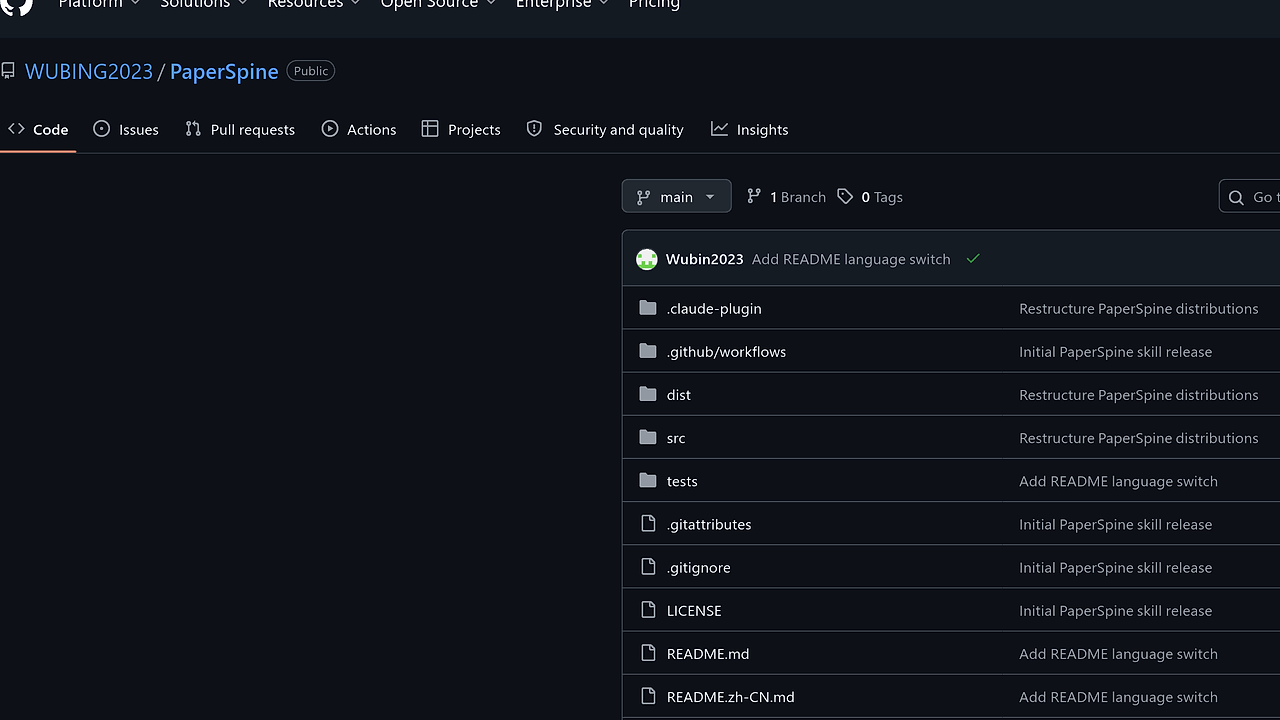
dist/codex/paper-spine, while Claude Code gets a flat suite underdist/claude/skills/*plus slash-command helpers indist/claude/commands/*.md. This avoids the common failure mode where the wrong folder shape breaks skill discovery. - Quality gates and artifact checks — PaperSpine ships checks for the artifact bundle, LaTeX output, Word output, and repository tests. A manuscript is not considered done until the generated files pass validation, which is the right bar for a serious writing pipeline.
PaperSpine vs Alternatives
| Tool | Best For | Key Differentiator | Pricing |
|---|---|---|---|
| PaperSpine | Evidence-backed paper and report drafting | Enforces motivation, research tiers, and unit-level writing rationale | Open-Source |
| Claude Code Canvas | Interactive drafting inside Claude Code | Better for collaborative editing surfaces than structured manuscript orchestration | N/A |
| Claude Context Mode | Managing context-heavy agent sessions | Stronger for context control than for multi-artifact writing pipelines | N/A |
| Brainstorm MCP | Early-stage idea generation | Better at exploration than at producing a defendable final manuscript | N/A |
Pick Claude Code Canvas when you mainly want a better editing surface inside Claude Code and do not need PaperSpine's evidence trail. Pick Claude Context Mode when the problem is context selection and retention across long sessions, not manuscript structure.
Pick Brainstorm MCP when you are still deciding the angle, the claim, or the research direction. Pick PaperSpine when the angle is already known and the job is to turn raw materials into a paper that can be defended with artifacts, not vibes.
How PaperSpine Works
PaperSpine is built around a deterministic artifact pipeline rather than a single prompt. The core abstraction is a manuscript job that moves through intake, research, drafting, audit, and packaging, with each stage writing files into paper_rewriting_output/ so the agent can justify decisions after the fact.
The repo splits the installable output from the readable source tree. dist/ holds the Codex and Claude Code distributions, while src/ keeps shared scripts, references, and agent metadata in a development-friendly layout, which reduces the chance that one host receives a stale copy of the workflow.
The design choice that matters most is the centrality of the rationale matrix and supporting evidence files. Instead of asking the model to write a paper in one pass, PaperSpine builds a claim register, source inventory, evidence bank, and section blueprint first, then checks the final artifact against those decisions.
git clone https://github.com/WUBING2023/PaperSpine.git
cd PaperSpine
./install.ps1 -Target all
python src/scripts/artifact_check.py paper_rewriting_output --markdown --write
The first three commands install the suite for both hosts, and the last command validates the generated artifact bundle. If the run is healthy, you should see the output directory fill with configuration files, evidence files, and a final paper folder containing main.tex, references.bib, and optional Word or PDF exports.
Pros and Cons of PaperSpine
Pros:
- Evidence-first workflow keeps the model from inventing claims without support.
- Separate Codex and Claude Code distributions reduce host discovery problems and make installation predictable.
- Artifact trail is explicit because the output includes research notes, claim registers, blueprints, and revision audits.
- Bilingual support helps teams that write in English but review intermediate material in Chinese.
- LaTeX and Word validation catch output-format issues before a manuscript is handed off.
- Windows-friendly installer lowers friction for the most common local setup described in the README.
Cons:
- High workflow overhead for small edits, because the system is built for full manuscript production.
- More moving parts than a plain chat-based drafting flow, including scripts, skills, and generated artifacts.
- Best experience depends on host support, since Codex and Claude Code package discovery behave differently.
- Requires discipline to keep the generated directory clean and avoid duplicate legacy skill folders.
- Not a general-purpose editor, so it is the wrong choice for casual prose cleanup or content marketing.
Getting Started with PaperSpine
The fastest way to use PaperSpine is to clone the repo, run the installer, and restart your agent host. For Codex, call the skill with $paper-spine; for Claude Code, use /paperspine after the skill set has been installed or the plugin has been loaded.
git clone https://github.com/WUBING2023/PaperSpine.git
cd PaperSpine
./install.ps1 -Target all
After installation, Codex users should restart the host and then select paper-spine from the skill list or invoke $paper-spine. Claude Code users should reload the app or install the plugin from .claude-plugin, then launch the intake flow with /paperspine or the fallback wizard python src/scripts/intake_wizard.py.
Verdict
PaperSpine is the strongest option for evidence-backed paper and report drafting when you care about traceability, not just output speed. Its biggest strength is the unit-level rationale trail, and its main caveat is setup complexity. If you are writing anything that may be reviewed, audited, or challenged, PaperSpine is the right choice.