What Is Papr?
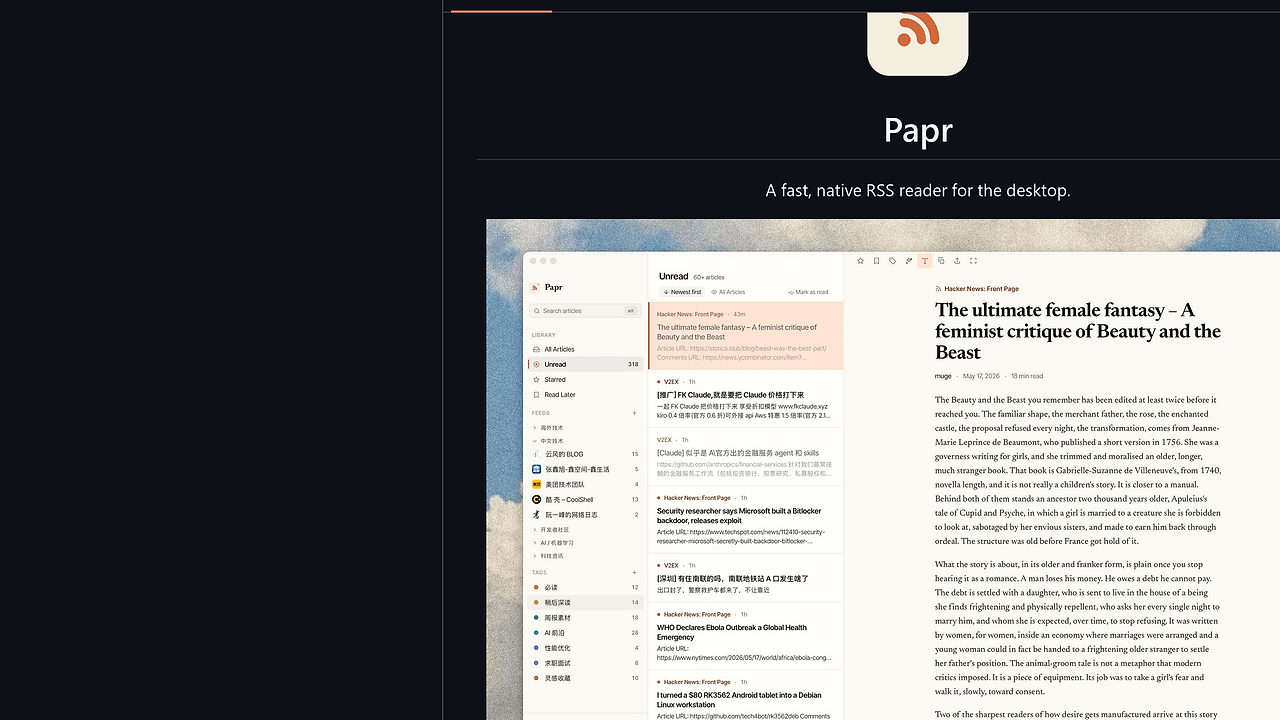
Papr is a native desktop RSS reader built by l0ng-ai. Papr is one of the best Desktop RSS Reader tools for developers and power users who want a local-first inbox, and the repository surfaces 8 major features plus 3 localized languages. It handles feeds, folders, OPML, smart views, tags, full-text extraction, AI summaries, audio playback, and FreshRSS sync without forcing a cloud account.
Papr is aimed at people who read a lot of technical feeds and want their read state to stay on their machine first. The design is simple: local data in SQLite, optional sync to FreshRSS, and AI features that use your own API key instead of a vendor login.
Quick Overview
| Attribute | Details |
|---|---|
| Type | Desktop RSS Reader |
| Best For | developers, indie hackers, and power users who want a local-first feed reader |
| Language/Stack | Native desktop app with local SQLite storage, OPML import/export, and FreshRSS sync |
| License | N/A |
| GitHub Stars | N/A as of Feb 2026 |
| Pricing | Open-Source |
| Last Release | N/A |
Who Should Use Papr?
- Local-first readers who want their feeds, read state, and tags stored in SQLite instead of a vendor cloud.
- Developers with heavy article intake who need unread counts, starred items, and read-later queues in one terminal-free desktop app.
- FreshRSS users who want a native client that can mirror read state without giving up server-side syncing.
- People who skim summaries first and only open the full article when the snippet is too thin, which is common on feed-only publications.
Not ideal for:
- Teams that want browser-native collaboration, shared folders, or org-wide content approval workflows.
- Users who refuse to bring their own AI API key and want all summarization billed and hosted by the app vendor.
- People who need a web app that syncs across every device without installing a desktop client.
Key Features of Papr
- Feeds, folders, and OPML import/export — Papr supports the standard RSS workflow: subscribe, organize, and migrate. OPML means you can move subscriptions in and out without locking yourself into one reader.
- Smart views with live counts — The All, Unread, Starred, and Read Later views are not just filters; they expose real-time counts so you can triage a backlog quickly.
- Tags and rules — Papr can apply color-coded tags and automatic rules to new articles, which is useful if you route posts by topic, source, or project.
- Full-text article fetching — When a feed only ships summaries, Papr can fetch the full article and clean the content. That makes it practical for RSS feeds that intentionally truncate posts.
- AI summaries and Q&A — The app can summarize articles, answer questions about the article, and generate digests using your own API key. That keeps the AI layer optional and under your control.
- Built-in audio player — Papr includes an audio player that follows you from article to article, which is useful if you convert long reads into listening sessions while working.
- FreshRSS sync and local SQLite — Papr stores data locally in SQLite and can sync read state with a FreshRSS server. That means the local database is the source of truth, not a cloud account.
Papr vs Alternatives
| Tool | Best For | Key Differentiator | Pricing |
|---|---|---|---|
| Papr | Local-first desktop RSS reading with AI support | SQLite-backed desktop app with FreshRSS sync and BYO-key AI features | Open-Source |
| NetNewsWire | Apple users who want a polished native reader | Mature native experience, strong macOS/iOS fit, simpler feature set | Open-Source |
| Feedly | Users who want a cloud RSS service with broad device access | Hosted sync, team-oriented workflows, and no local database to manage | Freemium |
| Inoreader | Power users who want server-side automation and filtering | Strong cloud rules, filters, and integrations across devices | Freemium |
Pick Papr when you want read state and article history to stay local, and when FreshRSS is the sync backend you already trust. Pick Feedly or Inoreader when you want hosted sync across devices without running anything yourself.
If you are on Apple hardware and only need a mature native reader, NetNewsWire is the cleaner fit. If your workflow ends in note capture or spaced repetition, pair Papr with Mnemosyne so high-value articles become review material instead of dead bookmarks. For another local-first data-owning workflow, compare the storage model with DataHaven.
How Papr Works
Papr is built around a local database-first architecture. Feeds, folders, read state, tags, and smart-view counters live in SQLite, which makes the app predictable offline and keeps sync boundaries clear. FreshRSS is the optional replication layer, so the server mirrors your state instead of owning it.
The design choice that matters most is that Papr separates ingestion from presentation. Ingestion pulls RSS and atom content, then Papr normalizes it into a local model that supports unread counts, tag assignment, and article enrichment like full-text extraction. That makes the app suitable for long-lived reading queues instead of ephemeral “check the headlines” use.
AI features are intentionally bolted on rather than central. Summaries, article Q&A, and digests use your own key, which means the application can remain open-source and local-first without shipping a proprietary inference backend.
brew tap l0ng-ai/papr
brew install --cask papr
open -a Papr
That installs the macOS build and launches the desktop app. On first run, you would typically import an OPML file, add feeds, and optionally connect a FreshRSS endpoint before turning on AI features with your own API key.
Pros and Cons of Papr
Pros:
- Local SQLite storage keeps feed state, tags, and read markers under your control.
- FreshRSS sync gives you an optional server-backed mirror without making the cloud the primary datastore.
- Full-text fetching is useful for feeds that only publish summaries or partial excerpts.
- AI summaries and Q&A are available without a forced vendor login, because Papr uses your own API key.
- OPML import/export makes migration from another reader straightforward.
- The app includes an audio player, which is rare in a plain RSS client.
Cons:
- N/A GitHub stars and N/A release metadata make external maturity checks harder from the repo page alone.
- AI features depend on third-party API credentials, so the experience is not fully self-contained.
- FreshRSS sync adds another moving part if you do not already run a FreshRSS server.
- The page does not list a formal web client, so this is a desktop-only workflow.
- License details are not surfaced in the provided page text, which matters for some enterprise procurement reviews.
Getting Started with Papr
brew tap l0ng-ai/papr
brew install --cask papr
open -a Papr
After launch, Papr should be configured with your feeds first, then your optional sync and AI settings. If you are not on macOS, the repo points to the latest release page for installers on other platforms, so the first step is usually downloading the correct package and importing your OPML file.
The initial setup is intentionally low-friction: no account creation, no cloud onboarding, and no mandatory workspace setup. If you want read-state sync, connect FreshRSS after the local library is populated so you can verify that the desktop database is behaving the way you expect.
Verdict
Papr is the strongest option for developers who want a local-first desktop RSS reader when they need offline storage, FreshRSS sync, and AI-assisted article triage without creating a cloud account. Its main strength is the SQLite-centric design; its main caveat is that AI and sync still require external services. If that trade-off matches your workflow, Papr is worth adopting.