What Is ratscad?
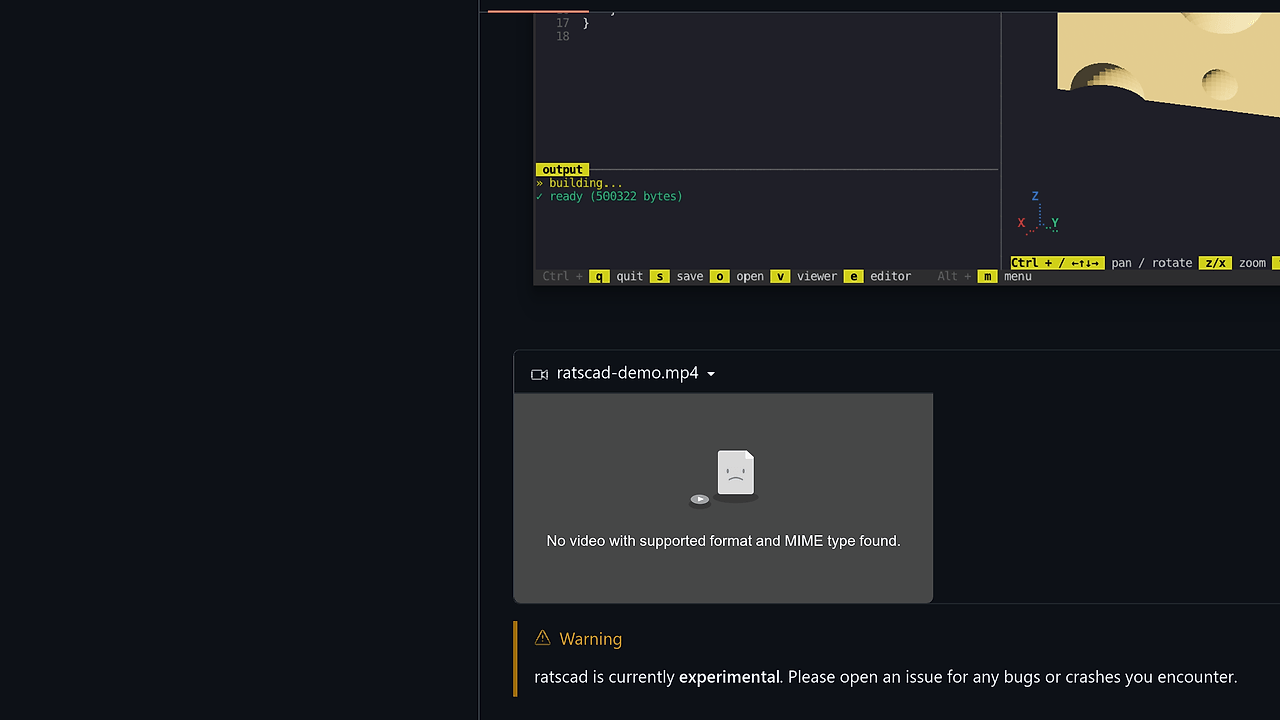
ratscad is a terminal-based IDE for OpenSCAD built by qewer33 with Rust, Ratatui, and the Ratty Graphics Protocol, giving hardware-accelerated inline 3D previews to OpenSCAD users who want to stay in the terminal. ratscad is one of the best TUI CAD Tools for OpenSCAD users, hardware hackers, and terminal-first developers. The README shows 20+ keyboard and mouse bindings plus a debounced build pipeline, so this is aimed at people who care about fast visual feedback inside a shell workflow.
Quick Overview
| Attribute | Details |
|---|---|
| Type | TUI CAD Tools |
| Best For | OpenSCAD users, hardware hackers, and terminal-first developers |
| Language/Stack | Rust, Ratatui, Ratty Graphics Protocol, OpenSCAD CLI, Bevy, wgpu |
| License | MIT |
| GitHub Stars | N/A as of Jan 2026 |
| Pricing | Open-Source |
| Last Release | N/A |
Who Should Use ratscad?
- OpenSCAD power users who want to edit
.scadfiles and preview geometry without switching to a separate GUI app. - Hardware engineers and makers iterating on parametric parts, jigs, brackets, and enclosures who value text-first modeling.
- Terminal-heavy developers who already live in a Ratty or TUI workflow and want CAD to fit the same muscle memory.
- Rust and systems programmers who want to inspect a small, understandable codebase with explicit subprocess and cache behavior.
Not ideal for:
- People who need a normal terminal emulator. ratscad depends on Ratty for inline mesh rendering, so generic terminals will not show the preview pane.
- Teams expecting a stable production release. The project explicitly marks itself experimental, so crash tolerance matters.
- Users who want broad CAD ecosystems such as assemblies, drawings, or mesh repair tools that sit outside OpenSCAD's text-based model.
Key Features of ratscad
- Tabbed editor with syntax highlighting — The editor supports multiple documents, a dirty marker, and click-to-switch tabs. That makes it practical for comparing parametric variants without losing state.
- Live inline 3D preview — The active OpenSCAD document is rendered directly in the terminal through the Ratty Graphics Protocol. The preview is hardware-accelerated instead of ASCII-based, so you get an actual mesh display rather than a fake text approximation.
- Debounced background builds — ratscad waits briefly after edits, then calls the
openscadCLI in a worker thread and pipes the STL result back into the UI. This avoids hammering the compiler on every keystroke. - Per-document build cache — Each tab stores the last compiled source string and generated OBJ bytes. Switching tabs without edits re-registers the cached mesh instead of spawning another OpenSCAD process.
- Interactive camera controls — The viewer supports mouse drag to rotate, scroll to zoom, arrow keys for rotation, and
Ctrl + arrowfor panning. That keeps inspection fast when debugging geometry intersections or alignment issues. - PBR mesh shading with normals — ratscad rewrites OpenSCAD's STL output into OBJ with flat per-face normals and a Z-up to Y-up axis conversion. That gives Bevy's PBR pipeline enough information to light the model correctly in the terminal renderer.
- File and path workflow built for the keyboard — New, open, save, save as, close, and quit are available from the menubar and shortcuts. The path prompt is centered, which matters when you are moving quickly between source files.
ratscad vs Alternatives
| Tool | Best For | Key Differentiator | Pricing |
|---|---|---|---|
| ratscad | Terminal-based OpenSCAD editing with live preview | Inline 3D rendering in Ratty plus cached background builds | Open-Source |
| OpenSCAD | Canonical parametric CAD from the command line | Mature modeler with the standard .scad workflow and broad community usage | Open-Source |
| FreeCAD | GUI-heavy CAD work and broader mechanical workflows | Full desktop application with assemblies, sketches, and workbenches | Open-Source |
| MiniVim | Pure terminal text editing | Modal editor focus without CAD-specific preview logic | Open-Source |
Pick OpenSCAD when you want the upstream toolchain and do not care about inline rendering. Pick ratscad when you want the same .scad workflow but with a live mesh preview and editor state in one terminal session.
FreeCAD is the better choice if your job requires a desktop GUI, constrained sketches, or downstream mechanical workflows that sit outside OpenSCAD's text model. For a pure editing surface, MiniVim is lighter than ratscad, and if you are comparing adjacent shell-first workflows, you can browse all CLI Tools.
How ratscad Works
ratscad is built around a two-thread architecture. The UI thread owns the Ratatui event loop, tabs, focus, popups, editor state, and preview panes, while the build worker blocks on a channel until source text changes, then compiles the active document in the background.
The data path is simple and explicit: text goes into openscad through stdin, binary STL comes back on stdout, and ratscad parses that STL into an OBJ representation with normals before handing the bytes to Ratty. The OBJ step matters because Bevy's PBR renderer needs vertex normals and a coordinate-system fix, so the terminal preview is lit like a real 3D scene instead of a flat wireframe.
cargo install ratscad
OPENSCAD_BIN=/usr/bin/openscad ratty -e ratscad
The command above installs the binary and launches it inside Ratty, which is the terminal emulator ratscad targets. On Linux x86_64, the app can fetch a recent OpenSCAD snapshot on first run if no binary is cached; on macOS and Windows, you should point OPENSCAD_BIN at an installed OpenSCAD executable or keep openscad on PATH.
Pros and Cons of ratscad
Pros:
- True inline preview inside the terminal instead of a separate render window.
- Low rebuild chatter thanks to the debounce window and per-document cache.
- Explicit OpenSCAD CLI integration makes the execution path easy to audit.
- Keyboard-first workflow with strong tab, file, and viewer bindings.
- Small, comprehensible architecture split across UI and build threads.
- Useful renderer details like axis gizmos, PBR shading, and fullscreen viewer mode.
Cons:
- Experimental status means crashes and rough edges are still expected.
- Ratty dependency limits the preview to a specific terminal environment.
- OpenSCAD-only pipeline means it is not a general-purpose CAD suite.
- GPU and wgpu requirements can be a blocker on minimal or remote systems.
- Initial setup friction is higher than a plain text editor because you need a working OpenSCAD binary and the right terminal.
Getting Started with ratscad
cargo install ratscad
ratty -e ratscad
If openscad is not already available, set OPENSCAD_BIN before launching. For local development, ./scripts/run-in-ratty.sh clones Ratty into references/ratty/, builds both binaries, and starts the app in the expected terminal environment.
After the first launch, open or create a .scad file with Ctrl + o or Ctrl + t, then wait for the background build to finish. On Linux x86_64, ratscad may download a recent OpenSCAD snapshot automatically, so the first run can take longer than later sessions.
Verdict
ratscad is the strongest option for OpenSCAD editing in the terminal when you want immediate 3D feedback without leaving a TUI. Its best feature is the Ratty-powered inline preview with cached background builds, and its biggest caveat is the experimental, Ratty-specific runtime. Use it if you want terminal-native CAD and can tolerate rough edges.