What Is Skeeper?
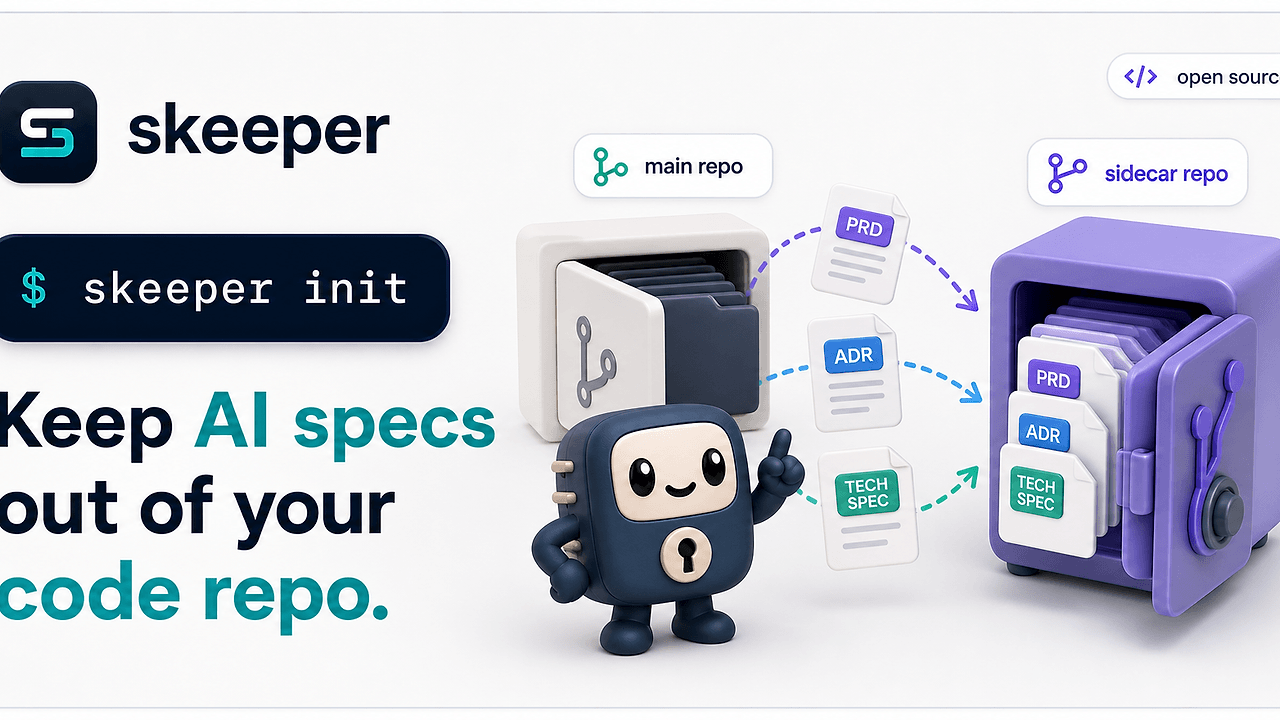
Skeeper is a Go-based Docs-as-Code Automation tool built by Compozy. It mirrors SPEC.md, ADRs, RFCs, and AI plan files into a sidecar Git repository, then writes skeeper.lock into the main repo so every doc commit is pinned to exact sidecar commits. Skeeper is one of the best Docs-as-Code Automation tools for AI agents and docs-as-code teams. The README shown here exposes nine day-to-day commands and a lockfile that records the sidecar URL, source branch, namespace branch, digest, file count, and byte count.
Quick Overview
| Attribute | Details |
|---|---|
| Type | Docs-as-Code Automation |
| Best For | AI agents and docs-as-code teams |
| Language/Stack | Go, Git hooks, sidecar Git repositories, YAML |
| License | MIT |
| GitHub Stars | N/A |
| Pricing | Open-Source |
| Last Release | N/A |
Who Should Use Skeeper?
- AI coding teams generating
SPEC.md, PRDs, and plan files next to code need strict sync without noisy PR diffs. - Platform and infrastructure teams that keep ADRs and RFCs in-repo need auditability with
git log,git blame, and branch history intact. - Solo developers who want full spec history without polluting the main repository diff can keep review noise low.
- Monorepo owners who need per-namespace ownership and branch-aware doc storage can avoid collisions between teams.
Not ideal for:
- Teams that want docs in Confluence, Notion, or another wiki instead of Git.
- Repositories where hooks are routinely bypassed or
--no-verifyis part of the normal workflow. - Workflows that want one shared doc branch but do not want a lockfile pinned to every main commit.
Key Features of Skeeper
- Lockfile-backed provenance —
skeeper.lockrecords the sidecar URL, source branch, namespace branch, sidecar commit, per-namespace digest, file count, and byte count. That gives you a deterministic mapping from the main repo commit to the exact sidecar state. - Strict managed Git hooks — The managed
pre-commit,pre-merge-commit, andpre-pushhooks sync staged content, push the sidecar, write the lockfile, and verify the lock against the remote. The hooks fail closed, so drift cannot slip through quietly. - Namespace isolation — One sidecar repository can host multiple namespaces without path collisions. Namespace branches use
<namespace>/__branches__/<source-branch>, which keeps branch history readable and separated. - Branch-aware sync model —
skeeper pull,skeeper push, andskeeper syncwork like a Git workflow for documentation. The tool mirrors files into a sidecar and replays them through commit history rather than treating docs like opaque artifacts. - Safe defaults for deletion — Manual push does not delete remote-only docs just because a clone lacks them. Destructive pruning requires
--prune, which is the right default when remote history matters more than local cleanup. - Fresh-clone recovery —
skeeper restore --allrestores files from the exact sidecar commits captured inskeeper.lock. That makes a new checkout or a broken workspace recoverable without guessing which spec version belongs where. - Config validation and guardrails —
.skeeper.ymlrejects unknown keys, requires each namespace to have a name and at least one glob, and forbids negative globs inpatterns.guardrails.max_filesandguardrails.max_byteskeep spec growth bounded, whilerespect_gitignore: falselets generated namespaces opt out of repo ignore rules.
Skeeper vs Alternatives
| Tool | Best For | Key Differentiator | Pricing |
|---|---|---|---|
| Skeeper | Docs-as-code repos with audited sidecar sync | Lockfile + managed hooks + namespace isolation | Open-source |
| Git submodules | Tracking another repository inside a repo | Skeeper mirrors files and records exact sidecar commits per namespace | Free/Open-source |
| git-annex | Large, distributed file storage | Skeeper is optimized for markdown specs and PR hygiene, not blob distribution | Open-source |
| git-lfs | Binary assets in Git | Skeeper tracks doc history and commit provenance instead of large-file pointers | Open-source |
If your upstream problem is spec generation, pair it with Claude Context Mode or Brainstorm MCP and let Skeeper own persistence and auditability. If you orchestrate multiple agent workers, OpenSwarm fits the same branch-and-namespace model because each task can land in a separate spec namespace.
Pick Skeeper over Git submodules when you need file-level sync, a lockfile, and hook enforcement instead of a nested repository workflow. Submodules can point at another repo, but they do not mirror docs by namespace or write an auditable skeeper.lock into the parent repository.
Pick git-annex when your primary problem is moving large binary files across machines. Skeeper is a markdown and plan-file system first, so it is the better choice when spec history, git blame, and PR review quality matter more than distributed blob storage.
Pick git-lfs when large assets are the bottleneck and the team already accepts pointer files in Git. Skeeper solves a different problem: it keeps generated and human-written docs close to the code while keeping the main diff small and the sidecar history explicit.
How Skeeper Works
Skeeper uses a two-repository model. The main worktree keeps specs near the code, while the sidecar repository stores mirrored files under <namespace>/<path> and pushes them to <namespace>/__branches__/<source-branch>. The runtime is Go, but the core abstraction is Git itself: commit objects, branch refs, and hook-driven state transitions rather than a separate database or daemon.
The data model is intentionally small. A namespace owns a set of file globs, an optional exclusion list, and a branch mapping, and the lockfile records the proof that the sidecar state matches the main repository commit. That makes skeeper.lock a provenance artifact, not just a convenience file.
During pre-commit and pre-merge-commit, Skeeper builds a plan from the staged index plus explicitly owned ignored or untracked spec paths. It then fetches and rebases the sidecar branch, mirrors content into .skeeper/, commits and pushes the sidecar, writes skeeper.lock, and stages that lock before Git creates the main commit.
skeeper init
skeeper status
skeeper sync
skeeper restore --all
The commands above initialize repository metadata, check for drift, run a pull-then-push cycle, and restore the exact doc set from the lockfile. After sync, the main repo and sidecar are in lockstep, and after restore --all, a fresh clone can reconstruct the tracked docs without manual archaeology.
Recovery is also explicit. SKEEPER_SKIP=1 writes .git/skeeper/bypass.json so the bypass remains visible, and status --check, repair, and the managed pre-push hook continue to surface stale-lock diagnostics until the state is fixed. git commit --no-verify is not supported because it skips the audit trail entirely.
Pros and Cons of Skeeper
Pros:
- The main repository stays focused on code, so spec-heavy changes do not drown out implementation diffs.
skeeper.lockgives you commit-level traceability from the main repo to the sidecar commit graph.- Namespaces prevent file ownership collisions in larger organizations and monorepos.
- Hook enforcement catches drift before a commit or push lands.
restore --allandrepairgive you a concrete recovery path after interrupted syncs.- The bundled
skills/skeeper/SKILL.mdhelps coding agents follow the strict sync workflow without inventing their own rules.
Cons:
- You need to manage Git hooks carefully, which adds operational discipline.
- The sidecar repository is another thing to host, back up, and monitor.
- Teams that prefer docs in a wiki or CMS will see little value here.
- The workflow is intentionally strict, so developers who rely on
--no-verifywill hit friction. ghis required whenskeeper initcreates a new GitHub sidecar repo, which adds one more prerequisite for bootstrapping.
Getting Started with Skeeper
The fastest path is to install Skeeper, point it at an existing repo, and let init write .skeeper.yml plus the managed hook blocks. If init creates a new GitHub sidecar repository, gh must be installed; existing sidecars can be reused with --sidecar.
go install github.com/compozy/skeeper/cmd/skeeper@latest
cd your-repo
skeeper init
skeeper sync
After init, Skeeper asks for the sidecar mode and repository name, then writes the config and hook plumbing at the repo root. sync is the first useful sanity check because it pulls remote docs, pushes local changes, and confirms that the lockfile and sidecar state agree.
If you are starting from source or a local clone of the tool itself, the README also documents Homebrew, npm, Docker, and direct go build paths. The important part is not the package manager; it is getting the hook-managed sync path into the repo before the first real spec change lands.
Verdict
Skeeper is the strongest option for docs-as-code repos when you need spec history outside the main diff and you care about hook-enforced provenance. Its biggest strength is deterministic sidecar pinning through skeeper.lock; the main caveat is stricter Git discipline than plain markdown files in the repo. Use it when auditability matters more than convenience.