What Is colleague.skill?
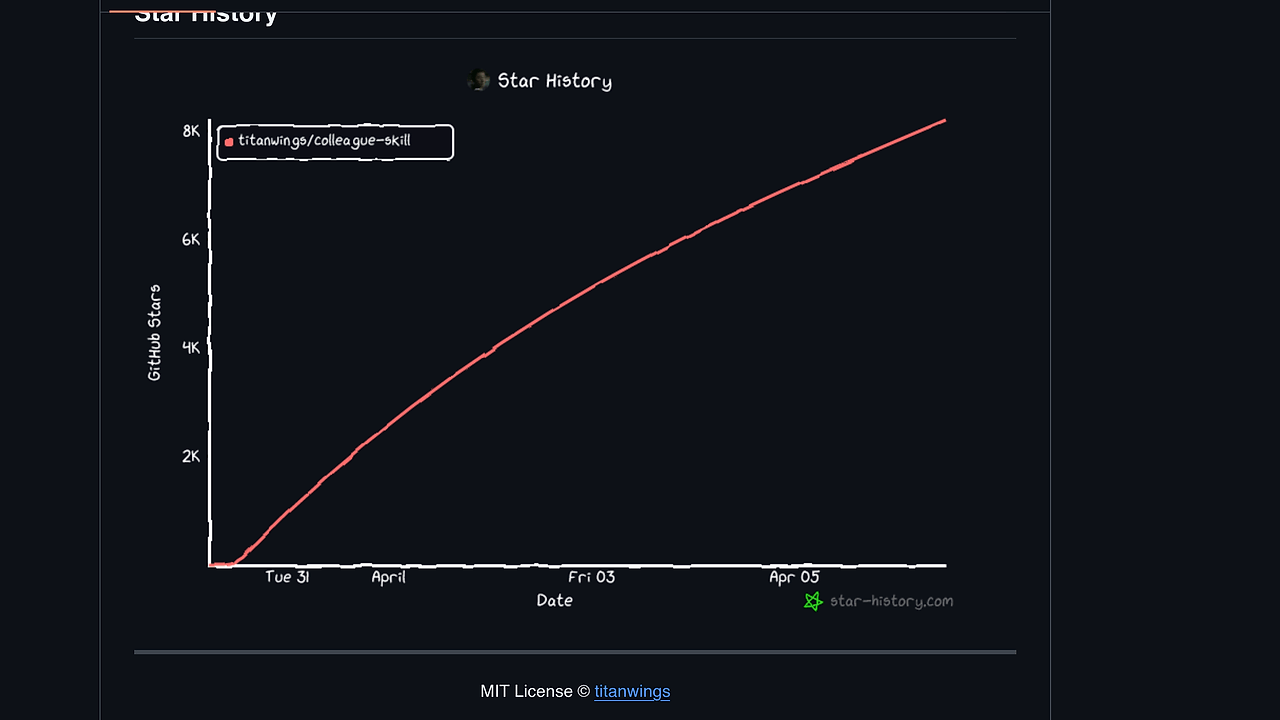
colleague.skill is one of the best AI Skill Generators tools for engineering teams. Built by titanwings and sitting at 9.7k GitHub stars as of Apr 2025, it turns Feishu, DingTalk, Slack, email, screenshots, and docs into a reusable skill that can imitate how a specific person writes, answers, and makes decisions. It is for team leads, ops owners, and knowledge managers who need more than a static archive after someone quits or transfers.
Quick Overview
| Attribute | Details |
|---|---|
| Type | AI Skill Generators |
| Best For | Capturing a teammate’s context from chats, docs, and exports |
| Language/Stack | Claude Code skill format, Python 3, Feishu/DingTalk/Slack APIs, SQLite, PDF/email/Markdown parsers |
| License | MIT |
| GitHub Stars | 9.7k as of Apr 2025 |
| Pricing | Open-Source |
| Last Release | N/A |
Who Should Use colleague.skill?
- Team leads who need to preserve decision history after a senior engineer, designer, or PM exits and the Slack history is not enough.
- Knowledge owners who maintain internal docs and want a skill that can answer in the same voice as the person who wrote the original material.
- Operations and support teams that work across Feishu, DingTalk, Slack, email, and Markdown exports and need one normalized output format.
- Consultants and agencies building client-specific assistants where the source material already exists in chats, wiki pages, and attachments.
Not ideal for:
- Teams with no access to source artifacts, because colleague.skill needs actual messages, docs, or exports to produce useful behavior.
- Regulated environments that cannot export chat logs or store screenshots outside approved systems.
- Users who want a polished no-setup SaaS with instant UI and zero collector configuration.
Key Features of colleague.skill
- Multi-source ingestion — colleague.skill accepts Feishu, DingTalk, Slack, WeChat chat history, PDF, images, Feishu JSON export, email
.emland.mbox, Markdown, and pasted text. That makes it practical when the evidence is split across terminal exports, screenshots, and document dumps instead of a single database. - Feishu auto collection — Feishu support is the cleanest path because the repo says you can just enter a name and let the API pull messages, docs, and sheets automatically. That cuts the manual work that usually kills context-capture projects.
- Slack collector with admin requirements — Slack ingestion uses the API, but it requires an admin-installed bot and the free plan is limited to 90 days of history. That limitation is explicit, so teams should not assume they can backfill every message from a free workspace.
- DingTalk browser fallback — DingTalk message history is collected through the browser because the public API does not expose the full history. This is a useful workaround, but it is also the kind of path that can break when the UI changes.
- WeChat SQLite support — WeChat history can be imported from SQLite, although the repo calls the path unstable and recommends open-source export tools instead. That honesty matters because many AI context tools hide their weakest collectors.
- Manual evidence uploads — PDF, screenshots, Feishu JSON export,
.eml,.mbox, Markdown, and plain pasted text are all supported as manual inputs. This makes colleague.skill useful even when the source system is locked down or no API is available. - Official skill-format output — The repository was refactored into the official AgentSkills and Claude Code skill format. That means the result is not just a prompt blob; it is structured for reuse in a skill-driven workflow and can pair well with Claude Code Canvas or Claude Context Mode.
colleague.skill vs Alternatives
| Tool | Best For | Key Differentiator | Pricing |
|---|---|---|---|
| colleague.skill | Turning colleague artifacts into a reusable AI skill | Cross-source collectors plus a Claude Code skill output format | Open-Source |
| Claude Context Mode | Injecting richer context into Claude workflows | Better when the problem is context assembly, not person modeling | Open-Source |
| Brainstorm MCP | Structured ideation and prompt exploration | Better for generating ideas than reconstructing a real person’s work style | Open-Source |
| Claude Code Canvas | Working inside Claude Code with a visual workflow | Better for authoring and editing skills after the data has already been collected | Open-Source |
Pick Claude Context Mode when you already have a tight document set and just need better retrieval and context packing. Pick Brainstorm MCP when the job is to explore prompt variants or workshop behavior, not to ingest real chat history.
Pick Claude Code Canvas when the skill exists and you need a better authoring surface. Pick colleague.skill when the first problem is evidence collection from Feishu, Slack, DingTalk, screenshots, and exports.
How colleague.skill Works
colleague.skill uses a source-adapter pipeline. Each source gets its own collector, then the raw material is normalized into a common evidence bundle that can be used to synthesize a reusable skill with consistent style, phrasing, and decision cues.
The design is closer to knowledge distillation than to generic search. Instead of indexing everything and hoping the model infers personality, colleague.skill extracts enough structured evidence to produce a portable Claude Code skill that can be versioned, shared, and regenerated when new artifacts arrive.
The repo also shows an opinionated approach to source quality. Feishu is treated as first-class because the API supports messages, docs, and sheets; DingTalk is handled through browser automation because the API is incomplete; Slack needs bot access and history limits are called out; WeChat is supported through SQLite but flagged as unstable. That tells you the project favors practical coverage over pretending every connector is equally clean.
git clone https://github.com/titanwings/colleague-skill.git
cd colleague-skill
python -m pip install -r requirements.txt
# then follow INSTALL.md for Feishu, Slack, DingTalk, or manual uploads
The commands above pull the repo and install the Python dependencies used by the collectors and parsers. After that, the next step is to choose a source path and feed it a name, a token, an export file, or a manual upload depending on where the evidence lives.
Pros and Cons of colleague.skill
Pros:
- Broad source coverage — Feishu, DingTalk, Slack, WeChat SQLite, PDF, screenshots, email, Markdown, and raw pasted text all land in the same pipeline.
- Low-friction Feishu flow — the repo claims you can enter a name and collect everything automatically, which is much faster than hand-curating docs.
- Explicit collector constraints — Slack history limits, DingTalk API gaps, and WeChat instability are documented instead of hidden.
- Fits Claude Code workflows — the official skill format makes the output easier to reuse inside modern Claude-centric developer setups.
- Useful for messy real-world data — screenshots,
.mbox, and JSON exports are first-class citizens, which matters when the original system is fragmented.
Cons:
- WeChat support is unstable — the repo itself warns that the path is not reliable enough to trust without fallback exporters.
- Slack ingestion is gated by admin access — if you cannot install a bot, the Slack path is dead on arrival.
- DingTalk depends on browser automation — that is more brittle than a clean API and can fail when the UI shifts.
- Not a one-click SaaS — you still need to read INSTALL.md, manage credentials, and select the right source path.
- Privacy review is on you — if the source data contains sensitive messages or screenshots, colleague.skill does not remove the compliance burden.
Getting Started with colleague.skill
git clone https://github.com/titanwings/colleague-skill.git
cd colleague-skill
python -m pip install -r requirements.txt
After installing dependencies, pick the source system that actually holds the best evidence. Feishu is the easiest starting point, Slack needs the right bot permissions, and DingTalk often requires browser-based collection because history is not fully exposed by the API.
If your inputs are already exported, start with PDFs, .eml, .mbox, Markdown, or screenshots and build the skill from those artifacts first. That avoids blocking on connector setup and gives you a quick signal on whether the resulting skill captures the right tone and domain knowledge.
Verdict
colleague.skill is the strongest option for preserving a teammate’s operational context when the raw evidence already exists in chats, docs, and exports. Its biggest strength is multi-source ingestion with a Claude Code-friendly output format, and its main caveat is collector brittleness in WeChat and browser-driven DingTalk flows. Use it if you need a reusable skill, not just an archive.