What Is figma-mcp-go?
figma-mcp-go is an open-source Figma MCP server built by vkhanhqui for developers, product designers, and AI-assisted UI teams that need live read/write control of Figma without public API quotas; the repo has 378 GitHub stars as of Feb 2026. figma-mcp-go is one of the best Design Automation tools for developers and AI-assisted product teams because it exposes 58 tools through a local plugin bridge instead of the Figma REST API.
It is built for MCP clients such as Cursor, Claude Code, and GitHub Copilot, and it turns Figma from a manual canvas into a programmable design surface. The core value is simple: AI can inspect nodes, edit text, mutate layout, and export frames inside a real file instead of generating a mockup in a separate sandbox.
Quick Overview
| Attribute | Details |
|---|---|
| Type | Design Automation |
| Best For | Developers, product designers, and AI-assisted UI teams |
| Language/Stack | Go, Model Context Protocol (MCP), Figma plugin bridge, Node.js npx wrapper |
| License | MIT |
| GitHub Stars | 378 as of Feb 2026 |
| Pricing | Open-Source |
| Last Release | N/A |
Who Should Use figma-mcp-go?
- Frontend engineers shipping design-to-code workflows who need to inspect and edit real Figma nodes from an MCP client.
- Product designers who want repetitive edits, component conversion, and text updates handled through commands instead of manual clicks.
- Indie hackers on Starter or free-tier Figma plans who want to avoid API-token setup and plan-based call limits.
- Platform teams building internal design assistants that must work across Cursor, Claude, and other MCP-compatible agents.
Not ideal for:
- Teams that need purely server-side, headless automation with no local desktop app.
- Users who only need read-only metadata export and do not care about live edits.
- Organizations that block Figma plugins or do not allow a local stdio-based tool to connect to desktop apps.
Key Features of figma-mcp-go
- Tokenless live access — figma-mcp-go does not require a Figma API token. It talks to Figma through a local plugin, so you skip token storage, OAuth setup, and the quota ceiling that hits REST-based automation.
- 58 MCP tools — the repo exposes a broad command surface for create, modify, and delete flows. The write set includes
create_frame,create_text,create_component,set_auto_layout, andmove_nodes, which is enough to build and mutate real layouts. - Full design object coverage — figma-mcp-go is not limited to rectangles and text. The README calls out styles, variables, components, prototypes, and content, which means the server can operate on the same node tree the Figma UI uses.
- Built-in design strategies — the repository includes prompts such as
read_design_strategyanddesign_strategy. That matters because agents get a higher-signal starting point for layout decisions instead of guessing from empty context. - MCP client compatibility — figma-mcp-go works with Cursor, Claude, GitHub Copilot, and any MCP-compatible client that can launch a local stdio server. That keeps the integration surface small: one package, one server process, many clients.
- Text node ergonomics —
create_textloads fonts automatically, which removes one of the usual Figma scripting failure modes. The practical result is fewer manual preconditions before an agent can place copy into a file. - PDF export support — the repository history mentions support for
export_frames_to_pdf. That gives figma-mcp-go a cleaner handoff path when a file needs a PDF artifact for review, QA, or stakeholder sign-off.
figma-mcp-go vs Alternatives
| Tool | Best For | Key Differentiator | Pricing |
|---|---|---|---|
| figma-mcp-go | Live Figma editing from MCP clients | Local plugin bridge, no API token, no rate limits | Open-Source |
| Figma REST API-based automation | Remote reads and backend scripting | Server-side API access, but quota-limited and token-based | Paid / plan-limited |
| Manual Figma plugin scripts | One-off in-app automation | Native Figma scripting, but no MCP client integration | Free |
| Browser-only mockup generators | Fast visual drafts | No real Figma node mutation or file-level control | Freemium |
Pick figma-mcp-go when you want an AI agent to edit the actual file the team already uses. Pick Figma REST API-based automation when you need remote processing or a service that runs without Figma Desktop open.
Manual plugin scripts are better for a designer who wants to run a local utility inside Figma once and move on. Browser-only mockup generators are fine for disposable concepts, but they do not replace a live design system or a component library.
For broader agent workflows, figma-mcp-go pairs well with Brainstorm MCP for upstream ideation, Claude Code Canvas for prompt shaping and artifact iteration, and OpenSwarm when multiple agents need to coordinate around the same UI task.
How figma-mcp-go Works
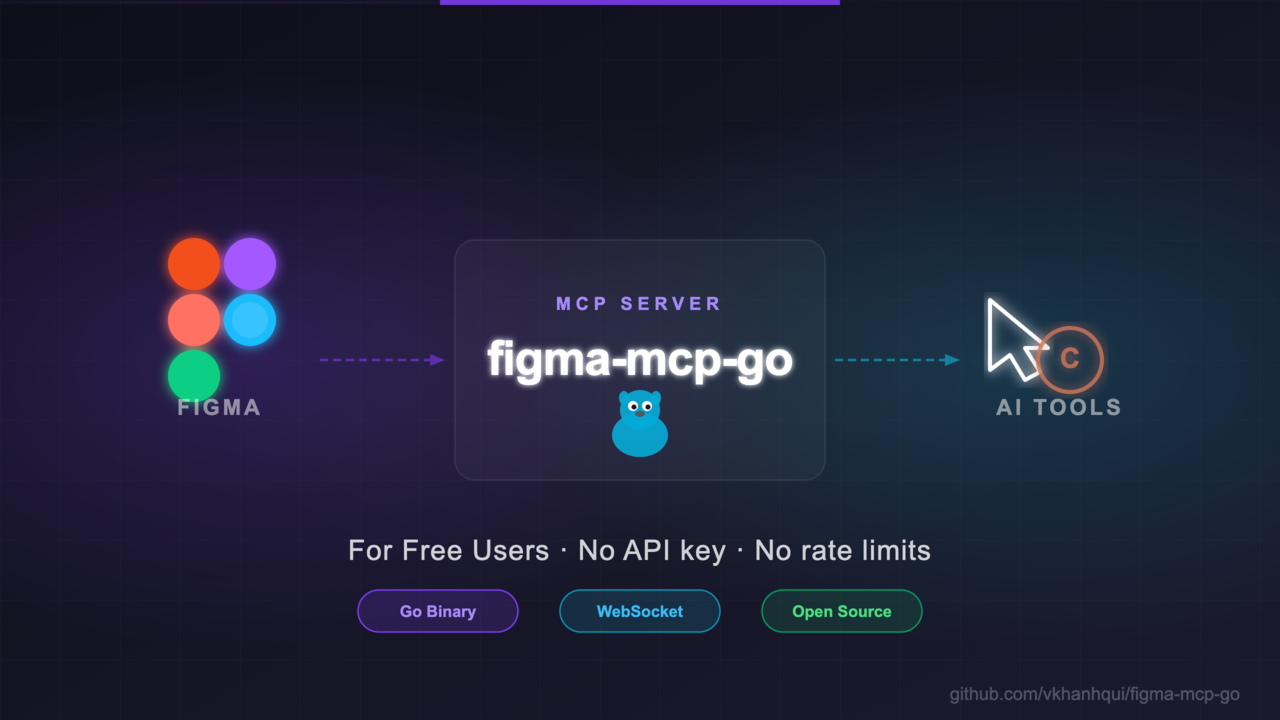
figma-mcp-go runs as a local MCP server over stdio, which means your client launches it like any other command-line tool and speaks the Model Context Protocol over standard input and output. The server then bridges those requests into a Figma plugin running inside Figma Desktop, and that plugin performs the actual node operations in the open file.
The architecture is intentionally simple: one process handles agent requests, one plugin handles file access, and the data model is the Figma node tree. Frames, rectangles, ellipses, text nodes, components, fills, strokes, and layout metadata are all addressed as structured edits, not as screenshots or brittle pixel diffs.
That design avoids the biggest failure mode of API-based tools, which is quota exhaustion before the work is done. It also keeps the surface area close to Figma's native editing model, so commands such as create_frame, set_text, or set_auto_layout map directly to the document structure the design team already understands.
claude mcp add -s project figma-mcp-go -- npx -y @vkhanhqui/figma-mcp-go@latest
That command registers figma-mcp-go as a project-scoped MCP server and pulls the latest package on demand. After that, you import the plugin manifest into Figma Desktop, open a file, run the plugin, and let the client call tools against live nodes.
Pros and Cons of figma-mcp-go
Pros:
- No API token required — figma-mcp-go removes the token management and quota math that usually slows down Figma automation.
- Real write access — it can create and mutate frames, text, components, and layout properties inside the active document.
- Broad client support — the same server can plug into Claude, Cursor, GitHub Copilot, and other MCP clients.
- Good for agentic workflows — the command set covers design-system primitives, not just exports, so agents can produce meaningful file changes.
- Local execution model — data stays within the desktop session and the plugin bridge, which is easier to reason about than a remote bot.
- MIT licensed — teams can audit, fork, and extend the server without vendor lock-in.
Cons:
- Requires Figma Desktop and the plugin — figma-mcp-go is not a cloud-only service, so pure headless deployment is off the table.
- Depends on the bridge being active — if the plugin is not running in the file, write operations will fail.
- Not ideal for backend pipelines — CI jobs and remote workers cannot fully replace the local desktop workflow.
- Versioning is less visible than a hosted SaaS — the repo does not advertise a formal release cadence on the page, so teams should test updates before rolling them out.
- Figma still owns the document semantics — agents can automate the file, but they cannot escape Figma's own layout rules, font availability, and file permissions.
Getting Started with figma-mcp-go
npx -y @vkhanhqui/figma-mcp-go@latest
claude mcp add -s project figma-mcp-go -- npx -y @vkhanhqui/figma-mcp-go@latest
Run one of those commands from a terminal, then import the plugin from the repository manifest into Figma Desktop and open the target file. The first thing to verify is that your MCP client can see the server and that the plugin is active, because figma-mcp-go only writes when both sides of the bridge are alive.
A practical first test is creating a frame or changing a text node in a small throwaway file. Once that works, move on to component conversion, auto-layout edits, and any export flow you need for handoff.
Verdict
figma-mcp-go is the strongest option for tokenless Figma automation when your team already uses MCP clients and can run the local plugin bridge. Its biggest strength is live write access without REST quotas, and its main caveat is the requirement for Figma Desktop plus the plugin. If that trade-off fits your workflow, figma-mcp-go is the one to adopt.