What Is UI/UX Pro Max?
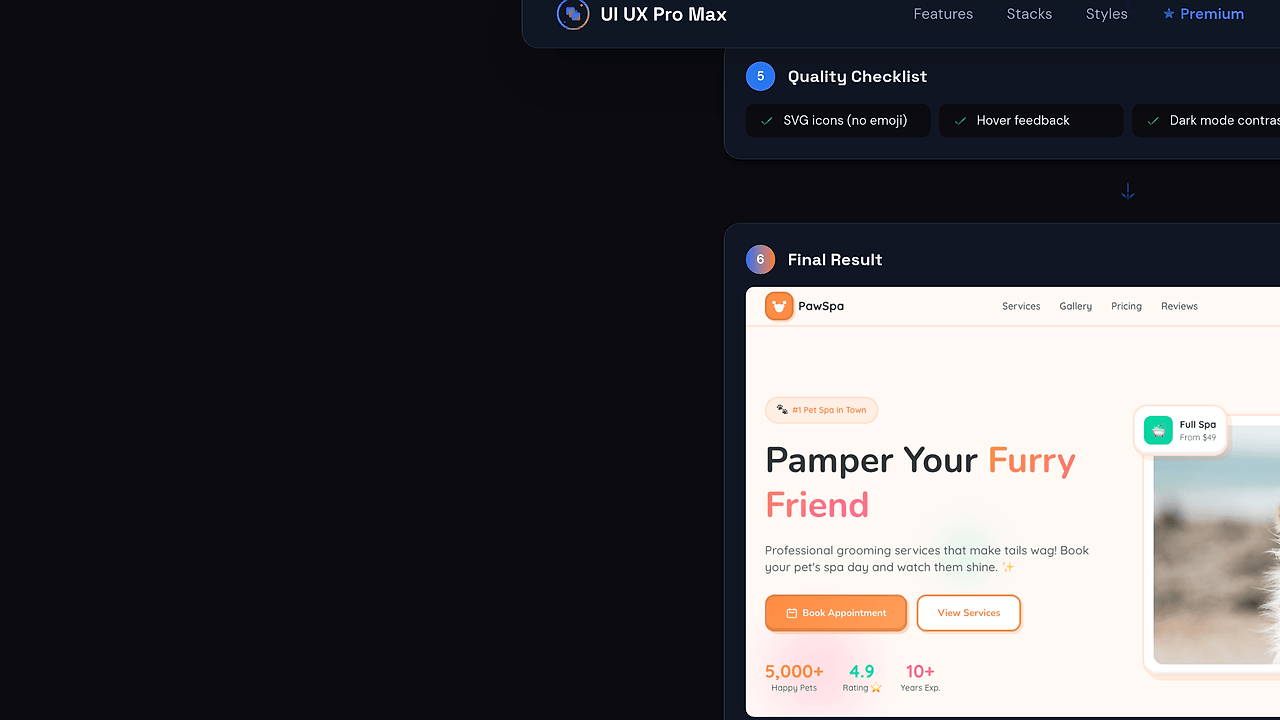
UI/UX Pro Max is a Claude skill developed by nextlevelbuilder that delivers design intelligence for professional UI/UX across platforms like web, mobile, and desktop frameworks. It analyzes project requirements to output complete design systems including color palettes, section patterns, and style guidelines. With 36k GitHub stars and 3.5k forks as of Feb 2026, UI/UX Pro Max stands as one of the best Claude skills for frontend developers and UI/UX builders needing instant, tailored design outputs. Built on prompt engineering, it supports multiple frameworks via single-source prompts in v2.0.
Quick Overview
| Attribute | Details |
|---|---|
| Type | Claude Skills |
| Best For | frontend developers and UI/UX builders |
| Language/Stack | Claude AI prompts |
| License | MIT |
| GitHub Stars | 36k as of Feb 2026 |
| Pricing | Open-Source |
| Last Release | v2.0 — Jan 2026 |
Who Should Use UI/UX Pro Max?
- Frontend solo devs prototyping MVPs who require instant design systems without Figma subscriptions.
- Agency UI teams handling 10+ client projects monthly that need consistent cross-framework styles.
- Indie hackers in wellness or e-commerce niches seeking emotion-driven patterns like hero-centric layouts.
- Claude power users integrating AI into daily workflows for WCAG-compliant designs.
Not ideal for:
- Designers preferring visual editors like Figma over text-based AI outputs.
- Teams locked into proprietary tools like Adobe XD without Claude access.
- Projects needing pixel-perfect mockups beyond generated guidelines.
Key Features of UI/UX Pro Max
- Design System Generator — Analyzes inputs like "Serenity Spa" to produce patterns (hero-centric + social proof), sections (hero, services, testimonials), and styles (soft UI with organic shapes) in under 10 seconds via Claude reasoning.
- Color Palette Automation — Outputs hex codes like Primary #E8B4B8 (Soft Pink), Secondary #A8D5BA (Sage Green), with performance and accessibility notes (WCAG AA compliant).
- Pattern Matching — Recommends layouts by niche: emotion-driven CTAs above fold for spas, repeated post-testimonials; supports conversion-focused structures.
- Multi-Platform Support — Single prompts adapt to React, Vue, Tailwind, or native mobile via .claude/skills structure.
- Droid Factory Integration — v2.0 adds factory-mode prompts for scalable component generation from design specs.
- Single Source of Truth — Reorganized codebase merges prompts across CLI, shared, and src folders for consistent outputs.
- WCAG Accessibility — Baked-in checks ensure AA compliance with subtle depth, soft shadows, and high-contrast text like #2D3436 Charcoal.
UI/UX Pro Max vs Alternatives
| Tool | Best For | Key Differentiator | Pricing |
|---|---|---|---|
| UI/UX Pro Max | Claude users generating full systems | Prompt-based reasoning for tailored palettes/patterns | Open-Source |
| Claude Code Canvas | Code-to-UI conversion | Visual canvas from prompts, less design-focused | Freemium |
| Claude Context Mode | Long-context coding | Maintains design state over sessions | Open-Source |
| Vercel v0 | React/Shadcn devs | Auto-generates components from text | Freemium |
Claude Code Canvas suits when visual editing trumps text outputs, pairing code gen with drag-drop for React apps—use it over UI/UX Pro Max for interactive prototyping. Claude Context Mode excels in extended sessions preserving design history but lacks palette generation depth. Vercel v0 wins for instant Shadcn UI but ties to React, missing multi-framework flexibility.
How UI/UX Pro Max Works
UI/UX Pro Max operates as a Claude skill via structured prompts in a single-source repository. Core architecture uses a reasoning engine: input project details (name, niche, goals) trigger analysis of patterns, styles, and colors. Prompts live in .claude/skills/ui-ux-pro-max, shared across CLI and src folders, ensuring v2.0 consistency without duplication.
It employs chain-of-thought prompting: first classify niche (wellness → calming), then match patterns (hero-centric), generate hex palettes, and validate accessibility. Outputs format as tables for easy copy-paste into Tailwind config or CSS vars. Droid support adds factory prompts for component factories.
# Copy prompt from .claude/skills/ui-ux-pro-max into Claude.ai
# Example input to Claude:
"Use UI/UX Pro Max skill: Generate design system for E-commerce Fitness App. Focus on high-energy, bold CTAs."
This command feeds the skill prompt to Claude, yielding a tabled system with Primary #FF6B35 (Energy Orange), sections like Hero + Product Grid, and Tailwind-ready classes. Expect 5-10s response with WCAG notes; integrate output directly into tailwind.config.js via theme.extend.colors.
Pros and Cons of UI/UX Pro Max
Pros:
- Generates production-ready palettes and patterns in seconds, cutting design time from hours to minutes.
- MIT-licensed with 36k stars enables community forks for custom niches like SaaS dashboards.
- Multi-framework output supports React, Vue, Svelte via neutral CSS vars and guidelines.
- v2.0 single-source refactor reduces prompt drift, ensuring reliable Claude responses.
- Built-in WCAG AA validation flags issues like contrast ratios pre-implementation.
- CLI folder enables scripted generation for CI/CD pipelines.
Cons:
- Relies on Claude API access; no offline mode or self-hosting.
- Text-only outputs lack visual previews, requiring manual Figma/Preview translation.
- Limited to prompt quality—vague inputs yield generic systems.
- No direct component code export; pairs with tools like Claude Code Canvas for that.
- Recent commits (95 total) focus docs over new features, slowing evolution.
Getting Started with UI/UX Pro Max
Clone the repo and copy prompts to Claude.ai or Desktop app.
git clone https://github.com/nextlevelbuilder/ui-ux-pro-max-skill.git
cd ui-ux-pro-max-skill
# Open .claude/skills/ui-ux-pro-max/main.prompt in editor
# Paste into Claude: "Execute UI/UX Pro Max skill: TARGET: Coffee Shop App - cozy vibe, earthy tones."
Running this clones 11 branches and exposes prompts; Claude processes input to output a design table like Serenity Spa example. Edit README links if needed, then configure Claude project with CLAUDE.md guidelines. First run yields a full system—paste colors into CSS, sections into wireframes; no further setup for basic use.
Verdict
UI/UX Pro Max is the strongest Claude skill for frontend developers needing instant design systems when prototyping cross-framework UIs without design tools. Its reasoning engine delivers WCAG-compliant palettes and patterns unmatched in speed. Pick it for MVP velocity, but pair with visual tools for refinements.