What Is WeChat Radar?
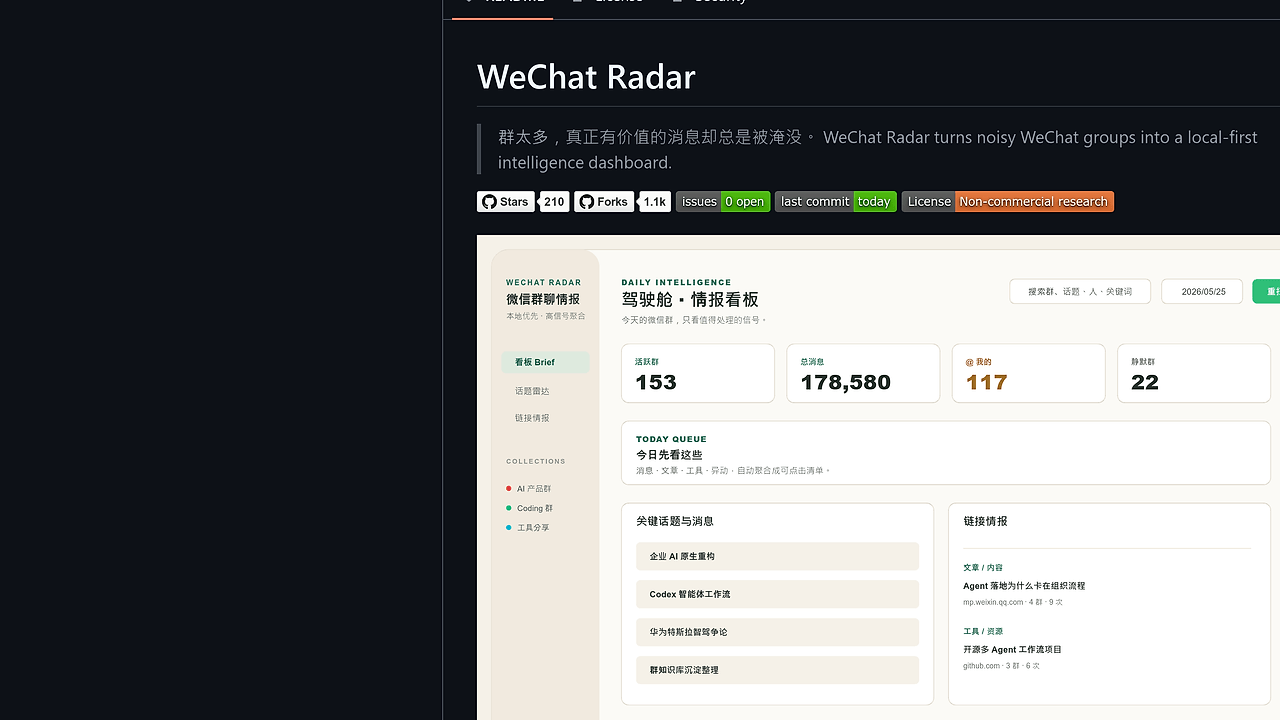
WeChat Radar is a Next.js WeChat Intelligence Dashboard built by joeseesun for developers, indie hackers, and operators who need to extract signal from noisy group chats; it runs against WeChat 4.1.9.58 and stores results in local SQLite instead of a cloud warehouse. WeChat Radar is one of the best WeChat Intelligence Dashboard tools for developers, indie hackers, and power users managing many WeChat groups because it turns messages, links, @mentions, and high-signal people into a daily workbench.
The core idea is simple: stop treating WeChat like a scrollback log and start treating it like an input stream. WeChat Radar focuses on read-only historical analysis, which makes it useful for research, triage, and personal intelligence workflows where the raw chat noise is more valuable after it is filtered, deduplicated, and summarized.
Quick Overview
| Attribute | Details |
|---|---|
| Type | WeChat Intelligence Dashboards |
| Best For | developers, indie hackers, and power users managing many WeChat groups |
| Language/Stack | Next.js App Router, React, SQLite, better-sqlite3, wx-cli, Codex CLI |
| License | Non-commercial research |
| GitHub Stars | N/A as of Feb 2026 |
| Pricing | Free |
| Last Release | N/A |
Who Should Use WeChat Radar?
Use WeChat Radar if you need local triage, not another chat client. It is built for people who already have access to a lot of group traffic and want a repeatable way to turn that traffic into summaries, topic clusters, and link queues.
- Solo founders and indie hackers who sit in too many product, investor, and community groups and need a daily signal digest without manual copy-paste.
- Developers and automation-minded operators who want a local SQLite archive that can be queried, backed up, and inspected with normal tooling.
- Research-minded users who need topic clustering, link extraction, and per-day group reports for later review or AI-assisted analysis.
- Privacy-conscious power users who do not want chat data shipped to a third-party SaaS and prefer keeping everything on their own Mac.
Not ideal for:
- Commercial monitoring or customer-facing reporting, because the project explicitly forbids commercial use and is licensed for non-commercial research only.
- Primary-account automation, because the project warns against using a main WeChat account and recommends a secondary or test account.
- Teams needing shared, multi-user collaboration, because the system is built around a single local machine and a local SQLite database.
Key Features of WeChat Radar
- Local-first SQLite storage — Chat data lands in
~/.wechat-radar/radar.db, which means the primary datastore is a single local file instead of a managed SaaS backend. That is the right shape for backups, grep-style inspection, and offline analysis. - Daily intelligence dashboard — The homepage groups messages, articles, tools, anomalies, and people into a date-based workbench. This is better than a chronological wall because it optimizes for decision-making, not rereading.
- Topic Radar powered by Codex CLI — When
codexis installed, WeChat Radar can cluster cross-group discussion by date and surface recurring themes. That makes the tool useful for summarization workflows where raw chat threads are too fragmented to scan manually. - Link intelligence and deduplication — Articles and tool links are normalized, deduplicated, and given readable titles so repeated shares do not flood the view. This is the difference between a link dump and a usable signal queue.
- Per-group daily reports — Each active group can generate a copy-friendly daily briefing that is easy to paste into another LLM or into notes. That makes WeChat Radar a practical upstream collector for Claude Context Mode.
- Defensive process boundaries — The project uses
child_process.execFilewith argument arrays, prepared statements in SQLite, and React text-node rendering for chat content. Those choices reduce shell injection risk and keep the UI from interpreting message text as executable markup. - Demo mode and theme support — You can enable demo data during setup, and the UI supports light and dark themes. That makes the first run less painful when you want to evaluate the product before trusting it with real chat history.
WeChat Radar vs Alternatives
| Tool | Best For | Key Differentiator | Pricing |
|---|---|---|---|
| WeChat Radar | Local WeChat message intelligence | SQLite-backed daily topic, link, and people views with read-only ingestion | Free |
| WeChat built-in search | Quick one-off message lookup | Zero setup, but no clustering, deduplication, or local analytics layer | Free |
| Obsidian | Long-term personal notes and knowledge bases | Markdown vault flexibility, but WeChat data has to be imported manually | Freemium |
| Notion | Team docs and lightweight collaboration | Cloud-first structure with relational-ish databases, but no native WeChat ingestion | Freemium |
Pick WeChat built-in search if you only need to find a single message and do not care about trend analysis. Pick Obsidian if the workflow is really about long-term note capture, because WeChat Radar is not trying to replace a personal wiki.
Pick Notion if your output needs to live in a shared workspace. If the bottleneck is storage rather than interpretation, DataHaven is the cleaner generic vault; if the bottleneck is turning a daily digest into an LLM prompt, Claude Context Mode fits after WeChat Radar has already extracted the signal.
For personal recall across lots of notes, Mnemosyne covers a different problem space. WeChat Radar is the better choice when the raw source is WeChat and the outcome you want is a structured daily intelligence feed, not a general-purpose notebook.
How WeChat Radar Works
WeChat Radar uses a local-first architecture with a Next.js App Router frontend, local API routes, and a persistent SQLite store. The data path starts with wx-cli, which reads WeChat content from the logged-in desktop client, then writes normalized records into ~/.wechat-radar/radar.db and writes app settings into ~/.wechat-radar/config.json.
The important design choice is that the app does not try to act like a cloud sync layer. It prefers a single-machine state model, where the dashboard rebuilds views from local history and the UI renders chat content as text nodes rather than executing or interpreting user content.
wx daemon status
wx sessions --json
codex --version
Those checks tell you whether the data source is alive and whether topic clustering will work. If wx daemon is not running, WeChat Radar cannot ingest new history; if codex is missing, the Topic Radar can still load, but the richer cross-group clustering path will be weaker or empty.
The design also assumes that analysis should be readable by humans before it is handed to an LLM. That is why the app exposes rescan and full-sync actions, then lets you export or copy the daily digest into other workflows such as Claude Context Mode or a private note vault.
Pros and Cons of WeChat Radar
Pros:
- Keeps the main database on disk in SQLite, which is easy to back up and inspect.
- Produces daily, date-based views that are actually useful for triage.
- Deduplicates links and surfaces repeated subjects instead of leaving you with repeated spam.
- Supports topic clustering via Codex CLI for better cross-group synthesis.
- Avoids cloud upload by default, which is the right choice for sensitive chat histories.
- Uses conservative implementation details like prepared statements and
execFile, which is better than shell-string glue.
Cons:
- macOS-only workflow in practice, because it depends on a local WeChat 4.x desktop client.
- Requires
wx-cli, a running daemon, and a compatible version of WeChat, which adds setup friction. better-sqlite3is a native module, so you may needpnpm rebuild better-sqlite3when the environment changes.- The license is non-commercial research only, so this is not a drop-in choice for paid products or SaaS offerings.
- Topic clustering depends on Codex CLI, so the higher-value analysis path is optional rather than guaranteed.
- It is designed for read-only historical analysis, not for posting, reacting, or social actions inside WeChat.
Getting Started with WeChat Radar
The fastest path is to clone the repo, install dependencies, rebuild the native SQLite module, and start the dev server locally. After that, open the app, complete /setup, and either enable demo data or enter your WeChat display names so the scanner can map messages correctly.
git clone https://github.com/joeseesun/wechat-radar.git
cd wechat-radar
pnpm install
pnpm rebuild better-sqlite3
pnpm dev
Once the server is up, open http://localhost:3000. The first run redirects to /setup, where you confirm the privacy notice, configure WECHAT_RADAR_MY_NAMES, and verify that wx daemon and wx sessions --json are working before you try a rescan.
If you want the topic radar to produce better clusters, install and authenticate Codex CLI before testing the app. If the page is empty, the fix is usually operational, not conceptual: check the daemon, confirm session output, and make sure the selected date range actually contains synced messages.
Verdict
WeChat Radar is the strongest option for local-first WeChat triage when you need to keep data on your own machine and turn noisy groups into daily briefs. Its main strength is SQLite-backed, read-only intelligence extraction; its main caveat is the macOS-and-WeChat-CLI dependency chain. Use it if privacy and signal extraction matter more than convenience.